

Active Directory Integration and Replication Configuration
General Information
General information about user replication in Intrexx can be found here.
Active Directory
Active Directory is divided into three parts: schema, configuration, and domain.
-
A schema is a template for all Active Directory entries. It defines object types, their classes and attributes, as well as their attribute syntax. You can influence which object types are available in Active Directory by defining new types. The underlying pattern is the schema that defines the objects and their attributes.
-
The configuration represents the structure of the Active Directory forest and its trees.
-
After all, the domain contains all the information that describes itself and the objects created within it.
The first two parts of Active Directory are replicated among all domain controllers in the forest, while domain-specific information is generally available only within the respective domain—that is, on its respective domain controllers. That is why there is also a so-called global catalog in every domain. It represents all information from its own domain and also contains key subsets of information from the other domains in the overall structure, thereby enabling, for example, cross-domain search operations.
The records in the database are defined in Active Directory as objects, and their properties are defined as attributes. The attributes are defined based on their type. Objects are uniquely identified by their names.
Objects can be divided into two main categories:
-
Accounts, such as user, group, and computer accounts
-
Resources, such as file and printer shares
The objects—which could number as many as several million—are stored in containers (organizational units), also known as OUs (Organizational Units). Some containers are predefined; any additional organizational units can be created using subunits (sub-organizational units). As an object-based system, Active Directory supports the inheritance of properties from an object container to child objects, which may themselves be containers. As a result, Active Directory allows networks to be structured logically and hierarchically.
An Active Directory contains various objects. In addition to users, there are permission objects such as user groups and roles, as well as organizations, organizational units, general containers, and distribution groups (mail system). Furthermore, Active Directories from different systems are not necessarily identical. Every system has its own unique characteristics.
Intrexx offers various replication profiles that are tailored to different Active Directory systems. These must be selected accordingly when configuring a replication job.
|
Profile Name |
Description |
|---|---|
| Active Directory Large Groups.xml | Profile for Active Directories with groups containing more than 1,000 members. This profile takes longer to replicate and should only be used if the number of group members exceeds the specified value. |
| Active Directory NTLM compatible.xml | This Active Directory profile is used when NTLMv1 login and domain names are required in Intrexx, for example, for integrated authentication via Tomcat. |
| Active Directory.xml | Default Active Directory Replication Profile |
| Attribute-Based Role Sample.xml | Sample Profile: In this profile, users are stored in the default user container (placing="fixed") and assigned to a role based on one of their attributes (in this case, `roleattr`). |
| Dynamic OU Path Sample.xml | Sample Profile: Here, users are assigned to a container that is determined based on one of their attributes (in this case, "ou"). The attribute value is expected to be a path separated by backslashes (2. Parameters of $path) |
| Dynamic OU Sample.xml | Sample Profile: Similar to the "Dynamic OU Path Sample" profile, except that only the last part of the path is evaluated to determine the container. |
| eDirectory.xml | Novell eDirectory |
| OpenLDAP - POSIX.xml | OpenLDAP |
| Sun ONE.xml | SUN One |
The tables below show the most common attributes; that is, only a portion of the actual scope. In particular, the attributes are extended by other applications (e.g., Microsoft Exchange), but optional attributes can also be configured individually.
Table of Active Directory Fields for the User Object
|
Class |
Field Name |
Description |
|---|---|---|
| General | distinguishedName | Defined Name |
| General | cn | Common Name |
| General | objectClass | Object Class (USER) |
| General | uSNCreated | Original USN |
| General | uSNChanged | Current USN |
| General | whenCreated | Created on |
| General | whenChanged | Last modified on |
| General | objectGUID | Object GUID |
| user | givenName | First Name |
| user | sn | Last Name |
| user | name | Display Name |
| user | samAccountName | NT Login Name |
| user | userPrincipalName | Username |
| user | description | Description |
| user | title | Title |
| user | initials | Initial |
| user | employeeID | Employee Number |
| user | physicalDeliveryOfficeName | Office Name |
| user | company | Company |
| user | department | Department |
| user | streetAddress | Street |
| user | postalCode | ZIP Code |
| user | postOfficeBox | P.O. Box |
| user | l | City |
| user | st | State |
| user | co | Country (Name) |
| user | countryCode | Country Code (ISO 3166) |
| user | c | Country Code (ISO 3166) |
| user | wwwHomePage | Website |
| user | url | Additional Website |
| user | Business Email | |
| user | telephoneNumber | Phone |
| user | otherPhone | Additional phone numbers |
| user | mobile | Mobile |
| user | otherMobile | Other cell phone numbers |
| user | facsimileTelephoneNumber | Fax |
| user | otherFacsimileTelephoneNumber | Additional Fax Numbers |
| user | ipPhone | IP Phone |
| user | otheriPhone | Additional IP phone numbers |
| user | pager | Pager |
| user | otherPager | More pagers |
| user | homePhone | Home Phone |
| user | otherHomePhone | Other private... Phone number |
| user | msExchHideFromAddressLists | Do not display in Exchange address lists True = hide null/empty = display |
| user | thumbnailPhoto | Photo (max. 100 KB) |
| user | accountExpires | Account validity period: Value 0 = Unlimited. The date value is calculated as a 100-nanosecond interval starting from January 1, 1601 (UTC). |
| user | passwordlastset | Last password change as a long value (100 ns interval since January 1, 1601 UTC) |
| user | userAccountControl Account Options | |
| user | info | Notes on the User |
| user | homeDirectory | Root Folder |
| user | lastLogonTimestamp | Registration Deadline |
| user | primaryGroupID | Primary Group Assignment |
| user | Nsaccountlock | |
| user | uid | Login Name (RFC 1274) |
Table of Active Directory Fields for the Group Object
|
Class |
Field Name |
Description |
|---|---|---|
| General | distinguishedName | Defined Name |
| General | cn | Common Name |
| General | objectClass | Object Class (GROUP) |
| General | uSNCreated | Original USN |
| General | uSNChanged | Current USN |
| General | whenCreated | Created on |
| General | whenChanged | Last modified on |
| General | objectGUID | Object GUID |
| group | sAMAccountName | Group Name (NT) |
| group | description | Description |
| group | groupType | Group Area/Type |
| group | info | Note |
| group | ||
| group | memberOf | Member of |
| group | managedBy | Managed by |
| group | primaryGroupToken | Primary Group Assignment |
Table of Active Directory Fields for the Organization Object
|
Class |
Field Name |
Description |
|---|---|---|
| General | distinguishedName | Defined Name |
| General | cn | Common Name |
| General | objectClass | Object Class |
| General | uSNCreated | Original USN |
| General | uSNChanged | Current USN |
| General | whenCreated | Created on |
| General | whenChanged | Last modified on |
| General | objectGUID | Object GUID |
| organizationalUnit | name | Name |
| organizationalUnit | Description | Description |
| organizationalUnit | gPLink |
Intrexx User Management
The "Users" module consists of several database tables and a view for managing the components.
|
Database Table |
Function |
|---|---|
| DSOBJECT | Object Management for All Objects in User Management |
| DSORGANIZATION | Organizational Attributes |
| DSORGUNIT | Attributes of Organizational Units |
| DSCONTAINER | Container Attributes |
| DSDISTLIST | Attributes of the distribution lists |
| DSGROUP | User Group Attributes |
| DSUSER | User Attributes |
| DSROLE | Role Mapping Table |
| DSSET | User Group Mapping Table |
| DSCLASS | Object Classes and Associated Data Groups |
| DSCLASSTITLE | Multilingual Titles of Object Classes |
| DSATTRIBUTES | Manage all user management attributes and their properties |
| DSATTRIBUTETITLE | Multilingual Attribute Titles |
| VBLUSER | View from DSUSER and DSOBJECT with reference to the users |
User Attribute Fields (DSUSER)
|
Name |
Data Field |
Description |
Type |
Length |
|---|---|---|---|---|
| - | LID | User ID | Integer | |
| - | STRGUID | User GUID | String | 255 |
| LOGIN | STRLOGIN | Username | String | 64 |
| LOGINLWR | STRLOGINLWR | Username (lowercase) | String | 64 |
| DOMAIN | STRDOMAIN | Domain | String | 48 |
| DOMAINLWR | STRDOMAINLWR | Domain (lowercase) | String | 48 |
| TIMEZONE | STRTIMEZONE | Time Zone | String | 32 |
| FIRSTNAME | STRFIRSTNAME | First Name | String | 64 |
| LAST NAME | STRLASTNAME | Last Name | String | 64 |
| MIDDLE NAME | STRMIDDLENAME | 2. First Name | String | 64 |
| FULL NAME | STRFULLNAME | Full Name | String | 172 |
| TITLE | STRTITLE | Title | String | 64 |
| GENDER | LEGEND | Gender | Integer | |
| STREET | STRSTREET | Street | String | 96 |
| ZIP CODE | STRPOSTALCODE | Zip Code | String | 10 |
| POBOX | STRPOBOX | P.O. Box | String | 10 |
| CITY | STRCITY | City | String | 96 |
| STATE | STRSTATE | State | String | 32 |
| COUNTRY | STRCOUNTRY | Country | String | 32 |
| MAILBIZ | STRMAILBIZ | Business Email | String | 192 |
| PHONEBIZ | STRPHONEBIZ | Phone | String | 40 |
| PHONEMOBILEBIZ | STRPHONEMOBILEBIZ | Mobile Business | String | 40 |
| PHONEFAX | STRPHONEFAX | Fax | String | 40 |
| PHONEPAGER | STRPHONEPAGER | Pager | String | 40 |
| MAILHOME | STRMAILHOME | Personal email | String | 192 |
| PHONEHOME | STRPHONEHOME | Home Phone | String | 40 |
| PHONEMOBILEHOME | STRPHONEMOBILEHOME | Personal cell phone | String | 40 |
| BIRTH | DTBIRTH | Date of Birth | DateTime | |
| ENTER | DTENTER | Start Date | DateTime | |
| LOGIN ATTEMPTS | LOGIN ATTEMPTS | Login Attempts (V7) | Integer | |
| PWDCHANGED | DTPWDCHANGED | Password Change Interval (V7) | DateTime | |
| DEFAULTLANGUAGE | STRDEFAULTLANG | Default Language | String | 2 |
| MUSTCHANGEPASS | BMUSTCHANGEPASS | User must change password at next login (V7) | Boolean | |
| MUSTNOTCHANGEPASS | I MUST CHANGE MY PASSPORT | User Cannot Change Password (V7) | Boolean | |
| PWDEXPIRES | BPWDEXPIRES | Password Expiring (V7) | Boolean | |
| DEFAULTLOCALE | STRDEFAULTLOCALE | Standard Regional Schema (V7) | String | 50 |
| TIMEZONE | STRTIMEZONE | Time Zone | String | 32 |
Fields of the Organizational Attributes (DSORGANIZATION)
|
Name |
Data Field |
Description |
Data Type |
Length |
|---|---|---|---|---|
| ID | LID | Organization ID | Integer | |
| STREET | STRSTREET | Street | String | 96 |
| ZIP CODE | STRPOSTALCODE | Zip Code | String | 10 |
| POBOX | STRPOBOX | P.O. Box | String | 10 |
| CITY | STRCITY | Location | String | 96 |
| STATE | STRSTATE | State/State/Canton | String | 32 |
| COUNTRY | STRCOUNTRY | Country | String | 32 |
Fields of the Organizational Units (DSORGUNIT)
|
Name |
Data Field |
Description |
Data Type |
Length |
|---|---|---|---|---|
| ID | LID | Organizational Unit ID | Integer | |
| STREET | STRSTREET | Street | String | 96 |
| ZIP CODE | STRPOSTALCODE | Zip Code | String | 10 |
| POBOX | STRPOBOX | P.O. Box | String | 10 |
| CITY | STRCITY | Location | String | 96 |
| STATE | STRSTATE | State/State/Canton | String | 32 |
| COUNTRY | STRCOUNTRY | Country | String | 32 |
Fields in the Object Table (DSOBJECT)
|
Name |
Data Field |
Description |
Data Type |
Length |
|---|---|---|---|---|
| ID | LID | Object ID | Integer | |
| CONTAINERID | LCONTAINERID | Integer | ||
| NAME | STRNAME | Object Name | String | 128 |
| CLASSID | LCLASSID |
Object Class ID: 2 = User 3 = Container 5 = Roll 6 = User group 7 = Distribution Lists 8 = Organizational Unit 9 = Organization |
Integer | |
| GUID | STRGUID | Internal Object GUID | String | 40 |
| PRIORITY | LPRIORITY |
Priority (0 … 100): 100 = Maximum 0 = Minimal |
Integer | |
| DELETABLE | BDELETABLE | Object can be deleted | Boolean | |
| DELETED | BDELETED | Object Deleted | Boolean | |
| DISABLED | BDISABLED | Object disabled | Boolean | |
| INTERNALUSN | LINTERNALUSN | Integer | ||
| RPLGUID | STRREPLGUID | GUID of the replication job | String | 40 |
| DN | STRDN | Distinguished Name | String | 512 |
| DESCRIPTION | STRDESCRIPTION | Property Description | String | 512 |
| EXTERNALGUID | STREXTERNALGUID | External Object GUID (Active Directory) | String | 40 |
| EXTPRIMGRPTKN | ||||
| EXTPRIMGRPID | LEXTPRIMGRPID | External primary group assignment (primaryGroupID) | Integer |
The Intrexx Replication Profile
LDAP replication profiles in the installation directory `cfg/ldapconfig` are used to define replication between LDAP sources and the Intrexx organizational structure.
Replication profiles are XML files that contain a mapping definition for each object type to be transferred. Any object type defined in the Intrexx organizational chart can be replicated. Every attribute can be described.
The <ldap> element (document root node)
You can configure global settings in this section. It is the root element of the XML document.
            <ldap  enablePaging="true">
        …
</ldap>
|
Parameters |
Starting with version |
Description |
|---|---|---|
| enablePaging | 5.2 | This parameter can be used to enable page-by-page querying of LDAP directories. Some directory servers limit the number of entries per results page; for example, Active Directory limits it to 1,000 results. If you enable this option, the directory server is instructed to return the subsequent pages as well, upon request, not just the first one. |
| pageSize | 7 | The pageSize attribute of the ldap element can be used to set the page size for replication. |
| pageSize | 5.2 | The page size can be set using the system property `de.uplanet.lucy.server.usermanager.replication.ldap.pagesize`. The default value is 500. |
The <item> element
The <item> element is used to define the mapping between Intrexx object types and LDAP query results. It may include a number of other definitions:
            <item class="<Target class>" query="<LDAP-Query>" placing="<Placement mode>" [dnfilter="<Filter-Regexp>"]> <attribute source="<Source attribute>"/>
  ...
  <attribute destination="<Target attribute>" source="<Source expression>"/>
  ...
  <call class="<Tool class>" method="<Methode>" [execafterwrite="true|false"]> <parameter type="<Builtin-Parameter>"/>
    ...
    <parameter type="<Java class>" value="<Value>"/>
    ...
  </call>
  ...
</item>
|
Parameters |
Description |
|---|---|
| Target Class | Class name in the Intrexx schema, e.g., for the user USER. |
| LDAP Query | LDAP query to be used to retrieve objects from the external directory. For a definition, see, for example, https://tools.ietf.org/html/rfc2254 |
| Placement Mode |
Intrexx provides the following features:
parent: Intrexx attempts to determine the correct location within the Intrexx organizational structure based on the file's location in the source directory.
fixed: Intrexx uses a default container (e.g., Users) as the target container. Use this if you want to replicate only the user objects without the organizational structure.
fixed by domain: Intrexx uses a subcontainer of the standard container that corresponds to the object's domain name. For this to work, the "domain" attribute of the target object must be set correctly.
dynamic <source expression>: Intrexx uses the source expression derived from the directory data to determine the corresponding target container. You can find the definition of the source expressions in the <attribute> element section. |
| dnfilter |
dnfilter="<Filter Regex>" The dnfilter attribute is optional. Here, you can specify a regular expression pattern to filter the objects to be replicated based on their DN (Distinguished Name), for example: dnfilter=".*ou=Intrexx User.*" |
The <attribute> element
This element comes in two forms: When a target is specified, it is used to map source expressions to Intrexx target fields; when no target is specified, it instructs the replication module to also query the specified source attribute, as it will be needed at a later time. If a source attribute is not specified in either variant, it will not be read.
Target attribute:
Attribute of the Intrexx target class
Source attribute:
Attribute of the LDAP object class
Source text:
<Source Expression> = [<Source Attribute>|<Function Call>]
The expression consists of either an attribute or a function call.
Function call:
<Function Call>=$FunctionName([<Source Expression>[,...]])
A function can have 0 to n parameters, which are themselves source expressions. You can find the documentation for the available built-in functions here.
The <call> element
Not every task can be performed through a simple assignment using an attribute element. For this reason, it is possible to inject specialized code by defining calls to Java classes. To configure the call, the <call> element can contain 0 to n <parameter> elements.
Tool class:
The name of the Java class that contains the static method to be called.
Method:
Method to Be Called
execafterwrite attribute:
Specifies whether the method is executed immediately or only after the Intrexx object has been written.
The <parameter> element
The `parameter` element always has a `type` attribute. This contains either the name of a built-in parameter, which is automatically populated correctly, or the name of a known Java class, whose content is defined via the value attribute. Currently, java.lang.String and the numeric classes built into the JRE are supported here.
Built-in parameters:
|
Parameters |
Description |
|---|---|
| $destinationitem | Includes the target object (ID* object) for the element |
| $dircontext | Includes the LDAP directory context |
| $domain | Contains the domain name that has already been generated for the target object (available only if execafterwrite=true and the object is a user object) |
| $inserted | Includes a flag that specifies whether the target object was new or updated (available only when execafterwrite=true) |
| $itemconnector | Contains a reference to the instance of the internal class that performs the attribute mapping. |
| $jdbcconnection | Includes the Intrexx JDBC system database connection |
| $login | Includes the login name that has already been generated for the target object (available only when execafterwrite=true and if the object is a user object) |
| $replicationconfig | Does the replication configuration object include |
| $searchresult | Includes the current record in the LDAP search result |
| $sourceconfig | Contains a source definition object |
| $usn | Contains the unique number of the current replication run |
| $dbmanager | Type-dependent DbManager object for editing the Intrexx organizational chart |
Built-in Functions
The following functions are available in various locations:
|
Function |
Intrexx Version |
Description |
|---|---|---|
| $add | 5.2 | $add(val0, val1) Add two values |
| $ansiTime | 7.0 | $ansiTime(value) Converts a Long value (100-nanosecond interval since January 1, 1601 UTC) as used in the passwordlastset field. |
| $bitand | 5.2 | $bitand(value, bitmask) And the value with the bitmask |
| $call | 6.0 | $call(class, method [, param-type, param-value [...]] Calling a specific method |
| $case | 5.2 | $case(value, checkval0, result0[,checkval1, result1...][elseresult]) Case construct |
| $concat | 7.0 OU7 | $concat(<string-expression1>, <string-expression2>) Concatenates two strings |
| $datetime | 6.0 | $datetime(format [, [locale,] timezone], value) Creates a timestamp from a string, e.g.: <attribute destination="myAwesomeDateField" source="$datetime("dd.MM.yyyy", "Europe/Berlin", whenChanged)"/> |
| $format | 5.2 | $format(formatstring, value...) Formats a value. The format string must be written in Java notation. |
| $generalizedTime | 7.0 | $generalizedTime(value) Create a timestamp from a string in generalized time format (YYYYMMDDHHmmSS.fffZ) |
| $last | 5.2 | $last(array) Extracts the last element from an array $last(value, number) Extracts the last n characters from a string |
| $length | 5.2 | $length(value) Returns the length of a string |
| $lower | 5.2 | $lower(value) Converts a string to lowercase |
| $null | 5.2 | $null() Null value |
| 6.0 | $print(value-array, separator) Write an array of values to a single field; the separator is <separator>. | |
| $sid | 11.0 |
$sid(value) converts the SID binary value from LDAP into a human-readable string value that conforms to the Microsoft specification, without changing the actual content. Example: <attribute destination="EXTERNALSID" source="$sid(objectSID;binary)"/> |
| $split | 5.2 | $split(value, delimiter) Splits a string into individual strings. |
| $substring | 5.2 | $substring(string, beginindex [,endindex]) Extract a substring from a string |
| $trim | 7.0 OU7 | $trim(<string-expression>) |
| $upper | 5.2 | $upper(value) Converts a string to uppercase |
LDAP Queries
The definition of LDAP queries is covered in RFC 4515.
RFC 4515
Lightweight Directory Access Protocol (LDAP):
String Representation of Search Filters
https://www.ietf.org/rfc/rfc4517.txt
Syntax and Operators
LDAP queries consist of one or more criteria that are linked together using AND or OR operators. The operators are listed first, followed by the search criteria. The search criteria are listed in parentheses, which are themselves enclosed in parentheses.
AND operator:
(& ( S1 ) ( S2 ) … ( Sn ) )
"OR" operator:
(| ( S1 ) ( S2 ) … ( S3 ))
Nested links:
Each AND/OR operator can, in turn, be defined as a single criterion:
(|(& ( S1 ) ( S2 ))(& ( S3 ) ( S4 ))) is equivalent to: (S1 AND S2) OR (S3 AND S4)
Negation:
The negation or inversion of a query is indicated by an exclamation point:
(! ( S1 ))
Comparison:
A comparison in a query is performed using an equals sign:
| Equality | (givenName=Max) |
| More Detailed Comparison | (passwordlastset >= 130575614253222449) |
| A Quick Comparison | (passwordlastset <= 130575614253222449) |
| Rough Comparison | (givenName~=Meier) |
| Defined | (givenName=*) |
| Wildcards | (givenName=Max*) (givenName=*meier*) |
Only accounts with usernames that begin with 8 or 9 (e.g., if the username is an employee ID and only certain number ranges are to be replicated):
(|(sAMAccountName=8*)( sAMAccountName=9*)
Tips and Tricks
Domains with a large number of objects (> 5,000)
For security reasons, the number of objects per replication or query in Active Directory is limited (Windows Server 2008 R2 = max. 5,000). This restriction can be administratively removed in Active Directory by configuring the dSHeuristic attribute accordingly. However, this modification is made at your own risk, and Microsoft also disclaims all liability in connection with this modification.
Starting with Intrexx 6.0, the ability to process data from Active Directory in blocks has been implemented. The `enablePaging` parameter is already set to `true` in the profiles. In this process, 1,000 elements are read per block.
<ldap xmlns=https://schemas.unitedplanet.de/intrexx/server/ldap/replication/enablePaging="true">
Trim field contents from Active Directory
Intrexx user data has field length limits that may, under certain circumstances, lead to so-called truncation errors during replication, since fields in Active Directory are sometimes used for purposes other than their intended ones, resulting in field contents that are longer than usual being transmitted. To address this situation, the field lengths in Intrexx can be extended using the Schema Manager, or the contents of the AD fields will be truncated during processing. To be on the safe side, you should set such limits for string fields—even after adjusting their length.
<attribute destination="FIRSTNAME" source="$case(givenName, $null, $null, $format("%1.64s",givenName))"/>
In this example, the first name is limited to 64 characters. Enter the corresponding length value for the section marked in blue. The $format parameter truncates the field content, and the $case parameter ensures that a zero is written to the Intrexx field if a value is missing.
Replication of the Supervisor
The supervisor's replication is already predefined in the Active Directory profile templates, but is commented out by default. If the supervisor is defined under "Manager," this section can be enabled in the replication profile. The function uses the mapping in Active Directory to identify the user in Intrexx and assigns them accordingly.
            <call class="de.uplanet.lucy.server.usermanager.replication.ldap.LDAPImportTools" method="assignBoss" execafterwrite="true">
  <parameter type="$dbmanager"/>
  <parameter type="$destinationitem"/>
  <parameter type="$itemconnector"/>
  <parameter type="$searchresult"/>
  <parameter type="$jdbcconnection"/>
  <parameter type="$usn"/>
  <parameter type="java.lang.String" value="manager"/>
</call>
Replication of User Photos
Attributes for managing user photos in Active Directory have been available since Windows 2000. However, image information can only be retrieved from Active Directory and displayed starting with Outlook/Exchange 2010. Although the size per image is limited to 100 KB, if a company has many employees, the volume of data to be replicated can become quite large. Microsoft recommends a thumbnail size of 96 x 96 pixels with a maximum of 10 KB. The photos must also be maintained in Active Directory—meaning administrators have to handle this task. In addition, a procedure must be established to document consent for the use of the photo of the respective employee.
            <call class="de.uplanet.lucy.server.usermanager.replication.ldap.LDAPImportTools" method="assignImage" execafterwrite="true">
  <parameter type="$dbmanager"/>
  <parameter type="$destinationitem"/>
  <parameter type="$itemconnector"/>
  <parameter type="$searchresult"/>
  <parameter type="$jdbcconnection"/>
  <parameter type="$inserted"/>
  <parameter type="java.lang.String" value="thumbnailPhoto"/>
</call>
Class de.uplanet.lucy.server.usermanager.replication.ldap.LDAPImportTools
Here is an overview of the methods of the de.uplanet.lucy.server.usermanager.replication.ldap.LDAPImportTools class:
assignMembers
public void assignMembers(IDsObjectRecord p_item, LDAPItemConnector p_connector, SearchResult p_sr, JdbcConnection p_conn, int p_iInternalUsn, String p_strMemberAttr, JobLog p_log) throws SQLException, NamingException
This method assigns members specified in an LDAP attribute of a group object to the corresponding Intrexx group. The Member attribute must contain the group members in an array with distinguished names.
Parameters:
| p_item | Intrexx Group Object |
| p_connector | Item Connector |
| p_sr | Search results for the LDAP group object |
| p_conn | Database Connection |
| p_iInternalUsn | Current Internal USN |
| p_strMemberAttr | Member attribute of the LDAP group |
| p_log | Job log, if available |
Throws:
SQLException - when an exception occurs
NamingException - when an exception occurs
assignMembersByLoginName
public void assignMembersByLoginName(IDsObjectRecord p_item, LDAPItemConnector p_connector, SearchResult p_sr, JdbcConnection p_conn, int p_iInternalUsn, String p_strDomainQuery, String p_strMemberAttr, JobLog p_log) throws SQLException, NamingException
This method assigns members specified in an LDAP attribute of a group object to the corresponding Intrexx group. The "member" attribute must contain the group members in an array of login names.
Parameters:
| p_item | Intrexx Group Object |
| p_connector | Item Connector |
| p_sr | Search results for the LDAP group object |
| p_conn | Database Connection |
| p_iInternalUsn | Current Internal USN |
| p_strMemberAttr | Member attribute of the LDAP group |
| p_log | Job Log Reference |
| p_strDomainQuery | User domain query |
Throws:
SQLException - when an exception occurs
NamingException - when an exception occurs
assignDomain
public void assignDomain(IDsObjectRecord p_item, LDAPItemConnector p_connector, SearchResult p_sr, String p_strDomainAttribute, String p_strDomainQuery) throws NamingException
Assigns a domain specified by the content of an LDAP attribute to an Intrexx object.
Parameters:
| p_item | Intrexx Item |
| p_connector | Intrexx Item Connector |
| p_sr | LDAP Search Result |
| p_conn | Database Connection |
| p_strDomainQuery | LDAP Domain Query |
| p_strDomainAttribute | LDAP Domain Attribute |
Throws:
NamingException - when an exception occurs
assignCredentialsWithDomainQuery
public void assignCredentialsWithDomainQuery(IDsObjectRecord p_item, LDAPItemConnector p_connector, SearchResult p_sr, String p_strLoginAttribute, String p_strDomainAttribute, String p_strDomainQuery) throws NamingException
Assigns credentials to an Intrexx object and the domain via the domain attribute and query.
Parameters:
| p_item | Intrexx Item |
| p_connector | Intrexx Item Connector |
| p_sr | LDAP Search Result |
| p_strDomainQuery | LDAP Domain Query |
| p_strDomainAttribute | LDAP Domain Attribute |
| p_strLoginAttribute | LDAP Login Attribute |
Throws:
NamingException - when an exception occurs
getDomain
public void getDomain(LDAPItemConnector p_connector, SearchResult p_sr, String p_strDomainAttribute, String p_strDomainQuery) throws NamingException
Throws:
NamingException
assignNameFromLogin
public void assignNameFromLogin(IDsObjectRecord p_record)
Assigns an Intrexx login name as the object name.
Parameters:
| p_record | Intrexx User Object Record |
assignPathRoleFromOUAttribute
public void assignPathRoleFromOUAttribute(IDsObjectRecord p_item, LDAPItemConnector p_connector, SearchResult p_sr, JdbcConnection p_conn, int p_iInternalUsn, String p_strTopOUAttribute) throws Exception
Assigns an object to a group, role, or set that is to be imported along with one of the object's OU attributes.
Parameters:
| p_item | Intrexx Item |
| p_connector | Intrexx Item Connector |
| p_sr | Search Results |
| p_conn | Database Connection |
| p_iInternalUsn | internal USN |
| p_strTopOUAttribute | OUAttribute |
Throws:
Exception - when an exception occurs
makeRelative
public String makeRelative(String p_strBaseDn, String p_strDn) throws InvalidNameException
Throws:
InvalidNameException
findUser
public int findUser(JdbcConnection p_conn, LDAPItemConnector p_itemConnector, String p_strMember, String p_strLogin, String p_strDomain) throws Exception
Parameters:
| p_conn | Database Connection |
| p_itemConnector | Intrexx Item Connector |
| p_strMember | Member Attribute Name |
| p_strLogin | Username |
| p_strDomain | Domain Name |
Returns:
user ID
Throws:
Exception - when an exception occurs
assignBoss
public void assignBoss(IDsDbManager<IDsObjectRecord> p_dbMan, IDsObjectRecord p_item, LDAPItemConnector p_connector, SearchResult p_sr, JdbcConnection p_conn, int p_iInternalUsn, String p_strBossAttr) throws SQLException, NamingException
Assigns a supervisor to an object.
Parameters:
| p_dbMan | Database Manager |
| p_item | Item |
| p_connector | Item Connector |
| p_sr | Search Results |
| p_conn | JDBC Connection |
| p_iInternalUsn | Internal USN |
| p_strBossAttr | Boss Attribute Name |
Throws:
SQLException - when an exception occurs
NamingException - when an exception occurs
normalizeName
public static String normalizeName(String p_strName) throws InvalidNameException
Throws:
InvalidNameException
dnForQuery
public static String dnForQuery(String p_strDN) throws InvalidNameException
Throws:
InvalidNameException
assignImage
public void assignImage(IDsDbManager<IDsObjectRecord> p_dbMan, IDsObjectRecord p_item, LDAPItemConnector p_connector, SearchResult p_sr, JdbcConnection p_conn, boolean p_bInsert, String p_strImageAttribute) throws Exception
Assigns a profile picture.
Parameters:
| p_dbMan | Database Manager |
| p_item | Intrexx Item |
| p_connector | Intrexx Item Connector |
| p_sr | LDAP Search Result |
| p_conn | Database Connection |
| p_bInsert | true for insert, false for update |
| p_strImageAttribute | LDAP Image Attribute Name |
Throws:
Exception - when an exception occurs
assignAsMember
public void assignAsMember(IDsObjectRecord p_item, LDAPItemConnector p_connector, SearchResult p_sr, JdbcConnection p_conn, int p_iInternalUsn, String p_strMemberOfAttr) throws SQLException, NamingException
Assigns a user to a group set identified by a user attribute.
Parameters:
| p_item | User Item |
| p_connector | LDAP Item Connector |
| p_sr | LDAP Search Result |
| p_conn | System Database Connection |
| p_iInternalUsn | Internal Replication USN |
| p_strMemberOfAttr | memberOf attribute |
Throws:
SQLException - when an exception occurs
NamingException - when an exception occurs
assignDefaultSet
public void assignDefaultSet(IDsObjectRecord p_item, LDAPItemConnector p_connector, SearchResult p_sr, JdbcConnection p_conn, int p_iInternalUsn, String p_strDefaultSetGuid) throws SQLException
Assigns a user to a default set
Parameters:
| p_item | User Item |
| p_connector | LDAP Item Connector |
| p_sr | LDAP Search Result |
| p_conn | System Database Connection |
| p_iInternalUsn | Internal Replication USN |
| p_strDefaultSetGuid | Default Set GUID |
Throws:
SQLException - when an exception occurs
assignToSet
public void assignToSet(IDsObjectRecord p_item, LDAPItemConnector p_connector, SearchResult p_sr, JdbcConnection p_conn, int p_iInternalUsn, String p_strSetGUID) throws SQLException
Assigns a user to a set identified by the given name.
Parameters:
| p_item | User Item |
| p_connector | LDAP Item Connector |
| p_sr | LDAP Search Result |
| p_conn | System Database Connection |
| p_iInternalUsn | Internal Replication USN |
| p_strSetGUID | Set GUID |
Throws:
SQLException - when an exception occurs
getContainers
public Map<String,IValueHolder<?>> getContainers()
getRoles
public Map<String,IValueHolder<?>> getRoles()
Prevent the deactivation of accounts from the domain
When users are replicated, their activation status is carried over to the account options. In other words, depending on whether the account is enabled or disabled in the domain, the user is also enabled or disabled in Intrexx. The option's status is determined using the $bitand method and assigned to the Intrexx attribute "DISABLED."
<attribute destination="DISABLED" source="$bitand(userAccountControl,2)"/>
If you want to determine independently in Intrexx which account should be active after replication, you must comment out or remove the instruction in the replication profile.
Replicate Date Field
In Active Directory, there are two date fields that are stored in the format yyyy-MM-ddTHH:mm:ss.000: the account's creation date (whenCreated) and the date of its last modification (whenChanged). Additional date information, such as the date of birth or the date of enrollment, is not included and must be defined separately. To import such date information into Intrexx, the following structure can be used in the replication profile. As an example, it populates the date of birth field in Intrexx with a date value from Active Directory. BIRTHDAY stands for the attribute name from Active Directory.
<attribute destination="BIRTH" source="$case(BIRTHDAY, $null, $null, $datetime("dd.MM.yyyy", "Europe/Berlin", $case(BIRTHDAY, $null, "01.01.1900", BIRTHDAY)))"/>
Lock the domain during replication
In larger corporate structures where acquisitions and mergers occur on a regular basis, this also leads to expansions and restructuring within Active Directory. It is not uncommon for these changes to occur during ongoing operations, or for the new domain to be integrated and then gradually migrated. This restructuring often follows organizational restructuring. This has its pitfalls, because a domain should actually be consolidated before it is integrated. The following example was the solution to a replication scenario in which two user objects from two different domain replicas contained the same domain in the "Domain" user attribute. During replication, the username is now used, and the domain information is predefined for each replication (domain) rather than being read from the AD field.
<!-- Replication of the user with a fixed domain -->
<attribute destination="LOGIN" source="sAMAccountName"/>
<attribute destination="LOGINLWR" source="$lower(sAMAccountName)"/>
<attribute destination="DOMAIN" source=""meinedomain.de""/>
<attribute destination="DOMAINLWR" source=""meinedomain.de""/>
Enter a fixed value in the field
To write a fixed value to a field during replication—regardless of the LDAP field—the string must be enclosed in " in the source attribute.
<attribute destination="TYPE" source=""Text""/>
Evaluate UserAccountControl
The Active Directory attribute `UserAccountControl` contains various settings that, in most cases, are relevant only for domain-level control. By default, Intrexx already uses the "User account disabled" option here. If any of the options are to be replicated due to workflow controls or for informational purposes, corresponding "Boolean" attributes must first be created in Intrexx User Management (User Attributes).
|
Description |
Hex |
|---|---|
| The logon script was run | 0x00000001 |
| User account deactivated | 0x00000002 |
| Home directory required | 0x00000008 |
| No password required | 0x00000020 |
| Password never expires | 0x00010000 |
| Users must authenticate themselves with a smart card | 0x00040000 |
| Computer account that is a member of this domain | 0x00001000 |
| Computer account for a system backup domain controller that is a member of this domain | 0x00002000 |
The hex value must be specified as the second parameter in the $bitand function. The first parameter is always the attribute from Active Directory (userAccountControl):
            <attribute destination="DISABLED" source="$bitand(userAccountControl,2)"/>
  <-- Example for retrieving "No password required"
  <attribute destination="NOPWREQ" source="$bitand(userAccountControl,20)"/>
Report a replication error
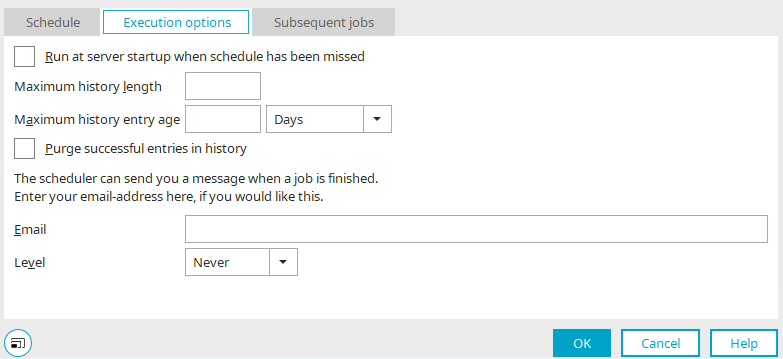
For each LDAP job, a corresponding email address must be entered in the execution options so that interruptions caused by errors can be detected early, analyzed, and resolved. Under "From Status," select the "Error" setting.
Replicating Multiple Domains to a Portal
When multiple domains are synchronized into a portal, you should specify a job that is configured for initial replication with active automatic execution. The replication jobs for the remaining domains are executed one after another, starting with this first job, by defining a chain of follow-up jobs. This prevents any overlap between individual replication jobs that could cause performance issues or locking situations in the database.
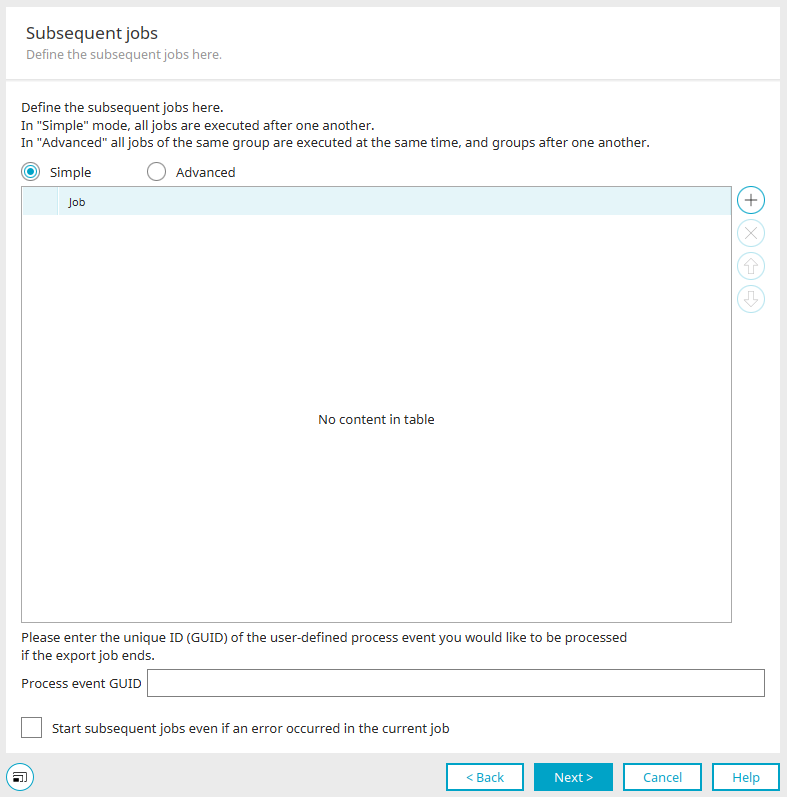
Follow-up jobs can be configured in the task planning section of the corresponding replication job. When you edit the schedule, you can define a group for each job and add the LDAP job. Note: There can be only one LDAP job per group. All entries in a group are executed in parallel!
If one of the replication operations in the chain fails, all subsequent replication operations will not be executed. To prevent this, you can enable the "Start subsequent processes even if an error occurs" setting.
You should definitely have any errors that occur reported via email and then resolve them promptly so that even failed replications are completed in full when they are run again.
Replication Without an Organizational Structure
Replication in Intrexx creates a copy of Active Directory.
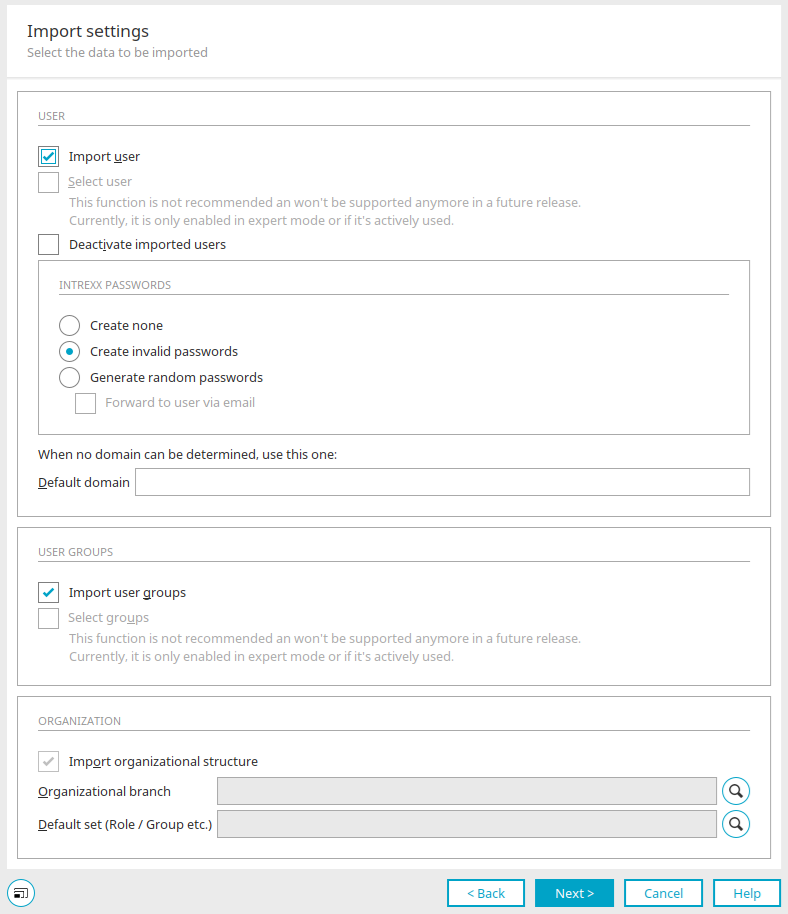
However, replication only works on a 1:1 basis if the "Import organizational structure" setting is enabled during the import job. Users are assigned to their respective organizational units (parents) during import. If the organizational units have not been imported previously, they cannot be assigned. Therefore, users are not imported. Only users and user groups that are not assigned to an organizational unit in Active Directory will be imported.
Importing all users without the organizational structure is only possible by customizing the profile. Changes should only be made to a copy of an existing profile.
Replace the word "parent" with "fixed by domain" in the following two places:
<item class="USER" query="(&(objectClass=User)(objectCategory=Person)(!(cn=*$)))" placing="parent">
<item class="GROUP" query="(&(objectClass=Group)(groupType:1.2.840.113556.1.4.803:=2147483648))" placing="parent">
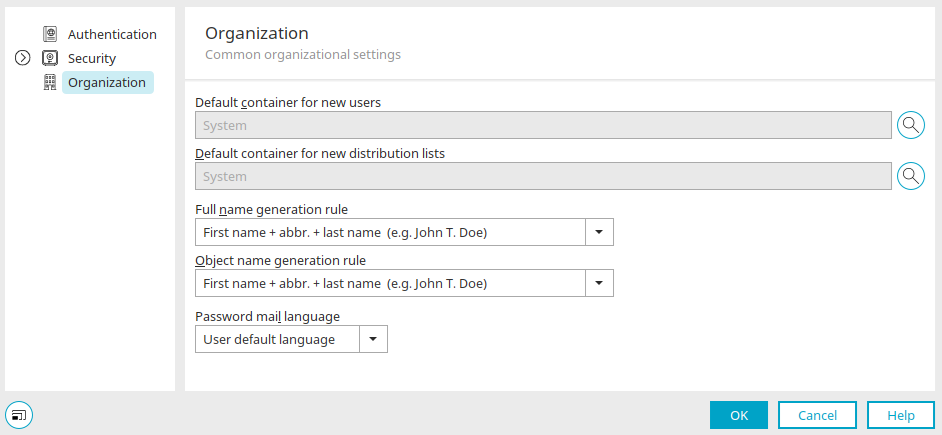
With this adjustment, users and user groups are imported even without the organizational units and are added to the default container for new users, which is defined in the "Users" module via the main menu "Users / Configuration. "
Replication of Users in a User Group

If you want to restrict user replication to a user group, you must modify the replication profile.
Here, for the "user-query," you can, for example, enter the condition "memberOf=CN=Support,OU=Support,DC=unitedplanet,DC=de))" for the "Support" group.
<main use-usns="false" path-separator-char=","escape-char="\" user-query="(&(objectClass=User)(objectCategory=Person)(!(cn=*$)(memberOf=CN=Support,OU=Support,DC=unitedplanet,DC=de))" group-query="(objectClass=Group)" unit-query="(objectClass=organizationalUnit)" domain-query="(objectClass=domain)" />
If you want the replication to also include all inherited permissions (i.e., all objects that are members of the specified group), you can extend the query statement with a special filter when querying a Windows domain running Windows Server 2003 SP2 or later:
<main use-usns="false" path-separator-char="," escape-char="\" user-query="(&(objectClass=User)(objectCategory=Person)(memberOf:1.2.840.113556.1.4.1941:=CN=SUPPORTER,OU=Team-Gruppen,DC=meinedomain,DC=org)(!(cn=*$)))" group-query="(&(objectClass=Group)" unit-query="(objectClass=organizationalUnit)" domain-query="(objectClass=domain)" />
If you also want to restrict the replication of user groups, you can add the condition (name=SUPPORTER) to the group-query.
<main use-usns="false" path-separator-char="," escape-char="\" user-query="(&(objectClass=User)(objectCategory=Person)(!(cn=*$)))" group-query="(&(objectClass=Group)(name=SUPPORTER))" unit-query="(objectClass=organizationalUnit)" domain-query="(objectClass=domain)" />
For more information on specific LDAP filters, see here:
Replication Without User Groups and Distribution Groups
If the user groups or distribution groups from Active Directory cannot be used effectively in Intrexx, it is also possible to import only the users and the organizational structure. User groups can also be defined in Intrexx, and users can be assigned from Active Directory. However, the mapping must always be maintained in Intrexx, which involves a corresponding administrative burden. In an existing replication profile, the two relevant blocks can be commented out as follows:
            <!—Deactivate group replication
 <item class="GROUP"
 …
 </item>
 -->
 <!—Deactivate group replication
 <item class="DISTLIST"
 …
 </item>
 -->
Actions After Replication
It may well make sense to perform additional processing on the replicated users after replication. An important step after replication is to run the indexing process for the search engine.
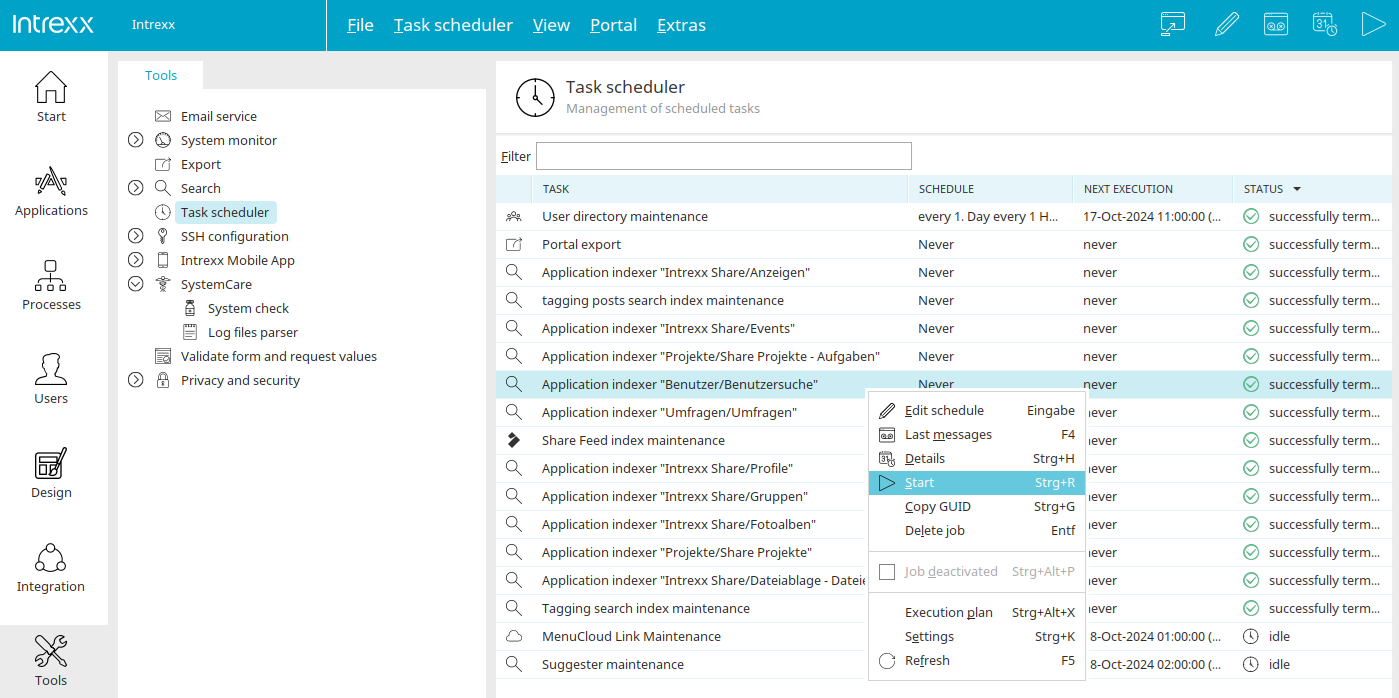
In other words, the "Users/User Search" application indexing should be run as a follow-up task after user replication so that both new users and modified users can be found via the search.
Another subsequent step is to analyze specific data within the user record and define any dependent additional data or mappings. One example is creating an additional attribute called "Sort Name" for users. This should contain the name in the format "Last Name, First Name" so that it can be used, for example, in drop-down lists. A process run after replication can use Groovy to combine the first and last names accordingly and write the result back to the user's additional attribute.
In a second example, an attribute from Active Directory is replicated that contains an organizational characteristic, such as a cost center or an organizational code. Based on this attribute, the user is now to be assigned to a specific authorization object (group, role) or organizational object (organizational unit). This approach allows for partial automation of administration if the AD structure does not provide structures and permission objects that can be used by the portal.
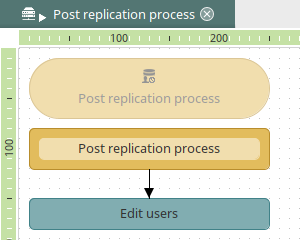
Use a timer event source with a data group connection to the user data group to define a post-replication process. The event source must be disabled, as it is not intended to run cyclically but rather through the replication job's chain of subsequent events. You can do this via the main menu "Edit/Deactivate Element" when the timer is selected on the workspace. Then save the process.
The event handler associated with the timer executes a Groovy action that can be used to process the respective user object.
            def l_intUserId = g_record["E3911A1A0198AFAD87AE026B161B7F7F202D557A"].value
/* datafield (PK) (S) User ID <integer> */
def l_strFirstname = g_record["71F6E73DF87EF94D5B2CB5F6946C7CC4093D876C"].value /* datafield Firstname <string> */
def l_strLastname = g_record["22BF94B5B5D9794429B741D8FD42128CC5E93A62"].value /* datafield Lastname <string> */
// Create sortname
def l_strSortname = l_strLastname + ", " + l_strFirstname
//Update of user record
g_dbQuery.executeUpdate(conn, "UPDATE DSUSER SET STR_SORTNAME = ? WHERE LID = ?") {
	setString(1, l_strSortname)
	setInt(8, l_intUserId)
	}
}
If Intrexx Share is available in the portal, a profile update can also be performed after replication to account for name changes, for example. To do this, you must first check whether a profile exists for the current user.
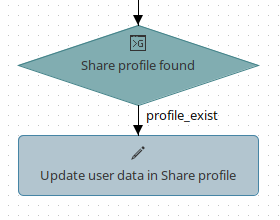
The following Groovy script can be used to check whether a profile record exists in Intrexx Share based on the user's GUID. If this is the case, the "profile_exist" output is triggered, which then executes a data group action to update the corresponding fields in the profile.
            def conn = g_dbConnections.systemConnection
	def l_strUserGuid = g_record["ACF15A10BE183A1EFBC7EF8C462069428F1E4663"].value
	/* datafield Guid <string> */
	if(l_strUserGuid != null)
	{
		def l_intShareProfile = g_dbQuery.executeAndGetScalarIntValue(conn, "SELECT COUNT(*) FROM DATAGROUP('198F73334DF58D0996897A5D7EF8DB12E6727E8D') WHERE STRID = ? AND B_DELETED = ?", 0)
		{
			setString(1, l_strUserGuid)
			setBoolean(2, false)
		}
		if(l_intShareProfile > 0)
		{
			return profile_exist
		}
}
Limited Replication of Groups
To replicate only specific groups that follow a particular naming convention, the query for the group objects (as well as for any other object type) can be modified. In this example, all groups whose names begin with "IX_" are replicated.
If the groups, in turn, contain memberships in other groups or rights objects that are relevant to user assignment, it is necessary to carefully verify whether any gaps will arise if these objects are replicated only partially.
<item class="GROUP" query="(&(objectClass=Group)(cn=IX_*)(groupType:1.2.840.113556.1.4.803:=2147483648))" placing="parent">
Common Error Messages
Unprocessed Continuation Reference(s)
Since Intrexx's LDAP import interface is also compatible with OpenLDAP, a function is called that is not correctly implemented in Microsoft Active Directory. Microsoft's implementation of LDAP referrals does not conform to the standard. This is why this warning message appears when importing from Microsoft Active Directory. In many cases, this message has no consequences and does not result in an error during import. In rare cases, however, it may indicate an interruption. In any case, you should verify the replication results (compare the number of objects in Active Directory with the number of replicated objects).
WARN 2008-06-19 11:29:44.110 - de.uplanet.lucy.server.usermanager.replication.ldap.LDAPReplicator[UserReplicationWorker]
javax.naming.PartialResultException: Unprocessed continuation reference(s); remaining name 'DC=unitedplanet,DC=de'
javax.naming.PartialResultException: Unprocessed continuation reference(s); remaining name 'DC=unitedplanet,DC=de'
at com.sun.jndi.ldap.LdapCtx.processReturnCode(LdapCtx.java:2784)
at com.sun.jndi.ldap.LdapCtx.processReturnCode(LdapCtx.java:2758)
at com.sun.jndi.ldap.LdapNamingEnumeration.getNextBatch(LdapNamingEnumeration.java:129)
at com.sun.jndi.ldap.LdapNamingEnumeration.hasMoreImpl(LdapNamingEnumeration.java:198)
at com.sun.jndi.ldap.LdapNamingEnumeration.hasMore(LdapNamingEnumeration.java:171)
at de.uplanet.lucy.server.usermanager.replication.ldap.LDAPReplicator.a(Unknown Source)
at de.uplanet.lucy.server.usermanager.replication.ldap.LDAPReplicator.a(Unknown Source)
at de.uplanet.lucy.server.usermanager.replication.ldap.LDAPReplicator.replicateIncremental (Unknown Source)
at de.uplanet.lucy.server.usermanager.replication.UserReplicationJobController$1.run (Unknown Source)
WARN 2008-06-19 11:29:45.637 - de.uplanet.lucy.server.usermanager.replication.ldap.LDAPReplicator[UserReplicationWorker]
Data Truncation
This is not an Intrexx error. User import is not working because one or more records in Active Directory contain entries that are too long. The maximum field length of the corresponding target data field in Intrexx User Management is too short, or the Active Directory entry is too long.
For possible solutions to prevent errors and replication failures, see the section titled "Truncating Field Contents from Active Directory. "
Import job terminated due to an error:
de.uplanet.jdbc.StandardDbException: Error: 0, SQLState: 22001: Data truncation
at de.uplanet.jdbc.sqlserver.SQLServerDescriptor.convertException (Unknown Source)
at de.uplanet.jdbc.JdbcPreparedStatement.executeUpdate(Unknown Source)
at de.uplanet.lucy.server.usermanager.ds.managerimpl.DsDbManager._doUpdateInsert(Unknown Source)
at de.uplanet.lucy.server.usermanager.ds.managerimpl.DsDbManager.insert(Unknown Source)
at de.uplanet.lucy.server.usermanager.replication.ldap.LDAPReplicator.a(Unknown Source)
at de.uplanet.lucy.server.usermanager.replication.ldap.LDAPReplicator.b (Unknown Source)
at de.uplanet.lucy.server.usermanager.replication.ldap.LDAPReplicator.a(Unknown Source)
at de.uplanet.lucy.server.usermanager.replication.ldap.LDAPReplicator.b (Unknown Source)
at de.uplanet.lucy.server.usermanager.replication.ldap.LDAPReplicator.a(Unknown Source)
at de.uplanet.lucy.server.usermanager.replication.ldap.LDAPReplicator.a(Unknown Source)
at de.uplanet.lucy.server.usermanager.replication.ldap.LDAPReplicator.replicateIncremental (Unknown Source)
at de.uplanet.lucy.server.usermanager.replication.UserReplicationJobController$1.run (Unknown Source)
December 3, 2008, 3:17:54 PM: *** ERROR OCCURRED, JOB STOPPED ***
The class DISTLIST cannot be cast to the class GROUP
This error occurs when the class of an object in Active Directory is changed. When an object is created, its function is defined by its class (user group or distribution list).
Converting an object—such as a distribution group—into a user group, or vice versa, affects Intrexx and the objects replicated there. In Active Directory, objects are distinguished by a flag, whereas in Intrexx, each object type is managed in its own data group. A conversion results in a replication error:
Error processing search result:
mail=adresse@domain.de
objectGUID;binary=[B@64250a59
name=Object Description
memberOf=CN=User,OU=Recipients,DC=row,DC=domain,DC=de
primaryGroupToken=5338
de.uplanet.lucy.usermanager.DsRuntimeException: The destination DS class DISTLIST cannot be cast to the class GROUP
at de.uplanet.lucy.server.usermanager.ds.managerimpl.DsDbManager.a (Unknown Source)
at de.uplanet.lucy.server.usermanager.ds.managerimpl.DsDbManager.select(Unknown Source)
at de.uplanet.lucy.server.usermanager.ds.managerimpl.DsDbManager.select(Unknown Source)
at de.uplanet.lucy.server.usermanager.ds.managerimpl.DsDbManager.select(Unknown Source)
at de.uplanet.lucy.server.usermanager.ds.managerimpl.DsDbManager.selectFullRecord(Unknown Source)
at de.uplanet.lucy.server.usermanager.ds.managerimpl.DsDbManager.selectFullRecord(Unknown Source)
at de.uplanet.lucy.server.usermanager.replication.ldap.LDAPReplicator.a(Unknown Source)
at de.uplanet.lucy.server.usermanager.replication.ldap.LDAPReplicator.b (Unknown Source)
at de.uplanet.lucy.server.usermanager.replication.ldap.LDAPReplicator.a(Unknown Source)
at de.uplanet.lucy.server.usermanager.replication.ldap.LDAPReplicator.a(Unknown Source)
at de.uplanet.lucy.server.usermanager.replication.ldap.LDAPReplicator.replicateIncremental (Unknown Source)
at de.uplanet.lucy.server.usermanager.replication.UserReplicationJob.doWork (Unknown Source)
at de.uplanet.lucy.server.scheduler.AbstractJob.execute(Unknown Source)
at org.quartz.core.JobRunShell.run(JobRunShell.java:213)
at org.quartz.simpl.SimpleThreadPool$WorkerThread.run(SimpleThreadPool.java:557)
Connection timed out: connect
This error occurs when the specified domain controller is unreachable. This may be caused by a lack of access rights to the server or blocked ports. If the error occurs during operation in a replication job that has already been successfully set up, the cause may be a server failure, a changed IP address, or modified access rights. It is especially important in large organizations with multiple independently maintained domains that changes be coordinated to avoid such problems.
July 20, 2014, 10:17:36 PM: *** User Replication Job 912496D87C849A5D109ED500F0D696A01B60D680 STARTED ***
Configuration:06C3620E8A4A3AB57992EF33A0263409CE7727C9 / DOMAIN
javax.naming.CommunicationException: 192.168.10.100:389 [Root exception is java.net.ConnectException: Connection timed out: connect]
at com.sun.jndi.ldap.Connection.<init>(Connection.java:209)
at com.sun.jndi.ldap.LdapClient.<init>(LdapClient.java:116)
at com.sun.jndi.ldap.LdapClient.getInstance(LdapClient.java:1580)
at com.sun.jndi.ldap.LdapCtx.connect(LdapCtx.java:2678)
at com.sun.jndi.ldap.LdapCtx.<init>(LdapCtx.java:296)
at com.sun.jndi.ldap.LdapCtxFactory.getUsingURL(LdapCtxFactory.java:175)
at com.sun.jndi.ldap.LdapCtxFactory.getUsingURLs(LdapCtxFactory.java:193)
at com.sun.jndi.ldap.LdapCtxFactory.getLdapCtxInstance(LdapCtxFactory.java:136)
at com.sun.jndi.ldap.LdapCtxFactory.getInitialContext(LdapCtxFactory.java:66)
at javax.naming.spi.NamingManager.getInitialContext(NamingManager.java:667)
at javax.naming.InitialContext.getDefaultInitCtx(InitialContext.java:288)
at javax.naming.InitialContext.init(InitialContext.java:223)
at javax.naming.ldap.InitialLdapContext.<init>(InitialLdapContext.java:134)
at de.uplanet.lucy.server.usermanager.replication.ldap.LDAPReplicator.a(Unknown Source)
at de.uplanet.lucy.server.usermanager.replication.ldap.LDAPReplicator.replicateIncremental (Unknown Source)
at de.uplanet.lucy.server.usermanager.replication.UserReplicationJob.doWork(Unknown Source)
at de.uplanet.lucy.server.scheduler.AbstractJob.execute(Unknown Source)
at org.quartz.core.JobRunShell.run(JobRunShell.java:213)
at org.quartz.simpl.SimpleThreadPool$WorkerThread.run(SimpleThreadPool.java:557)
Caused by: java.net.ConnectException: Connection timed out: connect
at java.net.PlainSocketImpl.socketConnect(Native Method)
at java.net.PlainSocketImpl.doConnect(PlainSocketImpl.java:351)
at java.net.PlainSocketImpl.connectToAddress(PlainSocketImpl.java:213)
at java.net.PlainSocketImpl.connect(PlainSocketImpl.java:200)
at java.net.SocksSocketImpl.connect(SocksSocketImpl.java:366)
at java.net.Socket.connect(Socket.java:529)
at java.net.Socket.connect(Socket.java:478)
at java.net.Socket.<init>(Socket.java:375)
at java.net.Socket.<init>(Socket.java:189)
at com.sun.jndi.ldap.Connection.createSocket(Connection.java:351)
at com.sun.jndi.ldap.Connection.<init>(Connection.java:186)
... 18 more
July 20, 2014, 10:17:57 PM: *** ERROR OCCURRED, JOB STOPPED ***
Tools
The Jxplorer search dialog is well suited for testing a query.
Tool Websites
Apache Directory Studio: https://directory.apache.org/studio/
LDAP Adnub: http://www.ldapadmin.org/
More Information
Objects, Classes, and Attributes
The sections of the "Users" module
Replication - Importing Users and Groups
Portal Login via Identity Provider
Use a proxy server for authentication