Set Portal Permissions
You can find the portal permissions in the main menu under "Portal > Portal Permissions...".
The menu item is accessible only after logging into a portal. All permissions defined here are valid for the current portal.
After you select the menu item, the "Set Portal Permissions" dialog box will appear.
Click on a user or user role to display the list of rights.
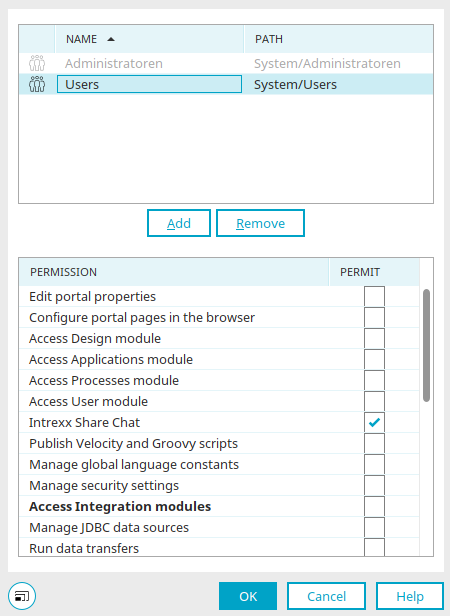
Below is an overview of the portal permissions.
|
Name
|
Description |
|---|---|
| Administrate portal | This permission allows you to configure portal settings and create portal exports or imports via the main menu under "Portal / Export Portal" or "Portal / Import Portal," respectively. |
| Set up portal pages in your browser | Rights holders are authorized to administer the portal pages in default mode. |
| Access design module |
In Portal Manager, rights holders have access to the Design module (Design). The "Access to Design Module" permission or the "Access to Applications Module" permission is required to edit the portal's menu structure (Edit the Portal's Menu Structure). |
| Access module applications |
In Portal Manager, rights holders have access to the Applications module (Applications). The "Access to Module Applications" permission or the "Access to Module Design" permission is required to edit the portal's menu structure (Edit the Portal's Menu Structure). |
| Access module processes | Rights holders have access to the Processes module (Processes) in Portal Manager. |
| Access user module | In Portal Manager, rights holders have access to the Users module (User). |
| Use Chat | Copyright holders can use Chat. |
|
Publish Velocity and Groovy scripts |
This permission allows Velocity and Groovy scripts to be published on the server. |
|
Manage global language constants |
Rights holders can edit language constants in Portal Properties / Country Settings / Global Texts and in applications. |
|
Starting with Intrexx version 12.0.1 Manage Security Settings |
Rights holders can manage connection data in the "Integration" module and have access to the login information store. |
|
Access Integration modules |
Automatically checks the "Allow" box for all applicable portal permissions so that they do not need to be selected individually. |
| Run data transfers |
In Portal Manager, rights holders have the right to carry out data transfers (Data Transfer). |
| Manage FileWalker connections |
In Portal Manager, rights holders have the right to manage FileWalker connections (FileWalker). |
| Manage API keys |
In Portal Manager, rights holders have the ability to manage API keys for the Intrexx Application API (Intrexx Application API). |
| Register OData services |
In Portal Manager, rights holders have the right to register OData services (OData Connector - Consuming Data). |
| Provide OData services |
In Portal Manager, rights holders have the right to offer OData services (OData Connector - Publish Data). |
| Register web services |
In Portal Manager, rights holders have the right to register web services ( Register a Web Service). |
| Provide web services |
In Portal Manager, rights holders have the right to offer web services (Web Service). |
| Configure WebDAV |
Authorized users can access "WebDAV" in the "Tools" module (Configure WebDAV). |
| Document integration |
In Portal Manager, rights holders have the right to set up document integration (Collaboration - Documents). |
|
|
In Portal Manager, authorized users have the right to register SAP Gateway sources (Connector for SAP Gateway). |
| Register Lotus Notes sources |
In Portal Manager, authorized users have the right to register Lotus Notes sources (Connector for IBM Lotus Notes). |
| Manage Microsoft Exchange sources |
In Portal Manager, rights holders have the right to manage Microsoft Exchange sources (Connector for Microsoft Exchange). |
| Manage SAP Business Suite sources |
In Portal Manager, rights holders have the right to manage SAP Business Suite sources (Connector for SAP Business Suite - Create a Connection). |
| Register M-Files services |
In Portal Manager, rights holders have the right to register M-Files services (Connector for M-Files 2.0). |
| Register dg hyparchive services |
Rights holders have the right to register dg hyparchive services in Portal Manager (Connector for dg archive). |
| Access to tools | With this setting, the following permissions are granted for functions in the "Tools" module: |
| Use system monitor |
In Portal Manager, rights holders have the right to use the System Monitor (System Monitor). |
| Manage search indexes |
Authorized users have access to the Lucene index management (Search) feature. |
| Manage task scheduler |
In Portal Manager, authorized users have the right to manage task scheduling (Task Planning). |
| Manage request variables |
In Portal Manager, rights holders have the right to manage request variables (Form and Request Value Validation). |
| Access email service |
Rights holders can access the email service in Portal Manager (Email Service). |

Special Considerations for Users Who Are Not Members of the "Administrators" User Group
- Users with the "Change Portal Properties" permission can make changes in the "Documents" section of the portal properties without the "Access to Applications Module" permission.
- Users with the "Change Portal Properties" permission can make changes in the "Country Settings" section of the portal properties without having the "Access to Module Design" permission. The "Access to Module Design" permission has no effect on this section in the portal properties. To edit global language constants, you need the "Manage Global Language Constants" permission.
- The "Manage Security Settings" permission is also required for the settings under "Security" and "Certificates" in the portal properties. Users without this permission cannot view these pages.
More Information