


With the Microsoft Exchange connector, you can, among other things, access information from your personal email inbox. The connector enables you to use this information to create and extend virtually any application in Intrexx and to incorporate data from the Exchange server into your processes.
For example, you can display a table in your customer management system that accesses your personal mailbox, the Inbox folder, or sent emails, and lists all emails that include the customer number of the currently selected customer in the subject line. Or you can add a contact to your personal address book with a single click.
With the Microsoft Exchange connector, you do not work with copies of the data; instead, you access your mailbox—or the mailboxes for which the respective users have granted you permissions via Microsoft Outlook—in real time.
The Connector is not a "second Outlook Web Access" or a replacement for Outlook—these products are designed as email clients and, of course, offer many more features. Nevertheless, the added value of using data from Microsoft Exchange Server in applications and processes offers a tremendous expansion of your platform's overall functionality.
Features at a Glance:
-
Automatic Transfer of Appointments
-
Flexible scheduling of invitations or entries based on approval processes
-
Transfer or update contacts manually or automatically
-
Transferring Mailbox Entries to the Intrexx Application
-
A convenient Groovy API for accessing Exchange mailbox items in your own code
-
Compatible with Microsoft Exchange Server 2010–2019 and 365.
Licensing
To use the connector for Microsoft Exchange, you must purchase a license. To activate the connector, launch the Intrexx Portal Manager. Open the License Manager from the main menu under "Tools / License Manager. "
Structure of the Connector
The Intrexx Microsoft Exchange Connector consists of two separate components:
-
Connector for Microsoft Exchange in Intrexx
-
Intrexx MediaGateway
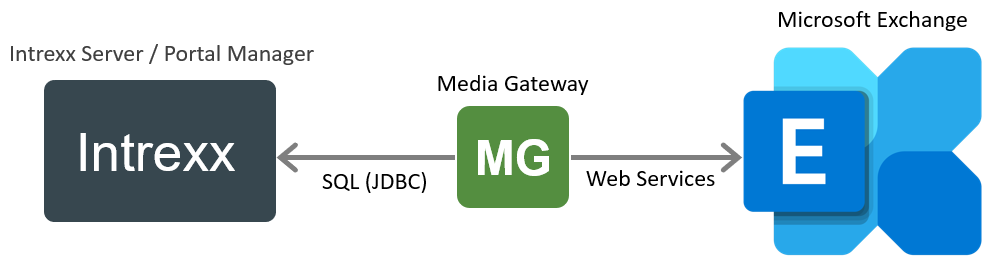
Intrexx MediaGateway is a software program that you must install separately before using the connector. The Intrexx MediaGateway acts as an intermediary between Intrexx and the Exchange server. All requests are forwarded by Intrexx to the Exchange server via the MediaGateway.
Security
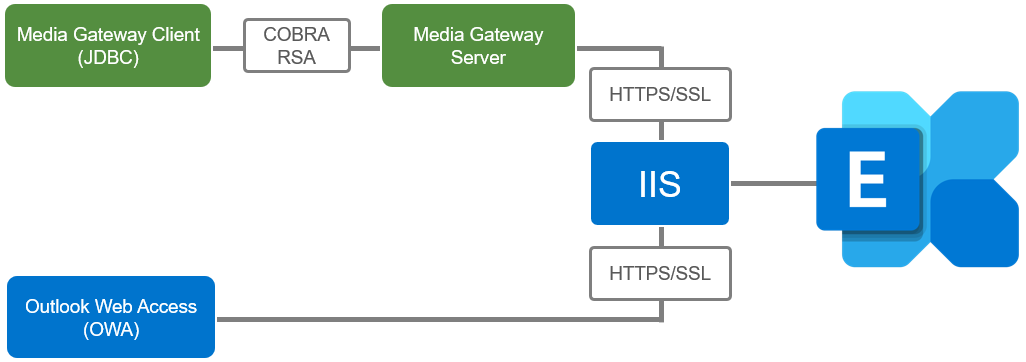
To use MediaGateway with Microsoft Exchange Server version 2003 or later, a fully functional Outlook Web Access (OWA) is required. This is provided and enabled by Microsoft Exchange by default. The security protocols used in this process (HTTPS, SSL) are also supported by MediaGateway.
Authentication
There are three options available for authentication on the Exchange Server or the Media Gateway:
-
Username - Password (Basic)
-
OAuth2 (Microsoft 365)
-
Kerberos
Permissions
Access to data is granted exclusively based on the permissions of the user logged in to the Exchange server. This means that any data access a user performs using the MediaGateway can also be performed by OWA. Using Microsoft Outlook, any user can grant other users access to their mailbox, and this access can be restricted at various levels, such as read-only, read, or read-write. In any case, the user must approve it themselves.
System Requirements
-
Intrexx Portal Server
-
Intrexx Licenses
-
Microsoft Exchange Server, version 2010 or later
-
Enabled Online Web Access (OWA) for the Microsoft Exchange Server
The Microsoft Visual Studio 2017 C++ Runtime Library must be installed for the ODBC connection. You can download them here:
Currently Supported Downloads for Visual C++
More Information