

To use SAP Business data in real time in an application, please first create a connection. You can find all the information about this here.
The connection can then be used in any application. To do this, open the application in the "Applications" module and select the application node. Create a new external data group by selecting "New / External Data Group" from the main menu.
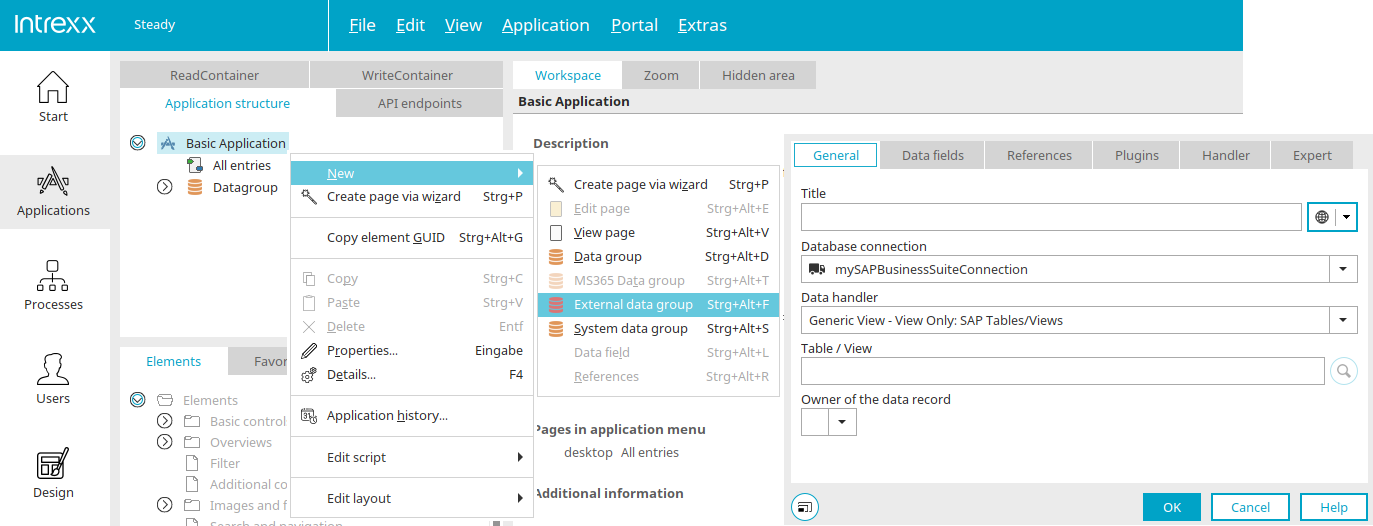
The dialog box for selecting the database connection opens automatically. You can find all the information about the settings in this dialog box here.
You can then select the data fields whose values you want to display or edit in the application on the "Data Fields" tab. Once the data fields have been integrated, they can be linked to elements on the application pages as usual.
More Information
SAP Trust Manager SSO Configuration
API Description, Part 1 - Overview
API Description, Part 2 - SAP Portal Plugin
API Description, Part 3 - Implementing Custom Processing Modules
API Description, Part 4 - Sample Code
Developer's Guide, Part 2 - Integration Scenario: SAP External Data Group
Developer's Guide, Part 3 - Integration Scenario: Scripting
Developer's Guide, Part 4 - Personalized SAP Access / Single Sign-On (SSO)
Developer's Guide, Part 5 - Add-ons
Developer's Guide - Sample Code