

Development Goals
The following development goals were the primary focus for the implementation of the SAP Portal Plugin:
-
No Java customizations required for requirements from the SAP environment
When implementing portal processes in an SAP environment, it is desirable to keep the effort required to develop user interfaces, portal applications, and authorization models within reasonable limits. However, it is essential to clarify the functionality (requirements specification) and analyze its feasibility within the existing SAP functions. The primary SAP system determines the data model and the implementable functionality. When designing the plugin, it was therefore important that the extension concept be implemented within SAP ABAP and that the interface between the systems remain fixed.
-
Using Functions That Are Not Available as BAPIs or RFCs
SAP provides a wide range of functions via BAPIs and RFC-enabled function modules that can be used by external systems. BAPIs, in particular, are designed to be business-object-oriented and should meet the requirements of a universal connector. However, many of the available BAPIs (depending on (from the release) are usually insufficient, incomplete, or partially implemented incorrectly, and each BAPI behaves differently. Key functions for customer projects are often not available for external systems and would need to be implemented as BAPI or RFC functions. For the plugin's design, we therefore opted to use a small number of API methods that can be called via RFC. These calls are then forwarded to other functions that handle the external requests.
-
Well-defined and straightforward RFC API
Above all, the approach discussed here makes it possible to keep the attack surface of the SAP system as small as possible. This prevents the uncontrolled proliferation of RFC functions. The authorization model is easier to implement because all external calls come through a single entry point.
API Concept
The development goals resulted in a small RFC-compliant API that essentially implements the following functions:
-
Get_MetaInfo
-
Get_List
-
Get_Detail
-
Modify
-
Delete
You can find more details about the RFC API here.
The RFC API is called from the third-party system (e.g., Intrexx) as part of that system's business logic via the SAP Java Connector.
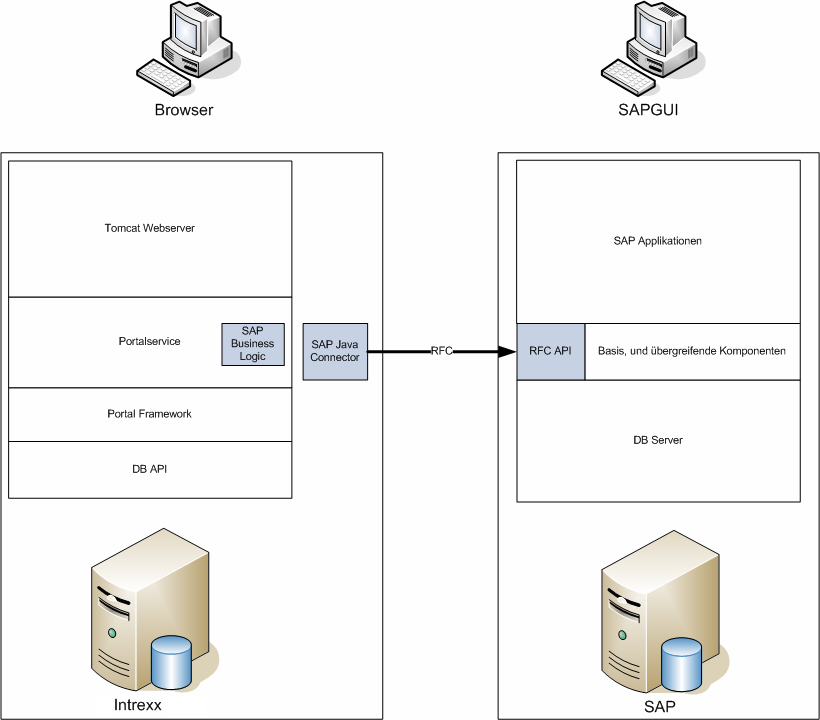
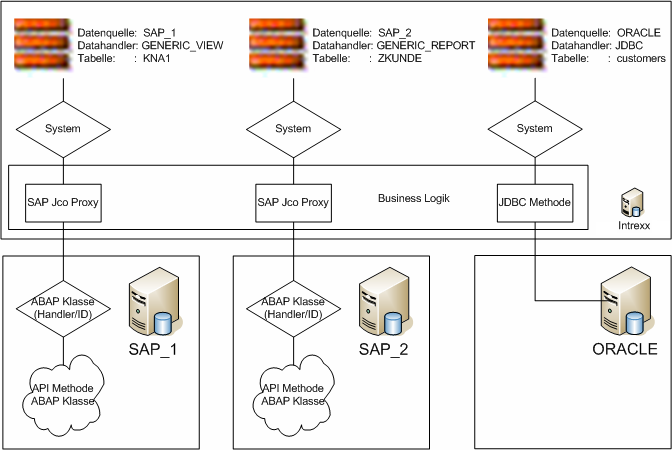
The process of identifying the appropriate SAP system was already described in Part 1 of the API documentation. Within the SAP system, a corresponding processing module is determined based on the combination of the external data handler and the table name.
Expansion Concept for Processing Modules
The ABAP Objects concept was used for the processing modules to take advantage of its benefits during implementation (primarily through inheritance). Every call to an API method therefore identifies an ABAP Objects class to which the external request is passed as a method. Inheritance enables the implementation of generic processing modules. For read access to SAP tables and views, for example, the same program steps are actually always required. Only the technical name of the table or view and the information to be transferred (different table structures, metadata) change. The requirement for read access to tables and views can therefore be more easily addressed using a general processing module (e.g., "GENERIC_VIEW") than the requirement for write access to SAP data objects. This is where requirements such as the lockout concept, validation logic, and the like must be addressed. must be observed. The implementation of write accesses can therefore hardly be mapped generically, since one should use object-specific API components (e.g., BAPI) in this case. The diagram illustrates once again the interaction between the system (represented by the external caller), the data handler, and the data object. The lower section, in particular, shows how to locate the ABAP Objects class and call the API method implemented there.
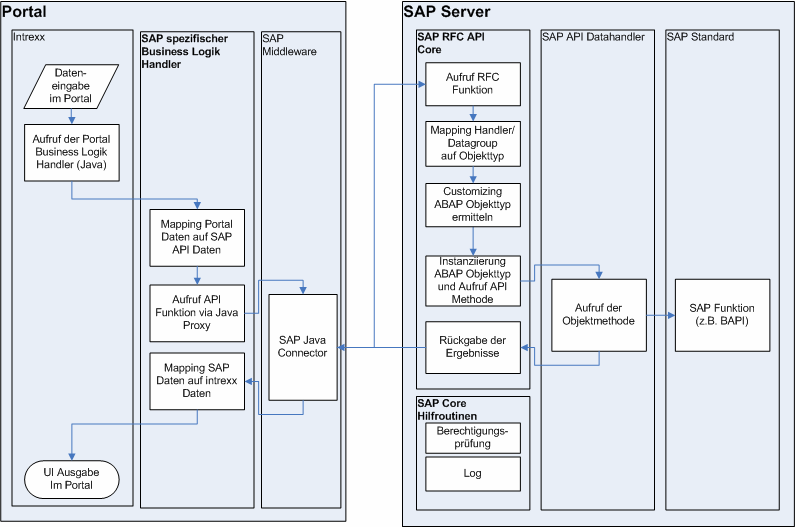
The following figure illustrates the data flow and how the processing routines are determined through the interaction between the external caller (in this case, Intrexx) and the SAP Portal Plugin.
Data Handler
In the external system, various data handlers may be necessary to distinguish between the different data objects. The following data handlers are predefined by the SAP Portal Plugin and can be used by external systems:
|
Data Handler |
Usage |
|---|---|
|
GENERIC_VIEW |
Generic read access to physically existing tables and views. This data handler is always used unless another data handler is explicitly specified. |
|
GENERIC_REPORT |
Generic Read Access for SAP Reports (SE38). Allows you to run (simple) reports by passing parameters and returning the results in a table format. |
|
GENERIC_STORE |
Enables data to be stored in table-like structures in SAP. "Generic" here means that, even though the data is physically stored in SAP, no development effort is necessarily required. This can be done, for example, by using classification or similar methods. Functions can be achieved. |
|
GENERIC_FUNCTION |
Enables function calls in SAP or EXIT functionality that allows SAP to validate data entered externally. Data is stored in an external system. Saving an external data record is passed on to the "modify" API method. |
|
GENERIC_BAPI |
This data handler could be used to implement generic access to SAP business objects and their BAPI methods. |
|
DEVELOPER_API |
Data handler for all non-generic processing modules that implement part or all of the API. |
The data handlers listed here are primarily used to identify the correct processing modules. These data handlers should not be confused with additional processing modules. These are typically created in association with the DEVELOPER_API data handler.
RFC API
Development Projects
The developments (also known as development classes in earlier releases of SAP Basis) for the RFC API can be found in the "ZIA_INTREXX_API" package in the "ZIA_IXA_API" function group. To use the SAP plugin's functionality externally, simply enable external access for this function group. You can find more information about the authorization model here.
Structures Used
a) Control structure
The control structure (technically "ZIA_IXA_API_INTREXX_CONTROL") is used as the "IS_CONTROL" import parameter for each API-RFC function module to make certain external parameters available.
|
No. |
Field Name |
Data element |
Data Type |
Length |
Description |
|---|---|---|---|---|---|
|
1 |
IX_DATAGROUP |
ZIA_IXA_DATAGROUP |
CHAR |
30 |
Name of the external data group |
|
2 |
IX_DATARANGE |
ZIA_IXA_DATARANGE |
CHAR |
30 |
Data groups may be used in different views, depending on the circumstances. This field contains the technical name of the view in the calling system. |
|
3 |
IX_DATAGROUP_EXT |
ZIA_IXA_DATAGROUP_EXTERN |
CHAR |
30 |
This field contains the name of a data group in the calling system (external to SAP) that corresponds to the data group specified in field (1). This field is rarely used and contains, for example, the value from (1). |
|
4 |
IX_SESSION |
ZIA_IXA_SESSION |
CHAR |
40 |
Contains the external session ID on the Internet and can be used to identify related requests. |
|
5 |
IX_USER |
ZIA_IXA_USER |
CHAR |
30 |
Contains the username within the external system. |
|
6 |
IX_USERGROUP |
ZIA_IXA_USERGROUP |
CHAR |
30 |
Contains the user group from the external system. |
|
7 |
IX_LANGUAGE |
ZIA_IXA_LANGUAGE |
CHAR |
2 |
Contains the language currently used by the external system. |
|
8 |
IX_SAPINSTANCE |
ZIA_IXA_SAP_INSTANCE |
CHAR |
20 |
Name of the data source for the current system in the external calling system. |
|
9 |
IX_SAPID |
ZIA_IXA_SAPID |
CHAR |
20 |
SAP system installation number. |
|
10 |
IX_SYSID |
SYSYSID |
CHAR |
8 |
SID of the SAP system. |
|
11 |
IX_CLIENT |
SYMANDT |
CLNT |
3 |
Client of the SAP system. |
|
12 |
IX_PRODUCTIVE |
ZIA_IXA_PRODUCTIVE |
CHAR |
1 |
Characteristic: productive system. |
|
13 |
IX_LICENSE |
ZIA_IXA_LICENSE |
CHAR |
60 |
License key. |
|
14 |
IX_SRVCFG |
ZIA_IXA_SRVCFG |
CHAR |
255 |
Server Configuration. |
|
15 |
IX_DATAHANDLER |
ZIA_IXA_DATAHANDLER |
CHAR |
20 |
External data handler. |
|
16 |
IX_DHNDL_VAR |
ZIA_IXA_DATAHANDLER_VARIANT |
CHAR |
30 |
Variant of the external data handler (e.g., default). |
|
17 |
PARAMETER_1 |
ZIA_IXA_PARAMETER |
CHAR |
50 |
Externally maintained parameter (1). |
|
18 |
PARAMETER_2 |
ZIA_IXA_PARAMETER |
CHAR |
50 |
Externally maintained parameter (2). |
|
19 |
PARAMETER_3 |
ZIA_IXA_PARAMETER |
CHAR |
50 |
Externally maintained parameter (3). |
|
20 |
PARAMETER_4 |
ZIA_IXA_PARAMETER |
CHAR |
50 |
Externally maintained parameter (4). |
|
21 |
PARAMETER_5 |
ZIA_IXA_PARAMETER |
CHAR |
50 |
Externally maintained parameter (5). |
Fields 1, 2, and 15 are used to determine the actual processing modules (object-oriented ABAP object instances). You can find more information here. Fields 3–8 contain information about the calling system only, but may be relevant within the processing modules (e.g., when evaluating the external language). Fields 9–14 can be used to prevent calls to the wrong SAP system (e.g., wrong client, production system). You can also use these fields to model a licensing model. Fields 15–16 contain information about the externally used data handler. In this context, the Datahandler variant can, for example, control the behavior of the processing module (default value "default"). Field 16 has no effect on the selection of the processing module. The behavior of the processing module can also be controlled using up to 5 parameters (fields 17–21).
b) Data objects
The "get_DataObjects" API function can be used to identify potential data objects in the processing module. The technical names and a description are returned to the external calling system in the form of a table (technical name of the structure "ZIA_IXA_API_INTREXX_DATAOBJ").
|
No. |
Field Name |
Data Element |
Data Type |
Length |
Description |
|---|---|---|---|---|---|
|
1 |
DATAOBJECT |
ZIA_IXA_DATA_OBJECT |
CHAR |
40 |
Technical Name of the Data Object |
|
2 |
DESCRIPTION |
ZIA_IXA_DATA_OBJECT_TEXT |
CHAR |
79 |
Description of the Data Object |
c) Data Exchange
Data is exchanged in both directions between the external calling system and the SAP system via a table with a fixed structure (technical name "ZIA_IXA_API_INTREXX_FIELDS"), which is independent of the data objects to be transferred.
|
No. |
Field Name |
Data Element |
Data Type |
Length |
Description |
|---|---|---|---|---|---|
|
1 |
LIST_RECORD |
ZIA_IXA_RECORDNUMBER |
INT4 |
10 |
Record Number |
|
2 |
STRUC_NAME |
ZIA_IXA_STRUCTURE |
CHAR |
30 |
Structure Name |
|
3 |
STRUC_RECORD |
ZIA_IXA_RECORDNUMBER |
INT4 |
10 |
Record number within the structure |
|
4 |
FIELD_NAME |
ZIA_IXA_FIELDNAME |
CHAR |
30 |
Field Name |
|
5 |
FIELD_VALUE |
ZIA_IXA_FIELDVALUE |
CHAR |
255 |
Field value |
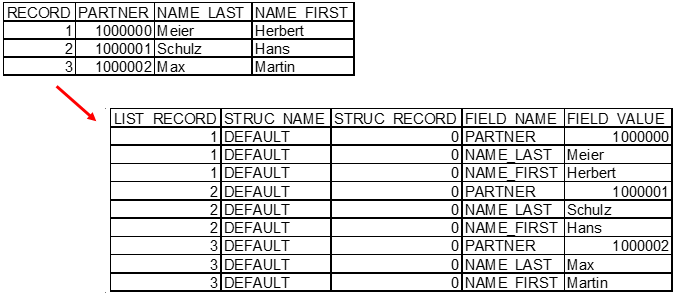
This structure allows any SAP-internal table structure (such as an internal table) to be mapped without having to modify the API. Exceptions are complex structures that include tables or references. Field (1) always contains the number of the transferred data record and can be easily mapped using the SY-TABIX of the table to be transferred. Field (4) contains the column name (or the field name in the structure), and field (5) contains the actual value. Fields (2) and (3) are intended to accommodate substructures (e.g., when transferring orders with line items). To do this, the calling system must be able to process this dependent data within a single call. For a regular call without dependent data, the fields are filled in as follows:
-
STRUC_NAME = "DEFAULT"
-
STRUC_RECORD = "0"
The following example shows how to transform an internal SAP table into the API transfer table for data exchange.
d) Key Information
Directly related to the data exchange structure is the structure for exchanging key information (technical name "ZIA_IXA_API_INTREXX_KEYS"). This structure is required, particularly within the "get_Detail" API method, to assign a unique key to each record within the data exchange structure—identified by the "LIST_RECORD" field.
|
No. |
Field Name |
Data Element |
Data Type |
Length |
Description |
|---|---|---|---|---|---|
|
1 |
LIST_RECORD |
ZIA_IXA_RECORDNUMBER |
INT4 |
10 |
Record Number |
|
2 |
LIST_KEY |
ZIA_IXA_KEYFIELD |
CHAR |
128 |
Key field value |
Assuming that the "PARTNER" field in the previous example is a unique key, the table for the key information would look like this:
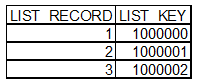
Since the SAP system allows a record to be uniquely identified by a combination of fields, a specific approach must be implemented in the processing modules to ensure that records retrieved using "get_List" can also be uniquely identified in the other API methods (e.g., "get_Detail"). For most SAP tables, the client concept already provides a primary key consisting of at least two database fields. However, the "Client" field can be ignored in the context of an external call, since the login is already performed on a client. Access to other clients or to client-independent data should be carefully reviewed. For example, the approach in which all actual key fields of the SAP table (excluding the client, however) were written to the "LIST_KEY" field, separated by a delimiter, has proven to be effective. For example, the following ABAP code could be used to generate a unique key consisting of three table fields:
            concatenate lv_key1
						lv_key2
						lv_key3<						into lv_key_extern
						separated by '~'.
The reverse route can be taken via
            split lv_key_extern
										at '~'
										lv_key3
										into lv_key1
												lv_key2
												lv_key3
be implemented. Of course, characters other than "~" can also be used as separators. You should use a character that will not appear in the table's key fields. If it cannot be ruled out that the selected separator appears in key fields, mapping can also be implemented using a GUID function. GUIDs (Global Unique ID; globally unique identification number) can be generated within the SAP system using the "GUID_CREATE" function module.
e) Reports
Messages that can be generated in SAP (such as warning or error messages) may also be relevant to the external calling system. Therefore, it is generally possible to transfer messages to the external system in a message table (technical name "ZIA_IXA_API_INTREXX_MESSAGES").
|
No. |
Field Name |
Data element |
Data Type |
Length |
Description |
|---|---|---|---|---|---|
|
1 |
TYPE |
BAPI_MTYPE |
CHAR |
1 |
Message Type |
|
2 |
MESSAGE |
BAPI_MSG |
CHAR |
220 |
Message Text |
|
3 |
TECH_ID |
SYMSGID |
CHAR |
20 |
Message Class |
|
4 |
TECH_NO |
SYMSGNO |
NUMC |
3 |
Message Number |
The structure used is similar to the "BAPIRET2" structure commonly found in BAPIs. However, we omitted the more technical information, since external systems are generally unable to process it. In this context, only fields 1 and 2 are relevant; they contain the message type and the text to be displayed. Fields 3–4 are SAP-specific and are intended only for troubleshooting by developers or administrators with SAP access. The message type in field 1 determines whether an action is successful. The external system should interpret the passed values as follows:
|
Message Type |
Meaning in SAP |
External significance for the calling system |
|---|---|---|
|
E |
Errors have occurred. |
Display an error message. |
|
A |
The function had to be terminated. |
Display an error message. |
|
X |
A serious exception has occurred. |
Display an error message. |
|
W |
The function terminated with warnings. |
Function completed successfully. Display a warning message, if necessary. |
|
I |
The function completed successfully. There are messages to inform the user. |
Function completed successfully. |
|
S |
The function completed successfully. There are status messages. |
Function completed successfully. |
f) Filter criteria
Filter criteria—such as those used when selecting data in the "get_List" API method—are passed as a table within the API (technical name of the structure: "ZIA_IXA_API_INTREXX_FILTER").
|
No. |
Field Name |
Data element |
Data Type |
Length |
Description |
|---|---|---|---|---|---|
|
1 |
SELPOS |
NUMC |
4 |
Position of the filter row. Used for sorting. |
|
|
2 |
COMBINE |
CHAR |
5 |
Type of combination with the previous row. Possible values: <AND|OR>. This field is irrelevant for the first filter row and is not evaluated. Nevertheless, it is filled with AND. |
|
|
3 |
LPARENTHESIS |
INT1 |
3 |
Number of opening parentheses |
|
|
4 |
FIELDNAME |
CHAR |
30 |
Field name of the filtered data object |
|
|
5 |
OPERAND |
CHAR |
2 |
Operand (see (possible values) |
|
|
6 |
VALUE_LOW |
CHAR |
70 |
Field value |
|
|
7 |
VALUE_HIGH |
CHAR |
70 |
Field Value 2 for Interval Operands |
|
|
8 |
RPARENTHESIS |
INT1 |
3 |
Number of closing parentheses |
Possible operands (field 5) are:
|
Operand |
Meaning |
|
|---|---|---|
|
EQ |
= |
equal |
|
NE |
<> |
unequal |
|
LE |
<= |
less than |
|
GE |
>= |
greater than or equal to |
|
LT |
< |
smaller |
|
GT |
> |
larger |
|
BT |
between |
within the range of <value_low> and <value_high> |
|
CP |
like |
matches the pattern |
This table allows you to pass even complex WHERE clauses with parentheses. The Example
WHERE ( FIELDNAME1 = 'HAMBURG' OR FIELDNAME1 LIKE '*dorf' ) AND ( FIELDNAME2 = 1 OR FIELDNAME2 = 2 )
would be represented as follows:

The * character is used as a wildcard. Depending on the actual procedure, this may need to be mapped to the % character, which is standard for databases.
g) Required data fields
In some functions, a table (technical name of the structure "ZIA_IXA_API_INTREXX_RQ_FLDS") containing the field names to be transferred is passed as a parameter. The rationale behind this functionality is that only information that will actually be processed (e.g., displayed) by the external calling system needs to be transmitted. The master SAP table contains, for example, more than 80 possible columns for the business partner (table "BUT000"). In many scenarios, only about 10 columns are required externally. Without this functionality, 8 times as many fields would be transmitted as are needed. These unnecessary data transfers inevitably lead to performance issues when working with large selections. The table contains only one column, which is populated with the field names of the required fields. If this table is empty, everything will be transferred.
h) Sorting Instructions
To sort data, you need to provide instructions that are passed in a table (technical name of the structure: "ZIA_IXA_API_INTREXX_ORDERBY").
|
No. |
Field Name |
Data element |
Data Type |
Length |
Description |
|---|---|---|---|---|---|
|
1 |
ORDERPOS |
NUMC |
4 |
Position in the table |
|
|
2 |
FIELDNAME |
ZIA_IXA_FIELDNAME |
CHAR |
30 |
Field Name |
|
3 |
ORDER TYPE |
ZIA_IXA_ORDERBY_ORDER |
CHAR |
1 |
Sorting; possible values: |
API RFC Functions
This section describes the API function modules that are called externally. What they all have in common is that certain parameters are used in all functions, which are not described in detail later on.
|
Parameters |
Meaning |
|---|---|
|
IS_CONTROL |
Control structure; contains information about the caller and is used to determine the processing module. |
|
ET_MESSAGES |
Contains messages from the structure |
|
EV_ERROR |
Contains "X" if the API method call failed. If the operation is executed without errors, this parameter is not populated. Any error messages that may be present are contained in the "ET_MESSAGES" parameter. |
a) get_DataObjects
The "get_DataObjects" API method determines the possible data objects for a processing module. To do this, the RFC function module "Z_IA_IXA_API_GET_DATA_OBJECTS" is called externally.
            FUNCTION z_ia_ixa_api_get_data_objects.
*"----------------------------------------------------------------------
*"*"Lokale Schnittstelle:
*"	IMPORTING
*"		VALUE(IS_CONTROL) TYPE  ZIA_IXA_API_INTREXX_CONTROL
*"		VALUE(IV_MAX_ROWS) TYPE  SYTABIX DEFAULT 100
*"		VALUE(IV_WILDCARD) TYPE  ZIA_IXA_FIELDVALUE OPTIONAL
*"	EXPORTING
*"		VALUE(EV_ERROR) TYPE  XFELD
*"	TABLES
*"		ET_MESSAGES STRUCTURE  ZIA_IXA_API_INTREXX_MESSAGES OPTIONAL
*"		ET_DATA_OBJECTS STRUCTURE  ZIA_IXA_API_INTREXX_DATAOBJ OPTIONAL
*"----------------------------------------------------------------------
It must be possible to apply restrictions using wildcards (parameter "IV_WILDCARD"; wildcard character *). For performance reasons, the maximum number of results can be limited using the "IV_MAX_ROWS" parameter. The values 0 or <0 mean that no hit restriction is active. The available data objects are passed to the calling system in the "ET_DATA_OBJECTS" parameter.
b) get_MetaInfo
The API method `get_MetaInfo` retrieves the technical properties of a data object. To do this, the RFC function module "Z_IA_IXA_API_GET_METAINFO" is called externally.
            FUNCTION Z_IA_IXA_API_GET_METAINFO
*"----------------------------------------------------------------------
*"*"Lokale Schnittstelle:
*"	IMPORTING
*"		VALUE(IS_CONTROL) TYPE  ZIA_IXA_API_INTREXX_CONTROL
*"	EXPORTING
*"		VALUE(EV_ERROR) TYPE  XFELD
*"	TABLES
*"		ET_MESSAGES STRUCTURE  ZIA_IXA_API_INTREXX_MESSAGES OPTIONAL
*"		ET_RESULT_VALUES STRUCTURE  ZIA_IXA_API_INTREXX_FIELDS OPTIONAL
*"		ET_RESULT_KEYS STRUCTURE  ZIA_IXA_API_INTREXX_KEYS OPTIONAL
*"----------------------------------------------------------------------
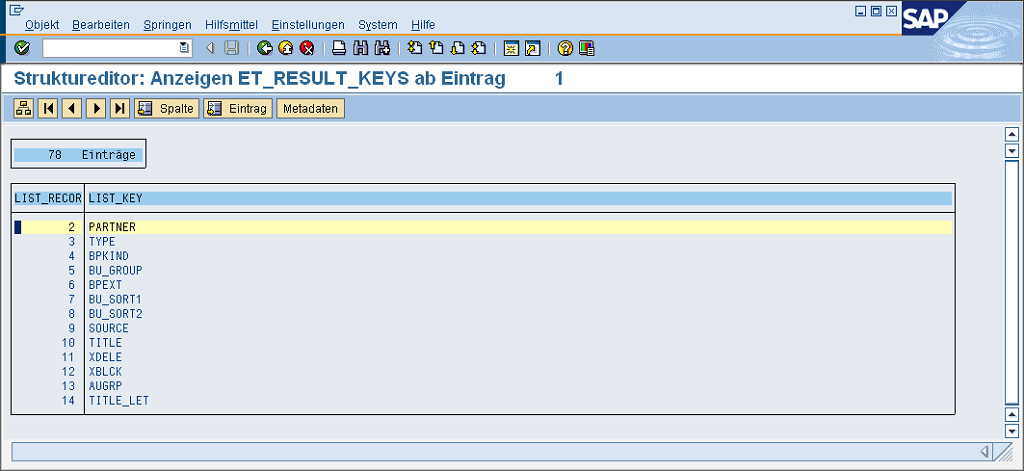
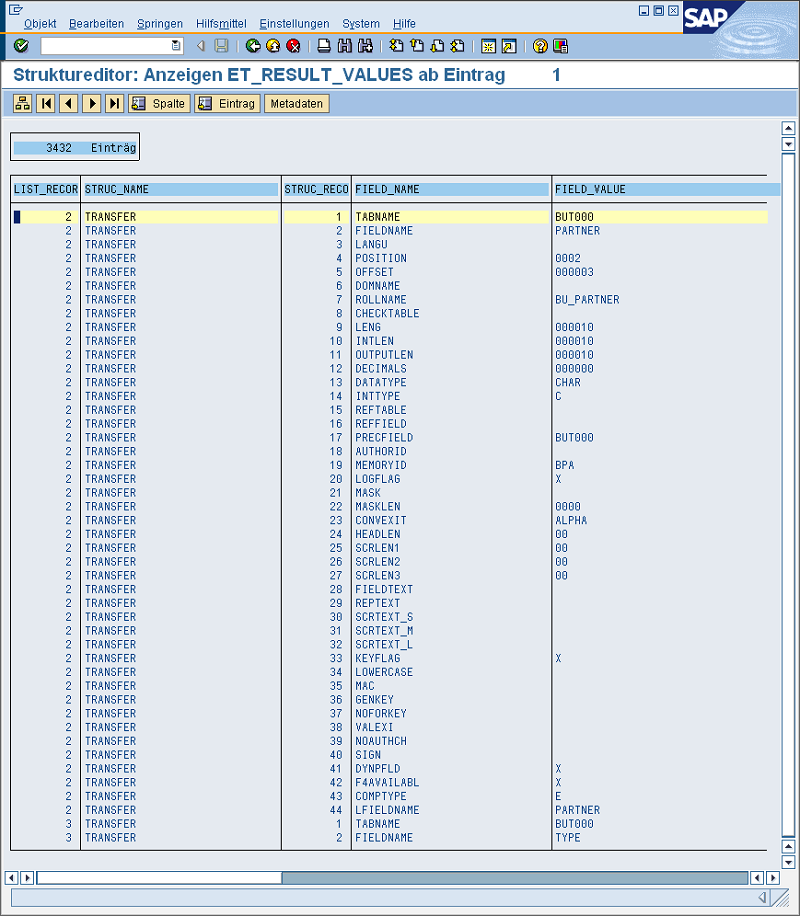
The technical properties are transferred in the "ET_RESULT_VALUES" and "ET_RESULT_KEYS" parameters (for more information, see Data Exchange and Key Information). Contrary to the data entry instructions provided there, a different data transfer process is shown here. The transfer is based on information in the "DFIES" structure. These are determined, for example, using the SAP function module "DDIF_FIELDINFO_GET." The external calling system decides for itself which information from the "DFIES" structure it will use for its own purposes. One thing is certain: the "FIELDNAME" field will be fundamental to the external mapping. The following two figures show how the technical information must be converted into export parameters. The "ET_RESULT_KEYS" table contains the field names of the data object; "ET_RESULT_KEYS" provides further details about the field.
c) get_List
The "get_List" API method retrieves records for a data object. To do this, the RFC function module "Z_IA_IXA_API_GET_LIST" is called externally.
            FUNCTION z_ia_ixa_api_get_list
*"----------------------------------------------------------------------
*"*"Lokale Schnittstelle:
*"	IMPORTING
*"		VALUE(IS_CONTROL) TYPE  ZIA_IXA_API_INTREXX_CONTROL
*"		VALUE(IV_MAX_ROWS) TYPE  SYTABIX DEFAULT 100
*"		VALUE(IV_START_ROW) TYPE  SYTABIX DEFAULT 0
*"		VALUE(IV_ORDERBY) TYPE  ZIA_IXA_FIELDNAME OPTIONAL
*"		VALUE(IV_CHECK_LANGUAGE) TYPE  XFELD DEFAULT ' '
*"	EXPORTING
*"		VALUE(EV_ERROR) TYPE  XFELD
*"		VALUE(EV_COUNT) TYPE  ZIA_IXA_LIST_COUNT
*"	TABLES
*"		IT_FIELDS STRUCTURE  ZIA_IXA_API_INTREXX_FIELDS OPTIONAL
*"		ET_MESSAGES STRUCTURE  ZIA_IXA_API_INTREXX_MESSAGES OPTIONAL
*"		ET_RESULT_VALUES STRUCTURE  ZIA_IXA_API_INTREXX_FIELDS OPTIONAL
*"		ET_RESULT_KEYS STRUCTURE  ZIA_IXA_API_INTREXX_KEYS OPTIONAL
*"		IT_FILTER STRUCTURE  ZIA_IXA_API_INTREXX_FILTER OPTIONAL
*"		IT_REQUESTED STRUCTURE  ZIA_IXA_API_INTREXX_RQ_FLDS OPTIONAL
*"		IT_ORDERBY STRUCTURE  ZIA_IXA_API_INTREXX_ORDERBY OPTIONAL
*"----------------------------------------------------------------------
The filtering criteria are passed in the "IT_FILTER" parameter (see Filter Criteria). Alternatively, the ability to implement a simple selection screen using the IT_FIELDS fields (see Data Exchange) has been added. The "IT_FIELDS" table would then contain field names and the desired values (including wildcards) to be used for the selection. The external calling system and the identified processing module determine which of the two selection options is implemented. If possible, the alternative should be implemented using "IT_FILTER." The number of records found is passed in the "EV_COUNT" parameter. For performance reasons, offset access to the data was enabled using the "IV_MAX_ROWS" and "IV_START_ROW" parameters. This allows for external scrolling through very large data sets by transferring only "<IV_MAX_ROWS>" records starting from the "<IV_START_ROW>" record. A value of 0 in the "IV_START_ROW" parameter disables this function. If the external calling system requires the data to be sorted, it can specify this using the "IT_ORDERBY" parameter (see Sorting Instructions) or the "IV_ORDERBY" parameter. Sorting the data on the caller's side does not make sense, since this only works if all the data is transferred. When dealing with large amounts of data that can only be processed effectively using offset access, sorting is virtually impossible. The "IT_ORDERBY" parameter takes precedence over "IV_ORDERBY". Once the table is filled, this sort statement is processed. The "IV_CHECK_LANGUAGE" parameter controls the evaluation of the external login language. Especially when selecting language-dependent Customizing tables, this parameter (enabled by "X") can control the filtering of all data records that do not correspond to the external language. The retrieved data records are provided in the "ET_RESULT_VALUES" and "ET_RESULT_KEYS" parameters. The process of filling out these results tables is described in detail in the chapter on Data Exchange and Key Information. The "IT_REQUESTED parameterr (see Requested Data Fields) contains the data fields that are explicitly requested by the caller. This, too, can improve the performance of queries by ensuring that data fields that are not requested are not transferred. If this parameter is not specified, all data fields are transferred.
d) get_Detail
This method retrieves details about a record that is uniquely identified by the provided key. To do this, the RFC function module "Z_IA_IXA_API_GET_DETAIL" is called externally.
            FUNCTION z_ia_ixa_api_get_detail
*"----------------------------------------------------------------------
*"*"Lokale Schnittstelle:
*"	IMPORTING
*"		VALUE(IS_CONTROL) TYPE  ZIA_IXA_API_INTREXX_CONTROL
*"		VALUE(IV_KEY) TYPE  ZIA_IXA_FIELDVALUE
*"	EXPORTING
*"		VALUE(EV_ERROR) TYPE  XFELD
*"	TABLES
*"		ET_MESSAGES STRUCTURE  ZIA_IXA_API_INTREXX_MESSAGES OPTIONAL
*"		ET_RESULT_VALUES STRUCTURE  ZIA_IXA_API_INTREXX_FIELDS OPTIONAL
*"		IT_REQUESTED STRUCTURE  ZIA_IXA_API_INTREXX_RQ_FLDS OPTIONAL
*"----------------------------------------------------------------------
The "IV_KEY" parameter contains the key for the data record, as determined, for example, by the "get_List" API method (see Key Information). The results are passed in the "ET_RESULT_VALUES" parameter. The " Data Exchange" chapter explains how to fill out this table. Since only one record can be affected, the following constants are assumed:
-
LISTRECORD = "1"
-
STRUC_NAME = "DEFAULT"
-
STRUC_RECORD = "0"
The amount of data can be limited using the "IT_REQUESTED" parameter (see " Requested Data Fields"), if it is specified.
e) modify
The "modify" API method allows you to insert new records or modify existing ones. To do this, the RFC function module "Z_IA_IXA_API_MODIFY" is called externally.
            FUNCTION z_ia_ixa_api_modify
*"----------------------------------------------------------------------
*"*"Lokale Schnittstelle:
*"	IMPORTING
*"		VALUE(IS_CONTROL) TYPE  ZIA_IXA_API_INTREXX_CONTROL
*"		VALUE(IV_KEY) TYPE  ZIA_IXA_FIELDVALUE OPTIONAL
*"	EXPORTING
*"		VALUE(EV_ERROR) TYPE  XFELD
*"		VALUE(EV_KEY) TYPE  ZIA_IXA_FIELDVALUE
*"	TABLES
*"		ET_MESSAGES STRUCTURE  ZIA_IXA_API_INTREXX_MESSAGES OPTIONAL
*"		ET_FIELDS STRUCTURE  ZIA_IXA_API_INTREXX_FIELDS OPTIONAL
*"		IT_FIELDS STRUCTURE  ZIA_IXA_API_INTREXX_FIELDS OPTIONAL
*"----------------------------------------------------------------------
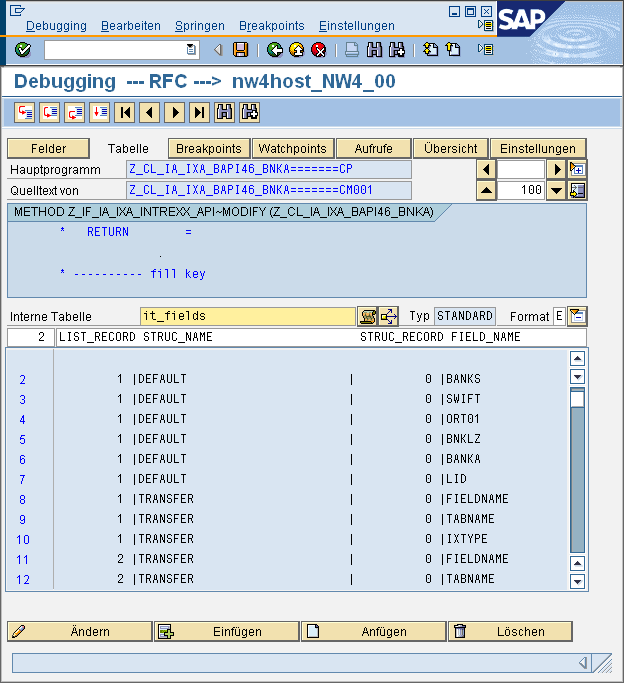
The IV_KEY parameter contains the key of an existing record (see Key Information). A value of -1 or an empty "IV_KEY" parameter indicates a new record. The data fields are passed in the "IT_FIELDS" parameter (see Data Exchange). The old and new keys (for new records) are expected in the "EV_KEY" parameter. In principle, there may be requirements that specific data fields within the processing modules need to be adjusted. Therefore, the actual values must be returned to the caller in the "ET_FIELDS" parameter. For simplicity, "ET_FIELDS" can be created as a copy of "IT_FIELDS." The "modify" API method may include a special feature for the "GENERIC_STORE" data handler. According to the definition in the " Data Handlers " chapter, this handler enables the modeling of data groups in the external caller and the storage of the data in SAP. To do this, the SAP system must receive information from the external system about the nature of the incoming data. In the reference implementations with Intrexx, this was resolved by including, in the "IT_FIELDS" parameter, information about the metadata in addition to the data fields ("STRUC_NAME = "DEFAULT"") information about the metadata is also exchanged ("STRUC_NAME = "TRANSFER""). The following screenshot shows the function in debug mode.
f) delete
The "delete" API method allows you to remove existing records from the data object. To do this, the RFC function module "Z_IA_IXA_API_DELETE" is called externally.
            FUNCTION z_ia_ixa_api_modify
*"----------------------------------------------------------------------
*"*"Lokale Schnittstelle:
*"	IMPORTING
*"		VALUE(IS_CONTROL) TYPE  ZIA_IXA_API_INTREXX_CONTROL
*"		VALUE(IV_KEY) TYPE  ZIA_IXA_FIELDVALUE OPTIONAL
*"	EXPORTING
*"		VALUE(EV_ERROR) TYPE  XFELD
*"	TABLES
*"		ET_MESSAGES STRUCTURE  ZIA_IXA_API_INTREXX_MESSAGES OPTIONAL
*"		ET_FIELDS STRUCTURE  ZIA_IXA_API_INTREXX_FIELDS OPTIONAL
*"----------------------------------------------------------------------
The record to be deleted is identified by the "IV_KEY" parameter (see Key Information). The "ET_FIELDS" parameter (see Data Exchange) contains the data fields of the deleted record.
g) update_temp_key
The "update_temp_key" API method allows data to be maintained simultaneously in the external system and in SAP. To do this, the RFC function module "Z_IA_IXA_API_UPDATE_TEMP_KEY" is called externally.
            FUNCTION z_ia_ixa_api_update_temp_key
*"----------------------------------------------------------------------
*"*"Lokale Schnittstelle:
*"	IMPORTING
*"		VALUE(IS_CONTROL) TYPE  ZIA_IXA_API_INTREXX_CONTROL
*"		VALUE(IV_KEY) TYPE  ZIA_IXA_FIELDVALUE OPTIONAL
*"		VALUE(IV_KEY_NEW) TYPE  ZIA_IXA_FIELDVALUE OPTIONAL
*"		EXPORTING
*"		VALUE(EV_ERROR) TYPE  XFELD
*"		VALUE(EV_KEY) TYPE  ZIA_IXA_FIELDVALUE
*"	TABLES
*"		ET_MESSAGES STRUCTURE  ZIA_IXA_API_INTREXX_MESSAGES OPTIONAL
This API method can be used to model scenarios in which data entered externally is first validated by the SAP system (API method "modify"). In SAP, the data is assigned a temporary key (e.g., GUID). The data is stored externally only after SAP has verified that it is error-free. The key assigned there is then sent back to SAP to establish the relationship between the data. The "IV_KEY" parameter contains the temporary key, and "IV_KEY_NEW" contains the key from the external system. "EV_KEY" contains the key that will be used to identify the data record in SAP in the future. This should contain the value from "IV_KEY_NEW". The behavior of such scenarios depends primarily on the interaction between external callers and the SAP internal processing module.
Processing Modules
In this context, "processing modules" refers to ABAP Objects classes that, once created, receive and process calls from the RFC API.
API Interface
The API methods of the processing modules are implemented in the "Z_IF_IA_IXA_INTREXX_API" interface.
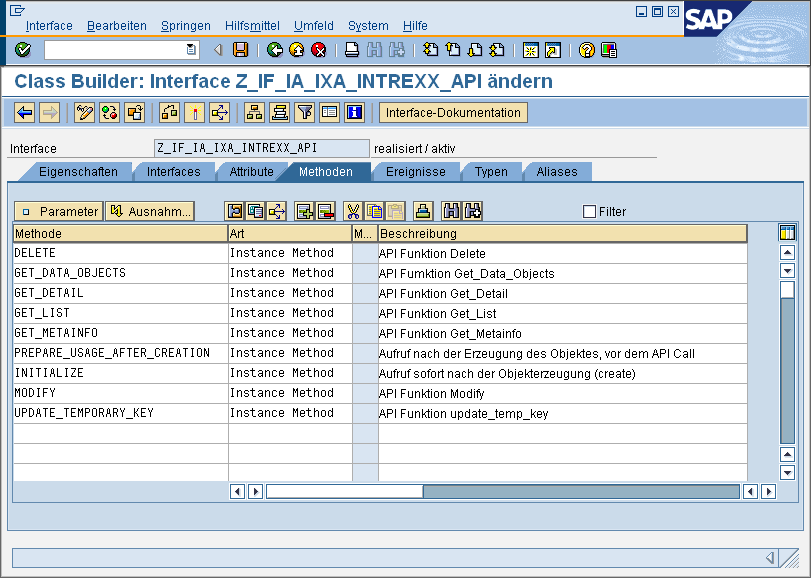
Every API method from the RFC API has a corresponding method in the interface. In addition, two more interface methods are available:
|
Method |
Meaning |
|---|---|
|
INITIALIZE |
Called immediately after the `create object` statement within the RFC API. Can be used to initialize default values, etc. be used. |
|
PREPARE_USAGE_AFTER_CREATION |
The call is made before the actual API method is called. This method is suitable for creating dynamic data structures or setting parameters. |
The API methods of the interface map the parameters of the RFC API on a 1:1 basis. The following example shows the "get_List" API method in the interface.
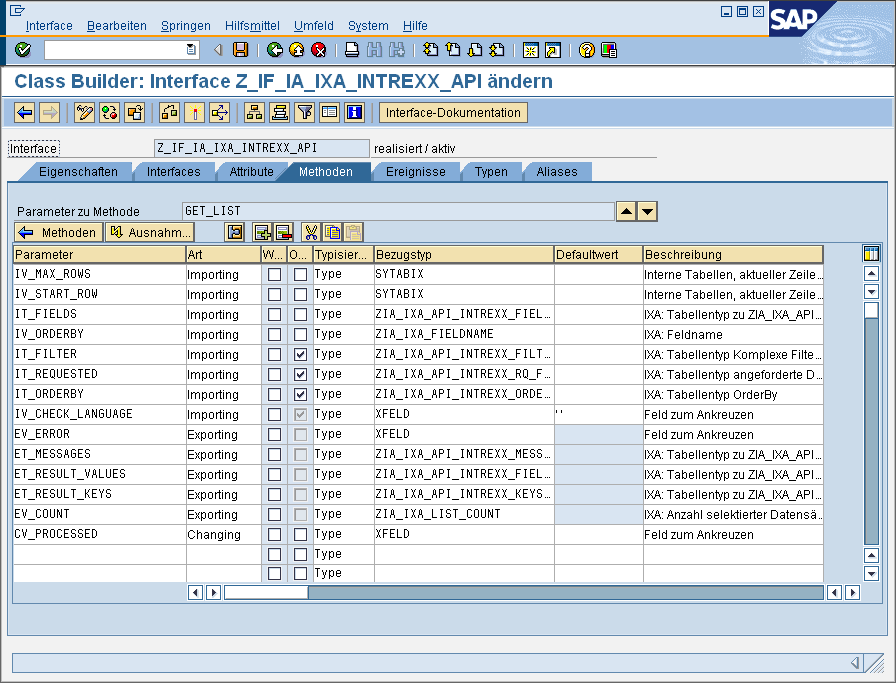
The "IS_CONTROL" parameter is missing from every interface method. This is available as the "ME->IX_CONTROL" attribute of the object instance (see Root Object). In addition, the "CV_PROCESSED" parameter is included in every API method of the interface. This parameter allows the RFC API to determine whether the called API method is available through the processing module. In this way, for example, the external calling system can determine that a processing module does not provide a "modify" function.
Every implementation must set the CV_PROCESSED parameter to "X," regardless of whether the method was processed successfully or with errors.
To report errors, the "EV_ERROR" parameter is available in conjunction with the "ET_MESSAGES" message table (see API RFC Functions).
Root Object
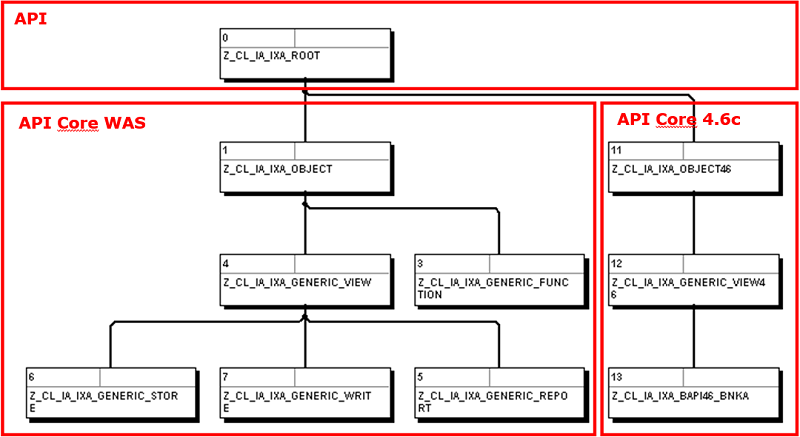
The class "Z_CL_IA_IXA_ROOT" is used as the parent of all processing modules. All processing modules must be derived from this class or one of its subclasses. This root object is rather abstract, but it implements the API interface from Api-Interface, as well as several attributes and methods. The following figure shows the root object with several sample implementations for processing modules as its descendants, as they are available for SAP Gateway systems and (backward-compatibly) for SAP systems running Basis 4.6.
Registration of Processing Modules
New processing modules can be easily created by inheriting from existing classes in the CORE API (see Root Object) or from your own processing modules that have already been inherited. The process of creating new processing modules is described in the chapter " Implementing Your Own Processing Modules." Each processing module must be registered before it can be used. This is done using a Customizing table and is documented in the chapter "Customizing - Determining Processing Modules."
Identification of Processing Modules
Information about the calling external data group is available from the external system (e.g., Intrexx). In any case, these are the data handler and a unique identifier for the data object. This information and more are available through the control structure.
A processing module is determined based on this information using a Customizing table (described in the chapter "Mapping External Data Groups to Processing Modules"). If it is not possible to identify a suitable entry using the mapping shown there between external data groups and SAP's internal processing modules, the processing module configured as the default under 0 is used. In most cases, this will be the processing module for the data handler "GENERIC_VIEW," since access to SAP tables and views is most likely.
Customizing
Some of the SAP Portal Plugin's Customizing tables were created without using the table maintenance dialog in order to ensure backward compatibility with Basis 4.6. The tables can therefore be maintained using either transaction SM30 or SE16. All of the screenshots in the following sections were taken using transaction SE16. The screens may vary depending on the system version and maintenance transaction.
Basic Settings
The Customizing table "ZIAC_IXACONFIG" contains the default settings for the SAP Portal Plugin.
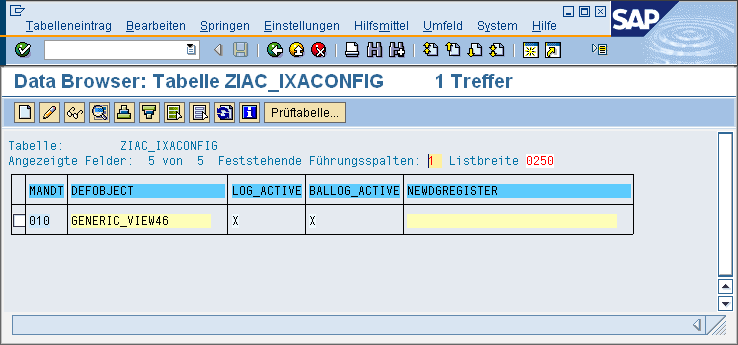
The fields have the following meanings:
|
Field |
Meaning |
|---|---|
|
DEFOBJECT |
Specifies the processing module to be used if it is not already specified by other settings. The default setting is the "GENERIC_VIEW" processing module. |
|
LOG_ACTIVE |
Enables logging of all API actions. |
|
BALLOG_ACTIVE |
|
|
NEWDGREGISTER |
Name of the function module that registers previously unknown external data groups for the GENERIC_STORE data handler. |
Identification of Processing Modules
The following Customizing tables are responsible for determining processing modules.
a) Registration of Processing Modules
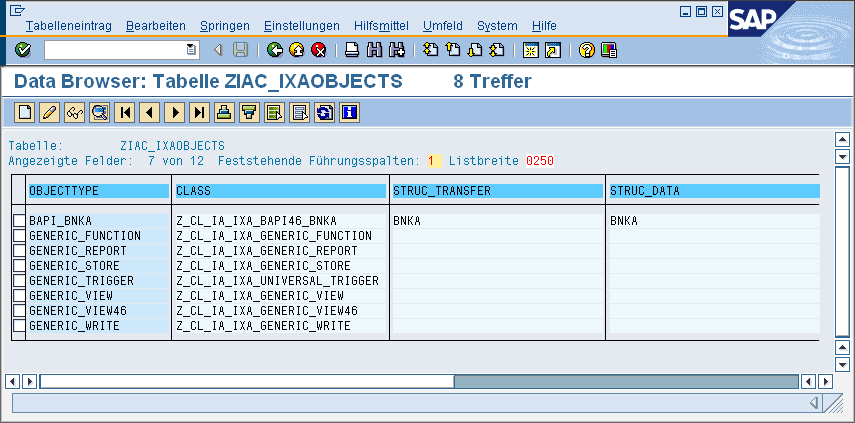
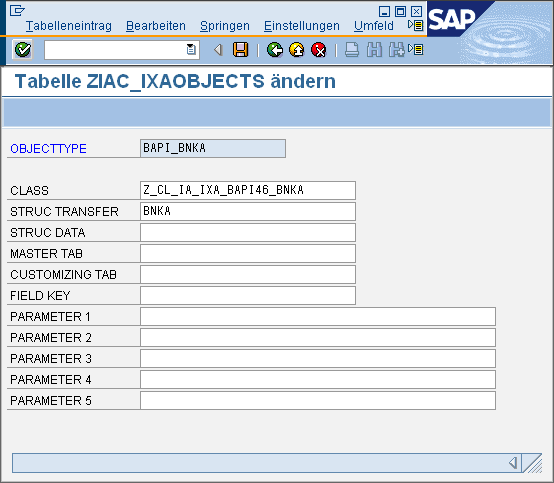
The "ZIAC_IXAOBJECTS" table contains registered processing modules. This is primarily where the ABAP Objects classes are stored.
|
Field |
Meaning |
|---|---|
|
OBJECTTYPE |
Unique name for the processing module. No naming convention has been established. Until now, "GENERIC*" has been used for generic processing modules and "BAPI*" for BAPI-related business objects. |
|
CLASS |
The name of the processing class (an ancestor of the root object or one of its descendants). |
|
STRUC_TRANSFER |
The name of a DDIC structure used for data exchange with the external caller. If this value is set, the "get_MetaInfo" API method can access it and does not need to be redefined. |
|
STRUC_DATA |
Can be used to generically create internal data structures. |
|
MASTER_TAB |
Can be used to create generic SELECT statements. |
|
CUSTOMIZING_TAB |
Can be used to enable generic access to Customizing tables. |
|
FIELD_KEY |
The name of the field within the <MASTER_TAB> that contains the unique key. |
|
PARAMETER* |
Can be used as an additional customization option, for example, to enable different behaviors using a processing class. These parameters are available within the processing class (see "Inherited Attributes of the Root Object"). |
It is absolutely essential to maintain the "<OBJECTTYPE>" and "<CLASS>" elements. If "<STRUC_TRANSFER>" has been maintained and the processing module is a descendant of the "GENERIC_VIEW" processing module, you can use the "get_MetaInfo" method implemented there.
b) Mapping external data sets to processing modules
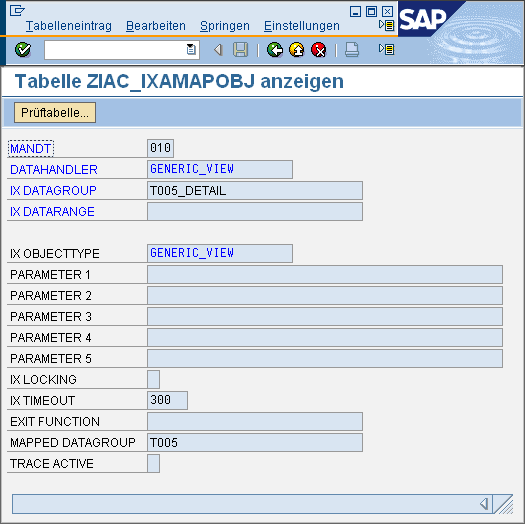
The "ZIAC_IXAMAPOBJ" table contains information about which external data group is mapped to which processing module.
|
Field |
Meaning |
|---|---|
|
DATAHANDLER |
Specifies the externally used data handler. |
|
IX_DATAGROUP |
Data group used externally (e.g., table name). |
|
IX_DATARANGE |
Additional optional restriction on a view of the data group (usually empty). |
|
IX_OBJECTTYPE |
Specify which processing module should be used for this combination of DATAHANDLER + IX_DATAGROUP [+ IX_DATARANGE]. |
|
PARAMETER* |
The parameters can be used as additional control parameters within the processing modules. |
|
IX_LOCKING |
Activate the lockout feature (= X). |
|
IX_TIMEOUT |
Timeout parameters for the lockout policy. |
|
EXIT_FUNCTION |
This parameter contains the name of a function module that can be used as an exit within the processing modules. Whether this exit is used depends on the processing module |
|
MAPPED_DATAGROUP |
If this parameter is set, the "IX_DATAGROUP" parameter is treated as an alias. The "<MAPPED_DATAGROUP>" parameter is then used during processing. This option can be useful if the same data group (e.g., SAP Customizing table) is to be processed in different ways using the same processing module (e.g., "GENERIC_VIEW") (e.g., Variant 1: as a real table; Option 2: as a text table for reading Customizing data) |
|
TRACE_ACTIVE |
If the parameter is set (= X), messages for this data group are logged as well. |
Authorization Policy
Access to SAP data objects is controlled in the SAP Portal Plugin via the authorization objects
-
ZIA_IXA_AC
-
ZIA_PISAP
protected. In addition, further permissions are required to enable external access via RFC. Specifically, these are the following permissions that must be available to the service user for portal access:
|
Authorization Object |
Permissions |
Value |
|---|---|---|
|
ZIA_IXA_AC |
Activity |
01, 02, 03, 06, 16 |
|
IXA: How the Intrexx API Works |
delete, getdataobj, getdetail, getlist, getmeta, modify, update_k |
|
|
ZIA_PISAP |
ESB: API Function |
GETDATA, GETDATAOBJ, GETDIST, GETF4, GETMETA |
|
ESB: Data Source ID |
* |
|
|
S_RFC |
Activity |
16 |
|
Name of the RFC object to be protected |
RFC1, SDIFRUNTIME, SLCH, SLST, SYST, SYSU, ZIA_IXA_API |
|
|
Type of RFC object to be protected |
ID |
|
|
ESB: Data Source ID |
FUGR |
|
|
S_TABU_DIS |
Activity |
02 |
|
Authorization Group |
&NC& |
If you assign the "SAP_ALL" profile to the service user, please keep in mind that this profile must also be regenerated in order to accept the new authorization objects from the SAP Portal Plugin. This can be done, for example, using transaction "SU28." If you encounter authorization issues or would like to apply further restrictions, you can use the authorization trace (ST05) to determine the values being used.
Other Framework Functions
Logging
a) Logging of all API requests
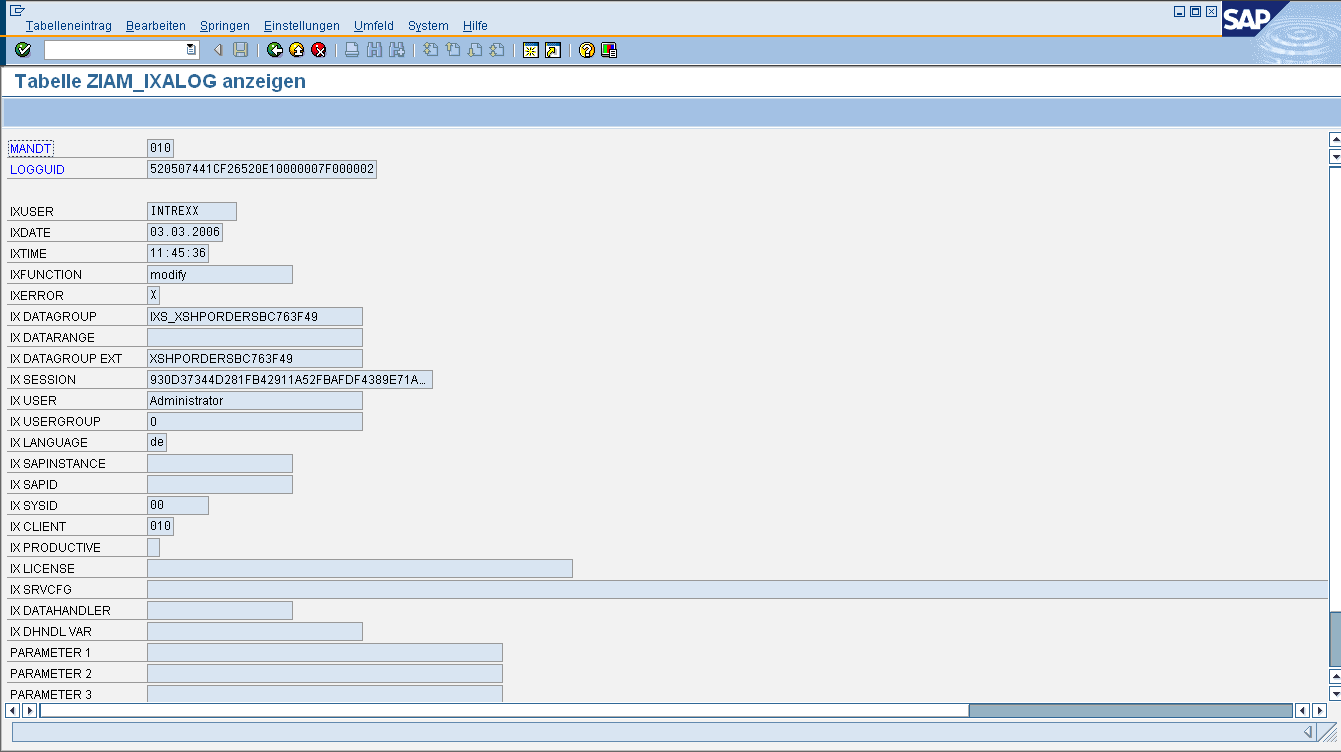
The "ZIAM_IXALOG" table contains information about every access to the RFC API, provided that logging has been enabled in Customizing (see Basic Settings) ("LOG_ACTIVE flag").
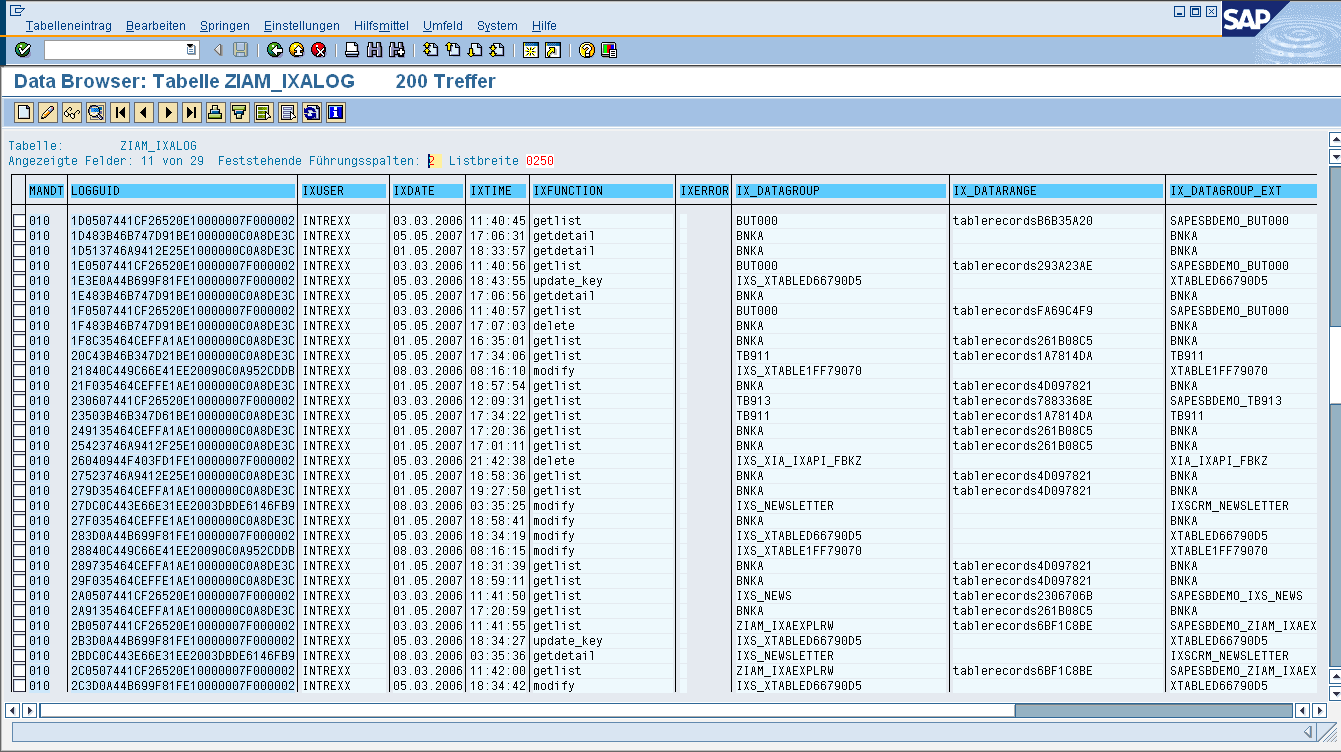
The data records contain information about the execution as well as information from the external caller.
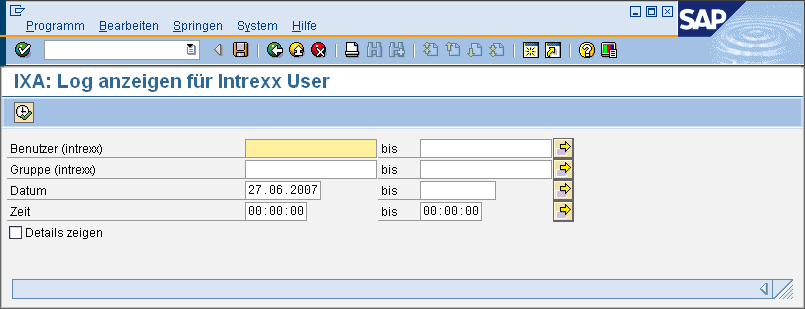
You can use the ZIA_IXA_LOG transaction to generate a report that analyzes this information.
Advanced Message Logging
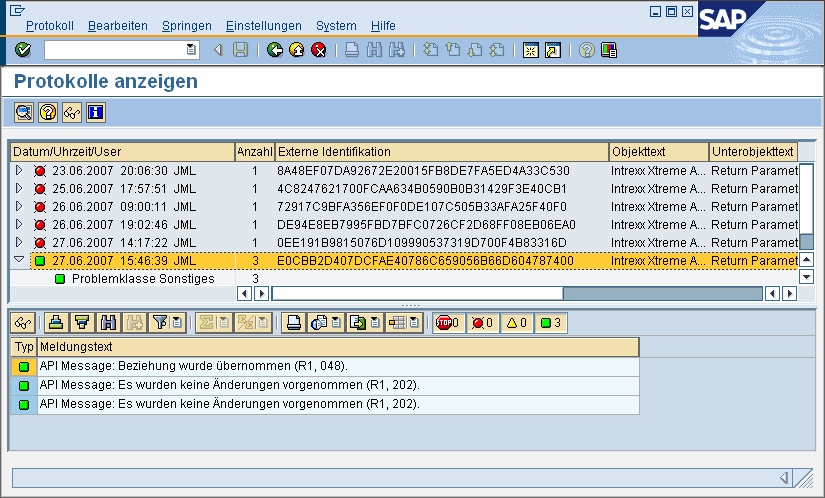
Another logging option—and one that is particularly well-suited for troubleshooting—is the application log (transaction SLG1). This is enabled via the BALLOG_ACTIVE flag (see Basic Settings). If both logging options are enabled, all error messages for the API parameter "ET_MESSAGES" (see Messages) are written to the application log and can be analyzed using transaction SLG1.
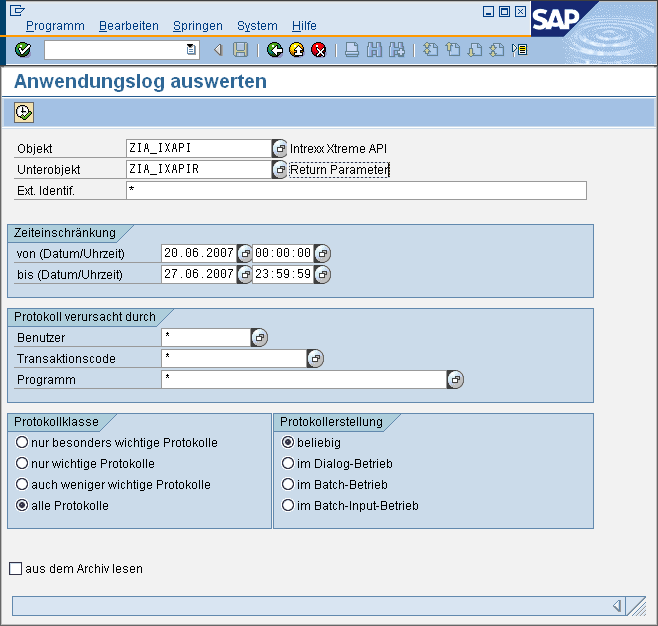
The session GUID from the " Control Structure " section is used as the external identifier. This normally contains the identifier for an Internet session.
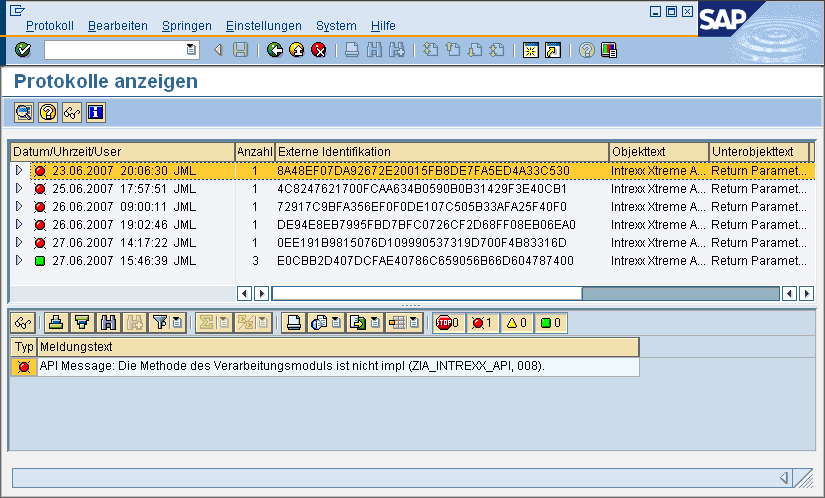
The session GUID can be used to link the records in the "ZIAM_IXALOG" log table back together. The message includes the SAP message class and message number (if available) in parentheses. The person who generated the message can then possibly be identified using transaction SE91 and the where-used list. Furthermore, it may be possible to troubleshoot the issue in the OSS if the messages originate from BAPI functions.
Tracemode for Troubleshooting
For troubleshooting processing modules, this logging can also be extended to include messages that are not error messages. This allows, for example, warning and status messages to be displayed when BAPI functions are called. Trace mode is enabled via the "TRACE_ACTIVE" flag in the processing module mapping (see Mapping External Data Groups to Processing Modules.)
Access Control Policy
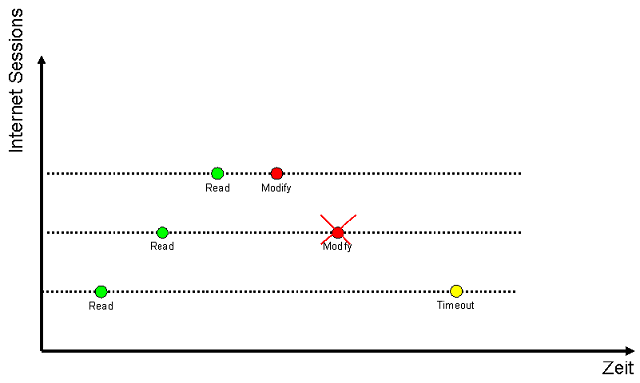
A simple locking mechanism has been implemented in the SAP Portal Plugin, which appears to be best suited for use in a stateless Internet environment. Within the RFC API, every access to an object can be monitored. This allows multiple Internet users to access an SAP data record simultaneously and even switch to edit mode without blocking each other. However, only the first write operation is permitted in that case. All subsequent write operations will be denied. The following graph illustrates this behavior.
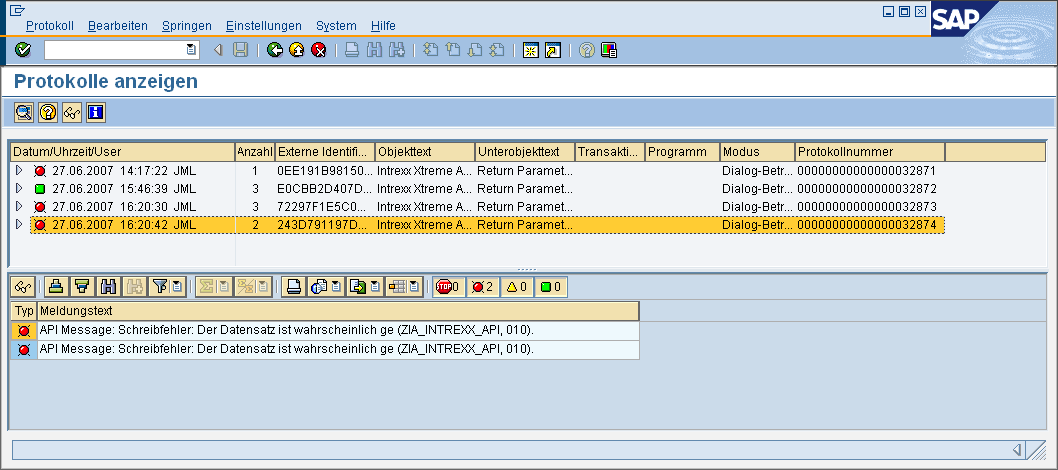
API requests are terminated due to errors. The reason is communicated to the calling system in the "ET_MESSAGES" parameter.
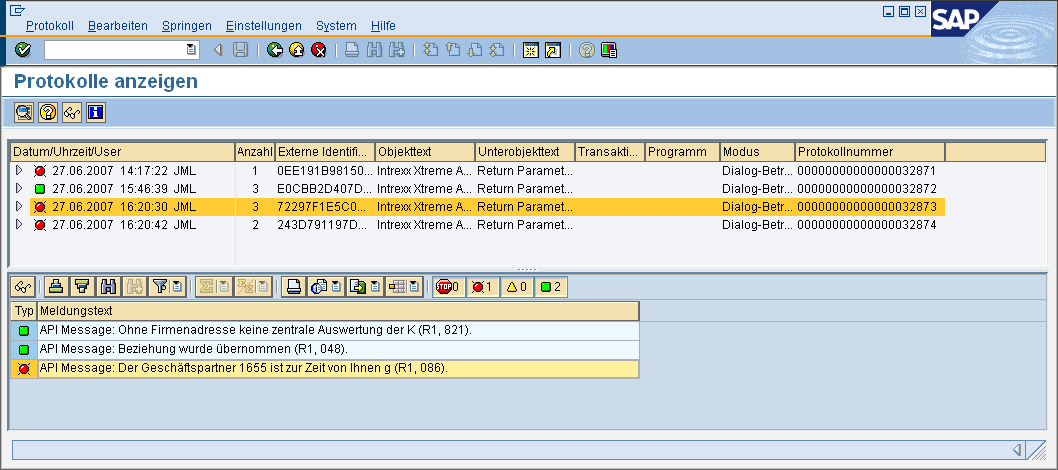
An additional lock can be integrated by having the processing modules internally implement the standard SAP locking logic. However, this makes little sense for read accesses, as external callers could potentially lock SAP transactions as a result. In general, it should be sufficient to check the SAP locks at the time of the change. If BAPI calls are used, SAP applies this procedure in exactly the same way—the lock is not applied until the time of the write operation.
The locking concept described above is activated during the determination of the processing modules (flag "IX_LOCKING"). The "IX_TIMEOUT" timeout parameter (specified in seconds) can also be used to configure write operations. The screenshot shows this setting for the example from the " Processing Modules" chapter. This uses the SAP Portal Plugin's lock concept as well as the standard SAP locks for business partners.
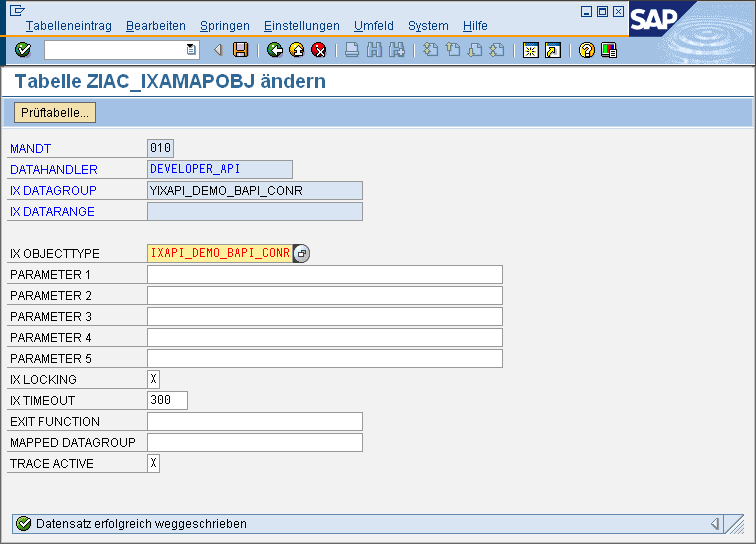
You can test this logic by performing parallel update operations via external access and simultaneously editing the SAP business partner in transaction BP.
EXIT Functions
Conceptually, the use of EXIT modules was planned; these can be called within the respective processing modules. You can assign a processing module in Customizing for determination. The actual call is handled by the processing module. The function module's interface can be based on the "Z_IA_IXA_API_EXIT_TEMPLATE" template. It is particularly suitable for use within the "MODIFY" API function to validate or modify data.
Number Ranges
The "GET_NEW_NEW_NUMBER_KEY" method provides a simple way to manage number ranges, generating an incrementing integer value as the key. The number ranges do not require an SAP number range object and are managed on a per-external-data-group basis.
Internal vs. External Conversion
In general, external systems use a different representation of data types than SAP. Let's use the "Date" data type as an example. Internally, SAP uses the format "<YEAR><MONTH><DAY>" (e.g., "20070626"). "2007-06-26" is often used externally. The Root object uses the following two methods internally
-
MAP_FIELDVALUE_IX_TO_SAP - Map External Representation to Internal
-
MAP_FIELDVALUE_SAP_TO_IX - Map Internal Representation to External
Custom conversions can be implemented through inheritance.
10. External Use of the SAP Portal Plugin
The plugin described here was developed primarily for external use by non-SAP systems. To use the functionality described here, the API functions must be available in the desired external programming language. The connectors provided by SAP AG (https://service.sap.com/connectors) are particularly well-suited for this purpose. First and foremost, the SAP Java Connector (SAP JCo) and the .NET Connector. Both include code generation tools that create complex SAP RFC API proxy modules in their respective programming environments. For Java, the SAP Enterprise Connector—which is available in the SAP Gateway Developer Studio—is suitable for this purpose.
More Information
SAP Trust Manager SSO Configuration
API Description, Part 1 - Overview
API Description, Part 3 - Implementing Custom Processing Modules
API Description, Part 4 - Sample Code
Developer's Guide, Part 2 - Integration Scenario: SAP External Data Group
Developer's Guide, Part 3 - Integration Scenario: Scripting
Developer's Guide, Part 4 - Personalized SAP Access / Single Sign-On (SSO)