

Integrate your SAP data with your Intrexx portal and visualize complete business processes from SAP—even across multiple SAP systems.
The connector uses Remote Function Call (RFC): A request is sent to the Intrexx server via HTTP/HTTPS through the browser. The Intrexx server calls the corresponding RFC module via the SAP middleware provided by SAP. The SAP middleware retrieves the requested data from the corresponding SAP system via the RFC API and returns it to the Intrexx server as a response.
The connector is fully integrated into the Intrexx application framework.
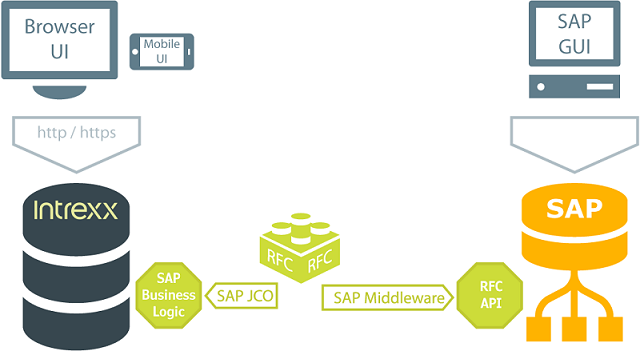
The connector for SAP Business Suite is available in two versions.
-
View & Write
With the "View & Write Module," you can map out write scenarios and functional calls. Examples of such scenarios include availability checks or price inquiries. All data operations (read, update, delete) are performed exclusively in the SAP system. You can access data from the Generic Store using an ALV grid, which also allows you to export the data to Microsoft Office products.
-
Developer API
The "Developer API" version includes a complex framework for developing bidirectional scenarios, as is often the case in projects. Data structures and processing logic already exist in SAP. The required portal functions (e.g., read, write, delete) are available in SAP within an object-oriented ABAP framework.
To use the connector for SAP Business Suite, please refer to the "Installation" section for the prerequisites. Then create a connection. The connection can then be integrated into any application.
More Information
SAP Trust Manager SSO Configuration
API Description, Part 1 - Overview
API Description, Part 2 - SAP Portal Plugin
API Description, Part 3 - Implementing Custom Processing Modules
API Description, Part 4 - Sample Code
Developer's Guide, Part 2 - Integration Scenario: SAP External Data Group
Developer's Guide, Part 3 - Integration Scenario: Scripting
Developer's Guide, Part 4 - Personalized SAP Access / Single Sign-On (SSO)