

This documentation describes the SAP Portal plugin (codename "SAPPOPI"), which was developed to enable Intrexx to connect to SAP. The SAP Portal plugin consists of framework-based developments in the customer namespace that could also be used for other portal projects or interfaces with external systems. This documentation is primarily intended for SAP developers who want to make SAP data available to Intrexx or other external systems.
For information on the current terms of use for the SAP Portal Plugin, please visit www.intrexx.com. SAP customers are permitted to use SAP-provided functionality in their own projects, as long as no third party integrates its own commercial solutions or products into SAP systems via the SAP Portal plugin. Maintenance of the SAP Portal plugin is provided on a voluntary basis. No liability is assumed for any damages resulting from the use of the SAP Portal Plugin.
Conceptual Approach
All Intrexx data groups have a key field (field name "STRID") that has the data type "String" in all internal portal tables. Intrexx helps users model subordinate data groups (dependent data) and references. Once again, subdata groups contain their own unique key and the key of the parent record (e.g., "FKSTRID" and "STRID"). In Intrexx applications, data from external applications can be integrated as long as it is in tabular form. These external data sets come from a data source (or database connection) and can be integrated into the applications without the user having to worry too much about the technical details. The only restriction is that the external data group must contain a field that includes a unique identifier for the record. The technical data type is not specified for this.
The data source, which can be configured in the Intrexx Portal Manager (the "Integration" module), contains information about the type (e.g., "JDBC" or "SAP") and the respective technical parameters required (e.g., connection parameters, login credentials).
When planning the integration of a third-party system such as SAP, this data-group-oriented approach determines the design of a specific connector. Most of the information can be presented in a table and is therefore suitable. Even SAP Reports (SE38 programs) can technically be represented as a virtual table by treating the output lines as text and creating a table from the output using the individual output lines. From the portal's perspective, this makes it necessary to introduce another term—the data handler. For example, a data source could technically be the table access to the ZKUNDEN table in the SAP R/3 test. However, you can also access the report with the same name, ZKUNDEN. So the data handler determines the type of access, and the table determines the technical implementation. Each data group can therefore be uniquely identified by the combination
-
Database connection or data source
-
Data Handler or Access Type
-
Table or Object Name
determine.
Intrexx Extension Concept
A very large number of requirements for portal applications—such as changes to the user interface, new fields, or process changes—can already be implemented using the standard Intrexx features. Only specialized validation logic, complex business logic requirements, or the integration of third-party systems may require this. the path of expansion. Intrexx offers three basic ways to extend its functionality:
-
JavaScript
This makes it possible, above all, to implement simple checks, respond to user interface events, or show and hide fields based on status information. JavaScript is integrated into the Portal Manager's graphical tools, but it is considered an advanced feature.
-
Java Extensions (Velocity)
Intrexx is technically built on a Java framework. Custom Java classes can be integrated into this framework to implement reusable functions or create specific user interface elements.
-
Custom Business Logic Handlers
Certain portal functions are implemented using business logic handlers written in Java. Data group actions are handled, for example, by such handlers.
To integrate external data as an Intrexx data group, you must therefore develop your own data group handler classes. This approach was chosen for the integration of SAP systems.

This custom handler for SAP access must implement the following API methods:
-
Get_Meta_Information
Technical information about the data object (e.g., field names and technical data types)
-
Parse_Data_Range
Selection of records restricted by filters and, if necessary, sorted and with an offset (e.g., 20 records starting from the 100th)
-
Parse_Data_Record
Detailed information about a specific data record
-
Modify_Record
Inserting, Modifying, or Deleting Records
The technical names of the methods differ from their actual names, but are specified through inheritance.
SAP Data Sources
Communication between SAP systems, as well as the exchange of information with application components, tools, or many external products, is facilitated by RFC technology. The approach is well-established and available on most platforms and for most programming languages. The SAP Java Connector has been available to the Java community for years; it is used both within SAP's own Java-based solutions and as a standalone application. The obvious choice is to use the SAP Java Connector and the RFC interface, since Intrexx portals are entirely Java-based.
Identification Concept
The following figure illustrates how technical systems are identified from external data sets.
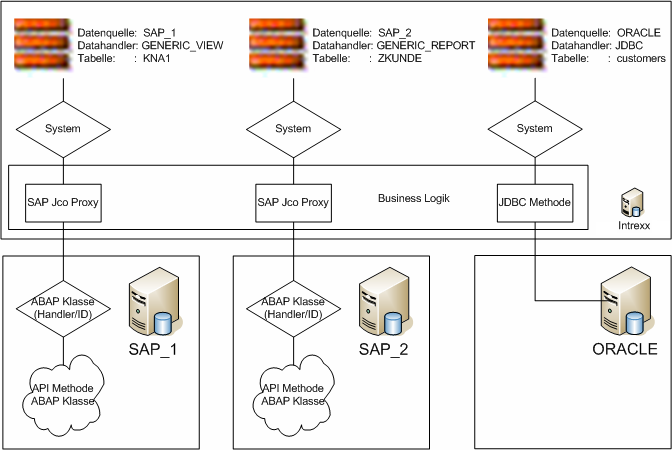
In particular, the data source is used within the portal to determine the actual target (technical parameters). The data handler and table name are primarily used in the called system to invoke the correct processing routines.
More Information
SAP Trust Manager SSO Configuration
API Description, Part 2 - SAP Portal Plugin
API Description, Part 3 - Implementing Custom Processing Modules
API Description, Part 4 - Sample Code
Developer's Guide, Part 2 - Integration Scenario: SAP External Data Group
Developer's Guide, Part 3 - Integration Scenario: Scripting
Developer's Guide, Part 4 - Personalized SAP Access / Single Sign-On (SSO)