

This section contains some sample code intended to make it easier to implement your own processing modules. As a general rule, it is assumed that a new processing module and an associated transfer structure—as shown in the checklist for creating new processing modules —will be used.
Example: Making Internal Tables Available
Functionality
This simple example demonstrates how any internal table can be made available to an external caller. The evaluation of incoming parameters is omitted.
Concept
-
New processing module for the GENERIC_VIEW data handler inherits from the standard module for GENERIC_VIEW access
-
Transfer structure from IV. 4.3.
-
Redefining the GET_LIST API Method
Screenshots
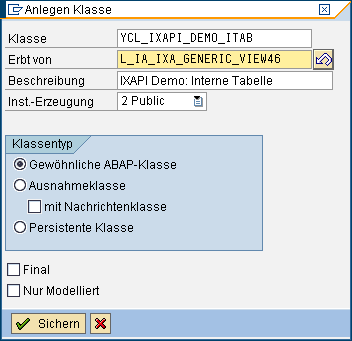

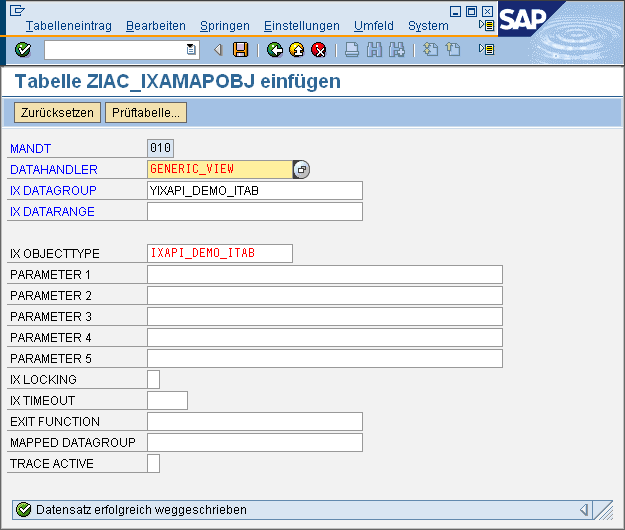
Coding
            METHOD z_if_ia_ixa_intrexx_api~get_list.

				* -------------- local data
				DATA: lt_data TYPE TABLE OF yixapi_demo.
				DATA: ls_data TYPE yixapi_demo.

				* -------------- init
				cv_processed = 'X'.
				ev_error     = 'X'.

				* -------------- get inbound parameters
				* nothing to do

				* -------------- initial check routines
				* nothing to do

				* -------------- process
				* 1. fill demo table
				ls_data-partner = '100000'.
				ls_data-name = 'Meier'.
				APPEND ls_data TO lt_data.

				ls_data-partner = '100001'.
				ls_data-name = 'Müller'.
				APPEND ls_data TO lt_data.

				ls_data-partner = '100002'.
				ls_data-name = 'Schulze'.
				APPEND ls_data TO lt_data.

				* -------------- fill outbound parameters
				* 1. sort internal table
				SORT lt_data BY name.

				* 2. loop and fill export
				LOOP AT lt_data INTO ls_data.
				CALL METHOD me->set_results_from_struc
				EXPORTING
				is_data         = ls_data
				it_requested    = it_requested
				iv_data_struc   = 'YIXAPI_DEMO'
				iv_key_value    = ls_data-partner
				iv_record       = sy-tabix
				iv_struc_name   = 'DEFAULT'
				iv_struc_record = 0
				CHANGING
				ct_keys         = et_result_keys
				ct_results      = et_result_values
				EXCEPTIONS
				failed          = 1
				OTHERS          = 2.
				IF sy-subrc EQ 0.
				ADD 1 TO ev_count.
				ENDIF.
				ENDLOOP.

				* -------------- finally set no error
				ev_error    = ' '.

				ENDMETHOD.
Test
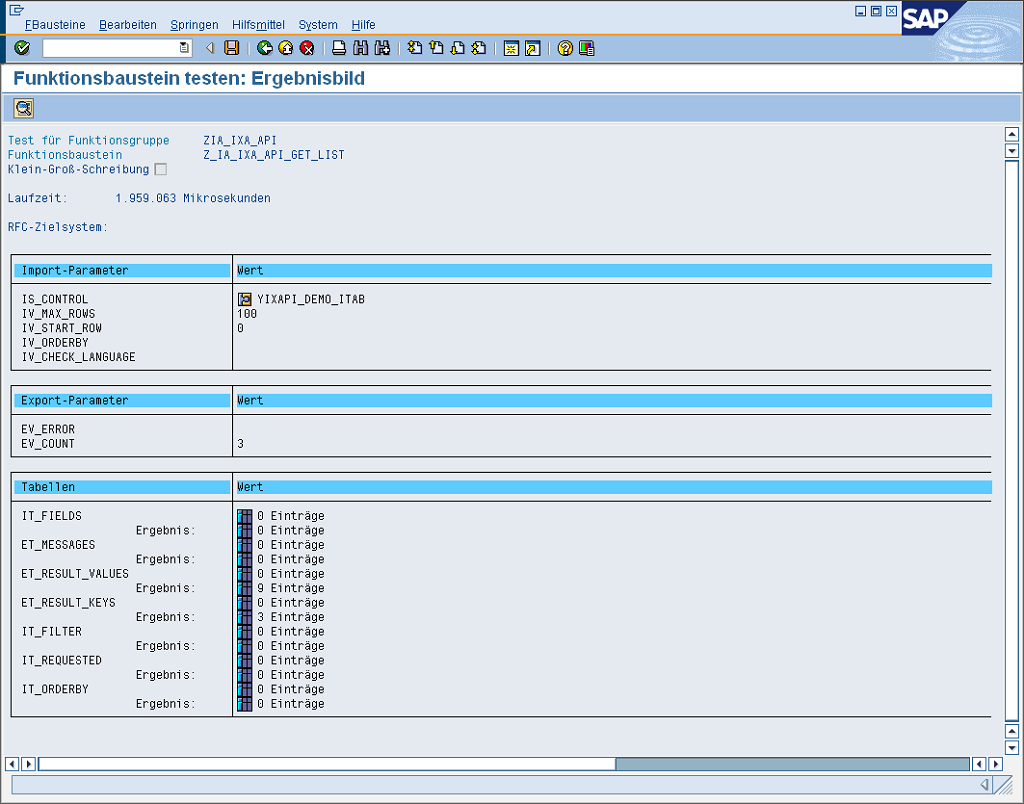
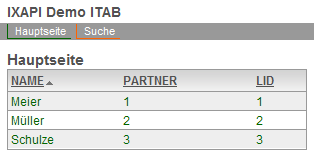
Search Help Feature
Functionality
This example demonstrates a simple search tool for external users. Based on an external entry in a search field (which may also include wildcards), a search is performed in the SAP system, and the results are supplemented with details. The SAP business partner (BOR object BUS1006) serves as an example.
Concept
-
New processing module for the GENERIC_VIEW data handler, derived from the standard module for GENERIC_VIEW access
-
Transfer structure, with added search field
-
Redefining the GET_LIST API Method
Screenshots

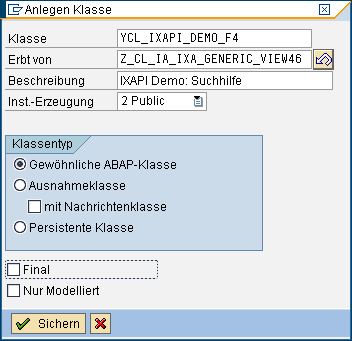

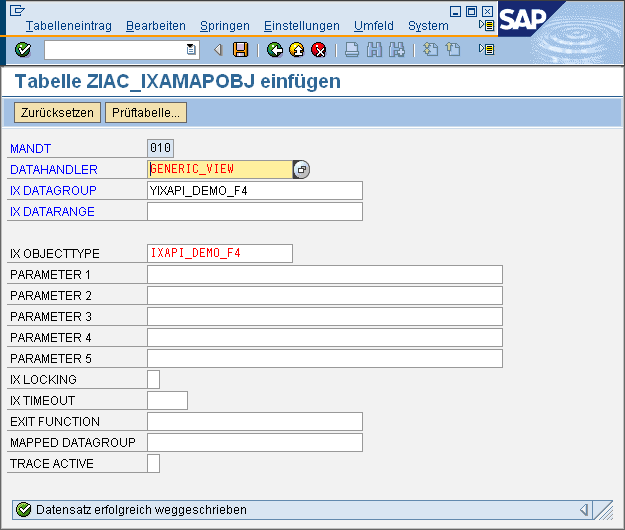
Coding
            METHOD z_if_ia_ixa_intrexx_api~get_list.

				* -------------- local data
				DATA: lt_data TYPE TABLE OF yixapi_demo_f4.
				DATA: ls_data TYPE yixapi_demo_f4.
				DATA: ls_filter TYPE LINE OF zia_ixa_api_intrexx_filter_t.
				DATA: lv_search TYPE bu_mcname1.
				DATA: lt_result TYPE TABLE OF bus020_search_result.
				DATA: ls_result TYPE bus020_search_result.
				DATA: lv_name TYPE bu_descrip_long.
				DATA: lt_return TYPE TABLE OF bapiret2.

				* -------------- init
				cv_processed = 'X'.
				ev_error     = 'X'.

				* -------------- get inbound parameters
				READ TABLE it_filter INTO ls_filter
				WITH KEY fieldname = 'SEARCH'.
				IF sy-subrc NE 0.
				ev_error     = ' '.
				EXIT.
				ENDIF.
				lv_search = ls_filter-value_low.

				* -------------- initial check routines
				IF lv_search IS INITIAL OR lv_search EQ '*'.
				ev_error     = ' '.
				EXIT.
				ENDIF.

				* -------------- process
				* 1. Search
				CALL FUNCTION 'BUPA_SEARCH'
				EXPORTING
				iv_mc_name1      = lv_search
				TABLES
				et_search_result = lt_result.

				* 2. build data table
				LOOP AT lt_result INTO ls_result.
				CLEAR lv_name.
				CALL FUNCTION 'BUPA_DESCRIPTION_GET'
				EXPORTING
				iv_partner          = ls_result-partner
				IMPORTING
				ev_description_long = lv_name
				TABLES
				et_return           = lt_return.

				IF lv_name NE space.
				CLEAR ls_data.
				ls_data-search  = lv_search.
				ls_data-partner = ls_result-partner.
				ls_data-name    = lv_name.
				APPEND ls_data TO lt_data.
				ENDIF.
				ENDLOOP.

				* -------------- fill outbound parameters
				* 1. sort internal table
				SORT lt_data BY name.

				* 2. loop and fill export
				LOOP AT lt_data INTO ls_data.
				CALL METHOD me->set_results_from_struc
				EXPORTING
				is_data         = ls_data
				it_requested    = it_requested
				iv_data_struc   = 'YIXAPI_DEMO_F4'
				iv_key_value    = ls_data-partner
				iv_record       = sy-tabix
				iv_struc_name   = 'DEFAULT'
				iv_struc_record = 0
				CHANGING
				ct_keys         = et_result_keys
				ct_results      = et_result_values
				EXCEPTIONS
				failed          = 1
				OTHERS          = 2.
				IF sy-subrc EQ 0.
				ADD 1 TO ev_count.
				ENDIF.
				ENDLOOP.

				* -------------- finally set no error
				ev_error    = ' '.

				ENDMETHOD.
Test

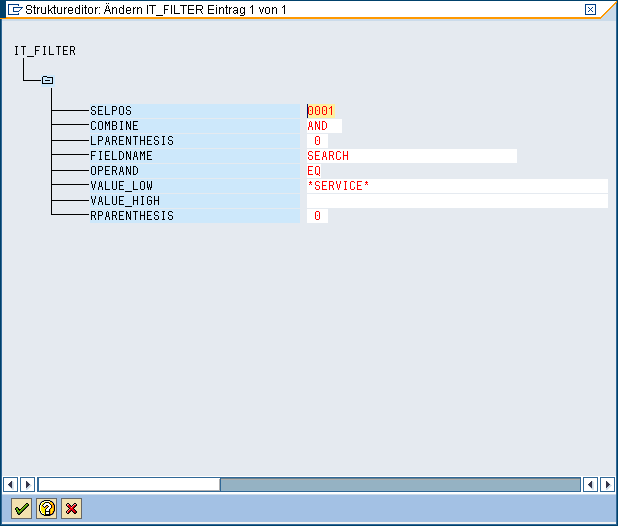
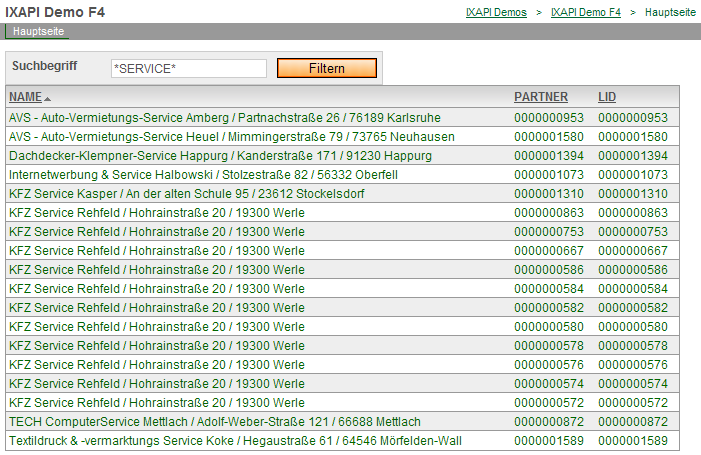
Function Calls
Functionality
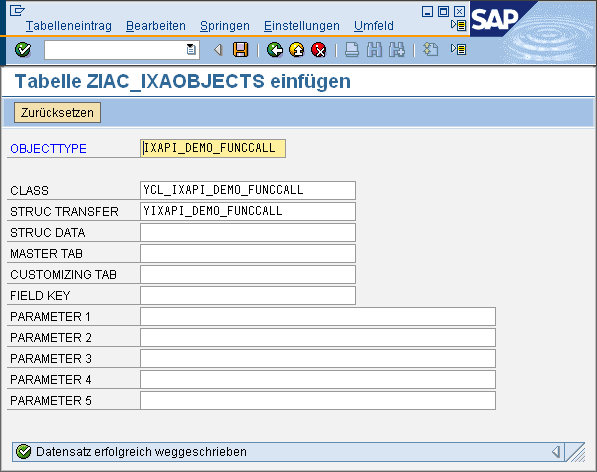
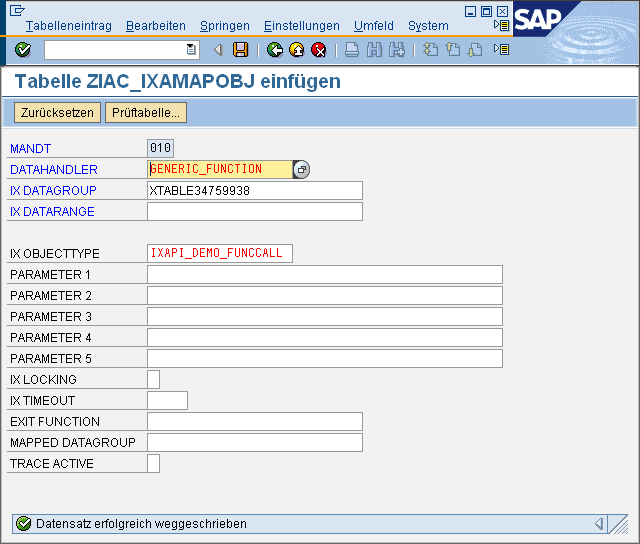
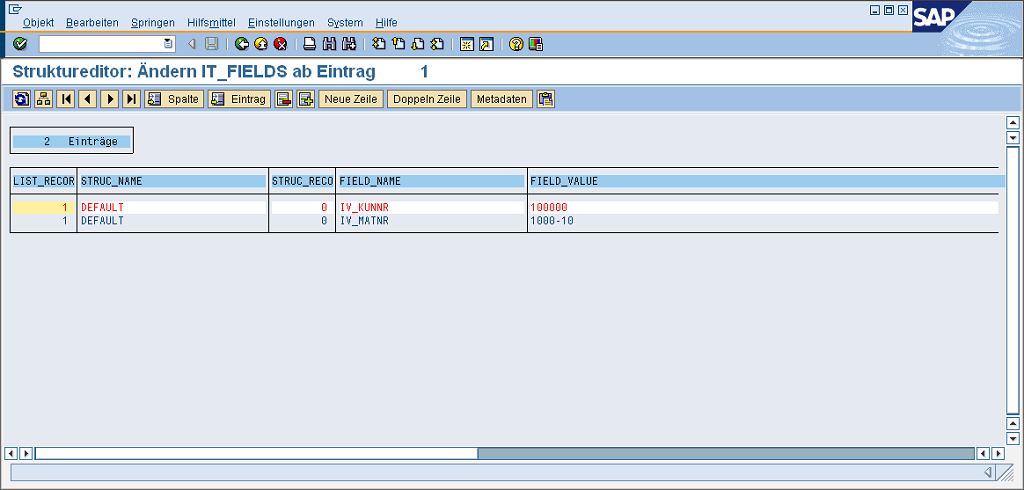
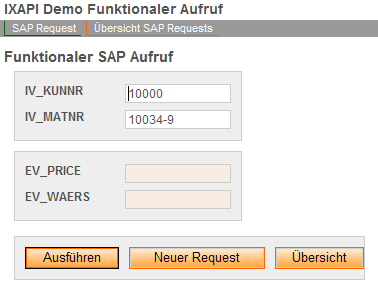
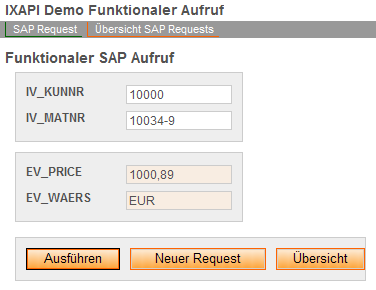
Functional calls are required when the external caller invokes the SAP system with parameters, which are then evaluated there and returned to the caller. This essentially corresponds to the behavior of Web services or the invocation of BAPI functions (without returning tables). It is irrelevant whether and where the data is backed up. This example simulates a price inquiry in SAP. In this process, a material number and a customer number are transferred to SAP to calculate any discounts, and a price is determined.
Concept
-
New processing module for the GENERIC_VIEW data handler inherits from the standard module for GENERIC_VIEW access
-
Transfer structure with import and export parameters (optional; may be useful for the external caller)
-
Redefining the MODIFY method.
Screenshots


Coding
            METHOD z_if_ia_ixa_intrexx_api~modify.

				* -------------- local data
				DATA: lv_kunnr TYPE kunnr.
				DATA: lv_matnr TYPE matnr.
				DATA: lv_price(20).

				* -------------- init
				cv_processed = 'X'.
				ev_error     = 'X'.

				* -------------- no saving within sap - external system is leading
				et_fields[] = it_fields[].
				ev_key = iv_key.

				* -------------- get inbound parameters
				* without convert because of external structure definition
				* -- get kunnr
				CALL METHOD me->get_field
				EXPORTING
				it_fields       = it_fields
				iv_record       = '1'
				iv_struc_name   = 'DEFAULT'
				iv_struc_record = '0'
				iv_fieldname    = 'IV_KUNNR'
				iv_convert      = ' '
				CHANGING
				cv_fieldvalue   = lv_kunnr
				EXCEPTIONS
				failed          = 1
				OTHERS          = 2.
				IF sy-subrc <> 0.
				EXIT.
				ENDIF.

				* -- get matnr
				CALL METHOD me->get_field
				EXPORTING
				it_fields       = it_fields
				iv_record       = '1'
				iv_struc_name   = 'DEFAULT'
				iv_struc_record = '0'
				iv_fieldname    = 'IV_MATNR'
				iv_convert      = ' '
				CHANGING
				cv_fieldvalue   = lv_matnr
				EXCEPTIONS
				failed          = 1
				OTHERS          = 2.
				IF sy-subrc <> 0.
				EXIT.
				ENDIF.

				* -------------- initial check routines
				CHECK NOT lv_kunnr IS INITIAL
				AND NOT lv_matnr IS INITIAL.

				* -------------- process
				* 1. call function module to get price (here simulated)
				* .....
				* 2. write price formatted to transfer structure
				lv_price = '1000,89'.

				* -------------- fill outbound parameters
				* -- modify ev_price
				CALL METHOD me->set_field
				EXPORTING
				*    IV_RECORD       = '1'
				*    IV_STRUC_NAME   = 'DEFAULT'
				*    IV_STRUC_RECORD = '0'
				iv_fieldname    = 'EV_PRICE'
				iv_convert      = ' '
				iv_fieldvalue   = lv_price
				CHANGING
				ct_fields       = et_fields
				EXCEPTIONS
				failed          = 1
				OTHERS          = 2
				.
				IF sy-subrc <> 0.
				EXIT.
				ENDIF.
				* -- modify ev_waers
				CALL METHOD me->set_field
				EXPORTING
				*    IV_RECORD       = '1'
				*    IV_STRUC_NAME   = 'DEFAULT'
				*    IV_STRUC_RECORD = '0'
				iv_fieldname    = 'EV_WAERS'
				iv_convert      = ' '
				iv_fieldvalue   = 'EUR'
				CHANGING
				ct_fields       = et_fields
				EXCEPTIONS
				failed          = 1
				OTHERS          = 2
				.
				IF sy-subrc <> 0.
				EXIT.
				ENDIF.

				* -------------- finally set no error
				ev_error    = ' '.

				ENDMETHOD.
Test




Specific Comments
To implement this concept, a data group is created in the Intrexx portal that contains all import and export parameters. Before saving the application for the first time, you should adjust the field names; otherwise, the automatically generated field names will need to be mapped within the SAP processing module.
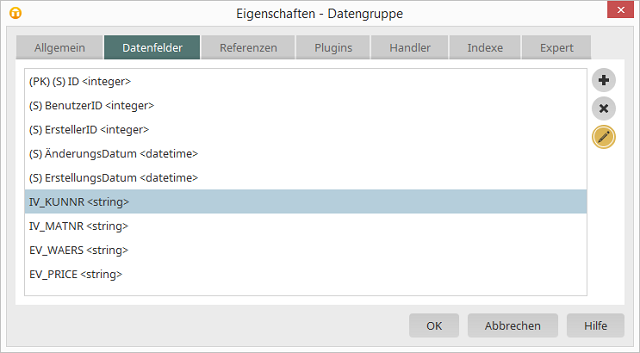
Click "Edit Data Field" here at  .
.
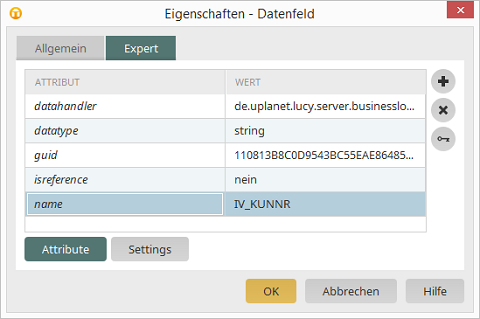
Switch to the "Expert" tab and change the name of the data field accordingly. A data entry page is then generated that defines the import parameters as input fields and the export parameters as read-only fields. A button triggers the "Save" action and remains on the same input page. This ensures that the export parameters that were changed during the save process are displayed in the portal later. The application can now be tested without SAP integration. It should behave normally, except for export parameters that have not been filled in; that is, records are created when saved. SAP integration is implemented using a special exit business logic. The completed input page is first sent to SAP before being saved in the portal. There, the fields can be analyzed, modified, and errors may even be generated. After that, the save process will continue in the portal. To enable this exit business logic, you must change the parameters in the data group's expert attributes.
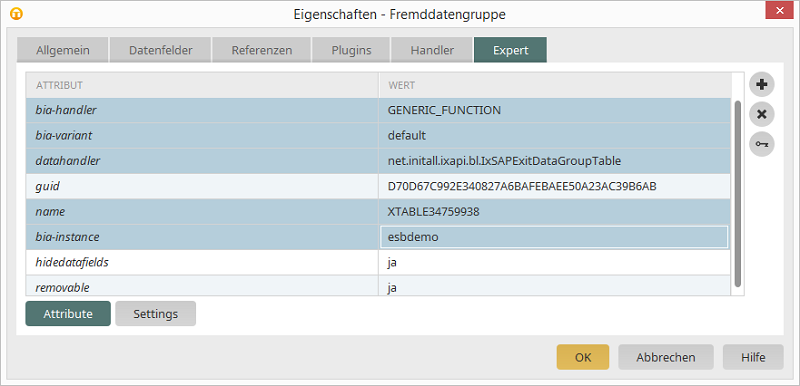
To do this, the "Datahandler" is replaced with an alternative class from the SAP Connector. The "bia-instance" parameter must contain the data source of the called SAP system. The parameter displayed as "name" is used as the data group name within the determination process of the SAP processing modules.
SAP Triggers with External Data Storage
Functionality
This example shows how a process in SAP can be triggered when data records are changed. The data in the relevant record can also be analyzed.
Concept
The concept is similar to that of a functional call. However, SAP should not perform any checks here, but should only use the data provided to initiate an internal SAP follow-up process. The processing module should not generate errors.
Coding
            METHOD z_if_ia_ixa_intrexx_api~modify.

				* -------------- local data
				DATA: lv_kunnr TYPE kunnr.

				* -------------- init
				cv_processed = 'X'.
				ev_error     = ' '.

				* -------------- no saving within sap - external system is leading
				et_fields[] = it_fields[].
				ev_key = iv_key.

				* -------------- get inbound parameters
				* -- get kunnr (example)
				CALL METHOD me->get_field
				EXPORTING
				it_fields       = it_fields
				iv_record       = '1'
				iv_struc_name   = 'DEFAULT'
				iv_struc_record = '0'
				iv_fieldname    = 'IV_KUNNR'
				CHANGING
				cv_fieldvalue   = lv_kunnr
				EXCEPTIONS
				failed          = 1
				OTHERS          = 2.
				IF sy-subrc <> 0.
				EXIT.
				ENDIF.

				* -------------- initial check routines
				CHECK NOT lv_kunnr IS INITIAL.

				* -------------- process
				* 1. call a trigger function module (e.g. SWE_EVENT_CREATE)

				ENDMETHOD.
Data Management in SAP
Functionality
This example illustrates a simple method of data storage in SAP. Concepts such as locks, permissions, and number ranges are not used. The data is stored in a table in the customer namespace. Further processing of the data could be initiated within the API methods. By using GUIDs as table keys, you can avoid using a number range object. A lockout policy can be extended either using the SAP standard lockout policy (which may have drawbacks due to status-free Internet use) or by retrofitting the sample implementation from the " Lockout Policy " chapter.
Concept
-
New processing module for the GENERIC_VIEW data handler inherits from the standard module for GENERIC_VIEW access
-
Table in the customer namespace with a primary key in the form of a GUID
-
Table is used as a transfer structure
-
The read-only API methods (get_Metainfo; get_List; get_Detail) can be used from the GENERIC_VIEW processing module.
-
Redefining the MODIFY and DELETE Methods
Screenshots
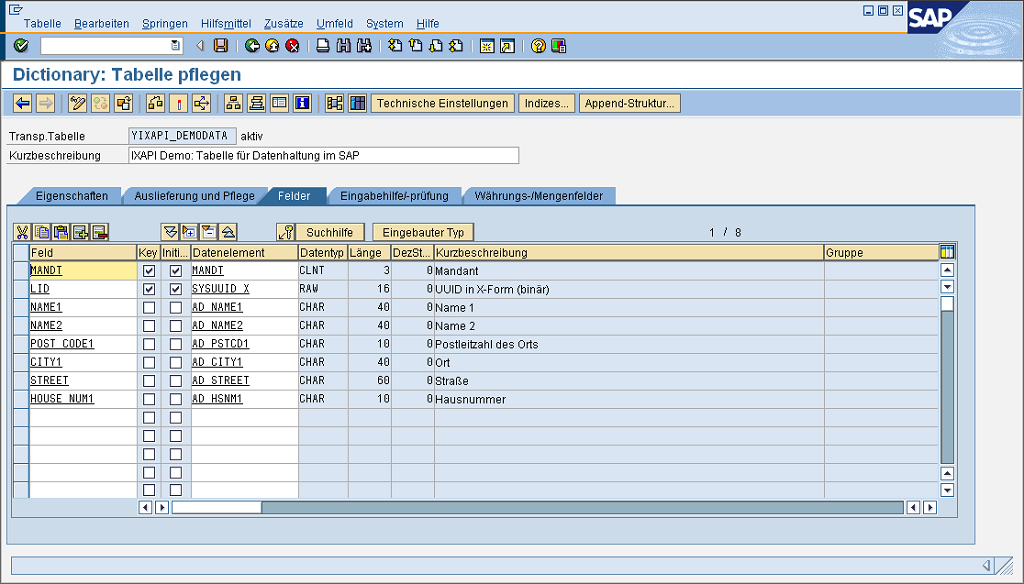

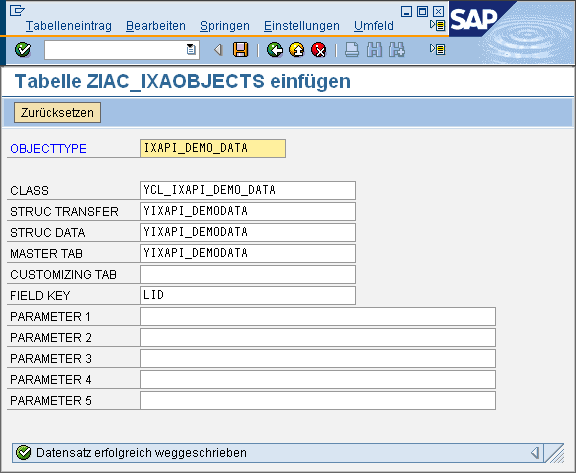
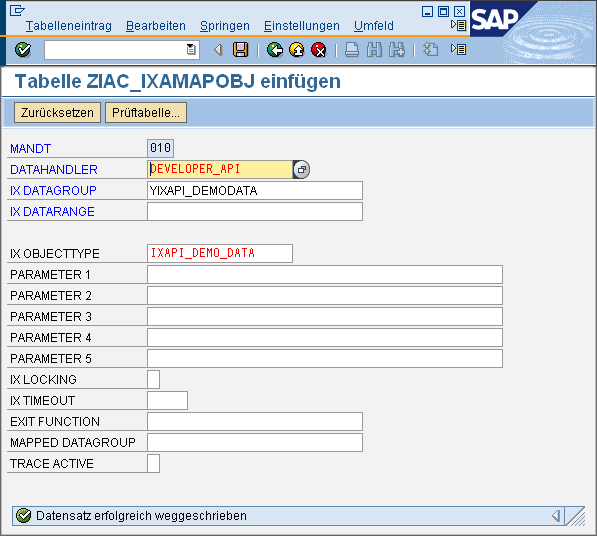
Coding
            METHOD z_if_ia_ixa_intrexx_api~modify.

				* -------------- local data
				DATA: ls_data TYPE yixapi_demodata.
				DATA: lv_guid TYPE sysuuid_x.

				* -------------- init
				cv_processed = 'X'.
				ev_error     = 'X'.

				* -------------- set export = import
				et_fields[] = it_fields.
				ev_key = iv_key.

				* -------------- get existing data
				CLEAR lv_guid.
				IF iv_key NE space AND iv_key NE '-1'.
				* ------- get existing
				lv_guid = iv_key.
				SELECT SINGLE * FROM yixapi_demodata
				INTO ls_data
				WHERE lid EQ iv_key.
				IF sy-subrc NE 0.
				CLEAR lv_guid.
				ENDIF.
				ENDIF.

				* -------- create a new guid if initial
				IF lv_guid IS INITIAL.
				CALL FUNCTION 'GUID_CREATE'
				IMPORTING
				ev_guid_16 = lv_guid.
				ENDIF.

				* -------------- get inbound parameters
				CALL METHOD me->get_fields_from_struc
				EXPORTING
				it_fields         = it_fields
				iv_record         = '1'
				iv_struc_name     = 'DEFAULT'
				iv_struc_record   = '0'
				iv_data_strucname = 'YIXAPI_DEMODATA'
				iv_convert        = 'X'
				CHANGING
				cs_data           = ls_data
				EXCEPTIONS
				failed            = 1
				OTHERS            = 2.
				IF sy-subrc <> 0.
				EXIT. "with error
				ENDIF.

				* -------------- process
				* 1. set key
				ls_data-lid = lv_guid.
				* 2. save to database
				SET UPDATE TASK LOCAL.
				MODIFY yixapi_demodata FROM ls_data.
				IF sy-subrc NE 0.
				ROLLBACK WORK.
				EXIT.
				ENDIF.

				* -------------- fill outbound parameters
				REFRESH et_fields.
				CALL METHOD me->set_results_from_struc
				EXPORTING
				is_data         = ls_data
				*    IT_REQUESTED    =
				iv_data_struc   = 'YIXAPI_DEMODATA'
				*    IV_KEY_VALUE    =
				iv_record       = 1
				*    IV_STRUC_NAME   = 'DEFAULT'
				*    IV_STRUC_RECORD = 0
				CHANGING
				*      ct_keys         =
				ct_results      = et_fields
				EXCEPTIONS
				failed          = 1
				OTHERS          = 2
				.
				IF sy-subrc <> 0.
				ROLLBACK WORK.
				EXIT.
				ENDIF.

				* -------------- final commit
				COMMIT WORK.
				IF sy-subrc NE 0.
				ROLLBACK WORK.
				EXIT.
				ELSE.
				ev_key = lv_guid.
				ENDIF.

				* -------------- finally set no error
				ev_error    = ' '.

				ENDMETHOD.                    "Z_IF_IA_IXA_INTREXX_API~MODIFY

				METHOD z_if_ia_ixa_intrexx_api~delete.

				* -------- get existing data via API Func get_Detail
				CALL METHOD me->z_if_ia_ixa_intrexx_api~get_detail
				EXPORTING
				iv_key           = iv_key
				*      it_requested     =
				IMPORTING
				ev_error         = ev_error
				et_messages      = et_messages
				et_result_values = et_fields
				CHANGING
				cv_processed     = cv_processed
				EXCEPTIONS
				failed           = 1
				OTHERS           = 2.
				IF sy-subrc <> 0.
				RAISE failed.
				ENDIF.

				* -------- check processed and error
				IF cv_processed EQ 'X' AND ev_error NE 'X'.
				* -- DELETE Record
				SET UPDATE TASK LOCAL.
				DELETE FROM yixapi_demodata
				WHERE lid EQ iv_key.
				IF sy-subrc NE 0.
				ROLLBACK WORK.
				ev_error = 'X'.
				EXIT.
				ENDIF.
				COMMIT WORK.
				ELSE.
				* -- Record does not exist
				cv_processed = 'X'.
				ev_error     = 'X'.
				ENDIF.

				ENDMETHOD.
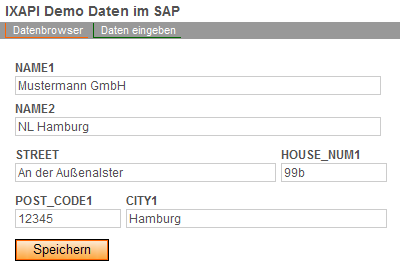
Test

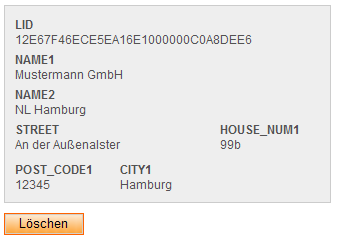
SAP Triggers with Data Storage in SAP
Functionality
As with the SAP trigger that uses external data storage, triggers are particularly well-suited for linking processes together. This can be done asynchronously or synchronously. In this context, external performance (e.g., on the portal) and the prevention of data loss are usually of particular importance during the design phase. This example is based on the demo data model in SAP. Using the approach described there, you can even program reusable triggers. Of course, the transfer structure would not contain data from SAP business partners, but rather, for example:
-
Trigger Type (Constant)
-
Business Object Type
-
Business Object ID
-
Parameter 1
-
…
-
Parameter n
The following code provides an example of how the processing from the SAP demo data model can be used and—after successful execution—how a trigger function is started asynchronously via qRFC.
Concept
-
New processing module derived from the data handler for SAP-internal data storage in the " Data Storage in SAP" demo
-
Expanding the table from the SAP data management demo to include processing information
-
Table is used as a transfer structure
-
Redefining the MODIFY Method
Screenshots


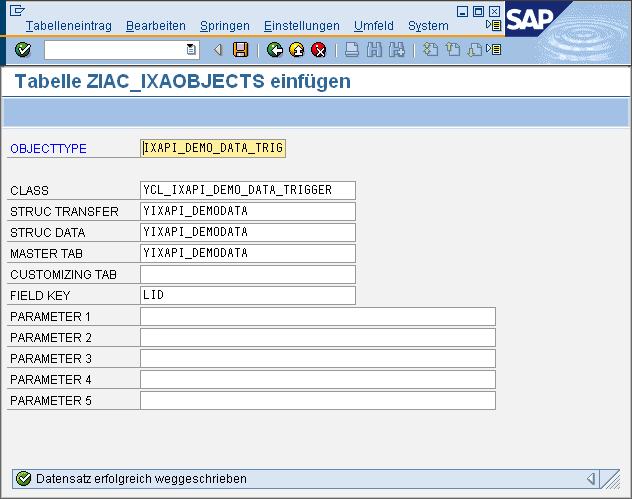
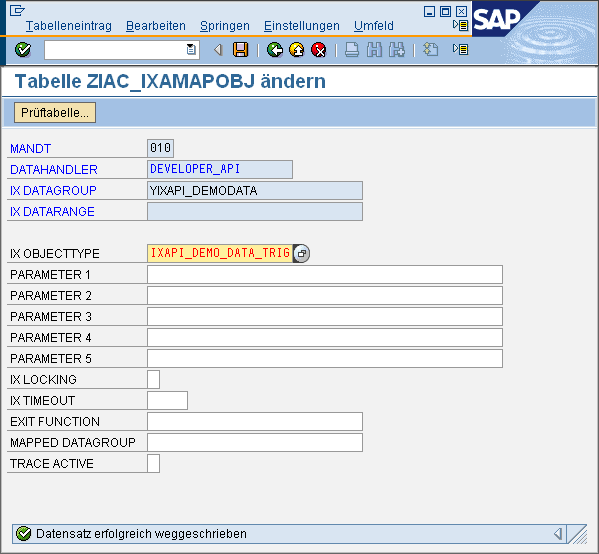
Coding
Function module for processing

            FUNCTION y_ixapi_demo_trigger_process.
				*"----------------------------------------------------------------------
				*"*"Lokale Schnittstelle:
				*"  IMPORTING
				*"     VALUE(IV_GUID) TYPE  ZIA_IXA_FIELDVALUE
				*"  EXCEPTIONS
				*"      NOT_FOUND
				*"----------------------------------------------------------------------


				* -------- local data
				DATA: ls_data TYPE yixapi_demodata.


				* --------- get data
				SELECT SINGLE * FROM yixapi_demodata
				INTO ls_data
				WHERE lid EQ iv_guid.
				IF sy-subrc NE 0.
				RAISE not_found.
				ENDIF.


				* --------- prepare data
				ls_data-processed = 'X'.


				* --------- save to db
				SET UPDATE TASK LOCAL.
				MODIFY yixapi_demodata FROM ls_data.
				COMMIT WORK.

				ENDFUNCTION.
MODIFY Method
            METHOD z_if_ia_ixa_intrexx_api~modify.

				* --------- local data
				DATA: lv_queue TYPE trfcqnam VALUE 'YIXAPI-TRIGGER'.

				* --------- call super
				CALL METHOD super->z_if_ia_ixa_intrexx_api~modify
				EXPORTING
				iv_key       = iv_key
				it_fields    = it_fields
				IMPORTING
				ev_error     = ev_error
				et_messages  = et_messages
				et_fields    = et_fields
				ev_key       = ev_key
				CHANGING
				cv_processed = cv_processed
				EXCEPTIONS
				failed       = 1
				OTHERS       = 2.
				IF sy-subrc <> 0.
				RAISE failed.
				ENDIF.

				* ---------- start trigger
				IF ev_error NE 'X'
				AND cv_processed EQ 'X'
				AND NOT ev_key IS INITIAL.
				* ------ luw start
				SET UPDATE TASK LOCAL.
				* ------ set queue name
				CALL FUNCTION 'TRFC_SET_QUEUE_NAME'
				EXPORTING
				qname                    = lv_queue
				*     NOSEND                   = ' '
				*     TRFC_IF_SYSFAIL          = ' '
				*     CALL_EVENT               = ' '
				EXCEPTIONS
				invalid_queue_name       = 1
				OTHERS                   = 2
				.
				IF sy-subrc <> 0.
				ev_error = 'X'.
				ENDIF.
				* ------ call function module asynchron in qRFC
				CALL FUNCTION 'Y_IXAPI_DEMO_TRIGGER_PROCESS'
				IN BACKGROUND TASK AS SEPARATE UNIT
				DESTINATION 'NONE'
				EXPORTING
				iv_guid   = ev_key
				EXCEPTIONS
				not_found = 1
				OTHERS    = 2.
				IF sy-subrc <> 0.
				ev_error = 'X'.
				ENDIF.
				* ------- execute
				COMMIT WORK.
				ENDIF.

				ENDMETHOD.
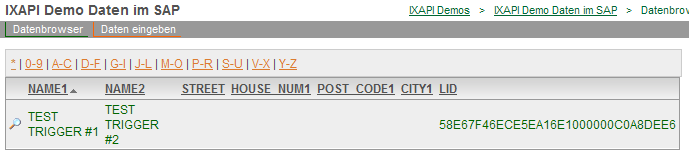
Test



Intrexx-Specific Notes
The demo relies on the copy functionality via the Process Manager. Data is entered in a separate application, with the data stored in the portal. If the flag is set during data entry, the process manager copies the data into the data group from the example " Data Management in SAP."
The data is then transferred to SAP and posted there. Due to the modified processing module, the implementation from the demo data storage in SAP is called first, followed by the RFC connection module, which is called asynchronously within the qRFC. It is only here that the data record is marked with the "Processed" flag. QRFC processing can be monitored using transactions SMQ1 and SMQ2. For more information on this topic, see the SAP documentation on QRFC.
Mapping SAP Business Objects
Functionality
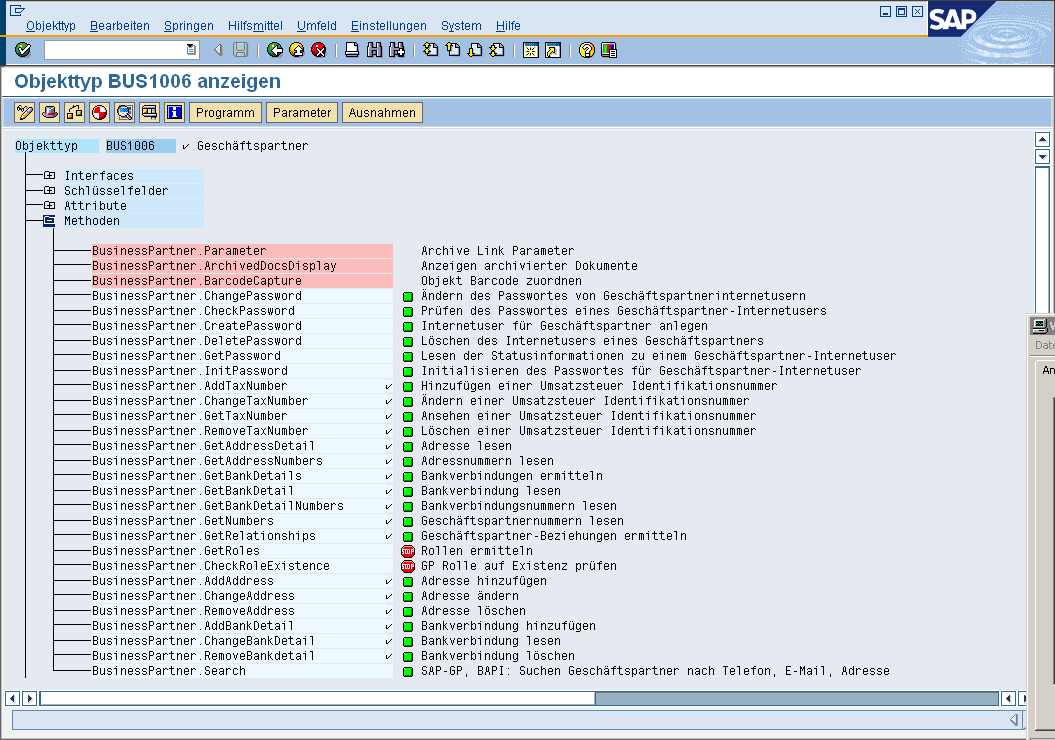
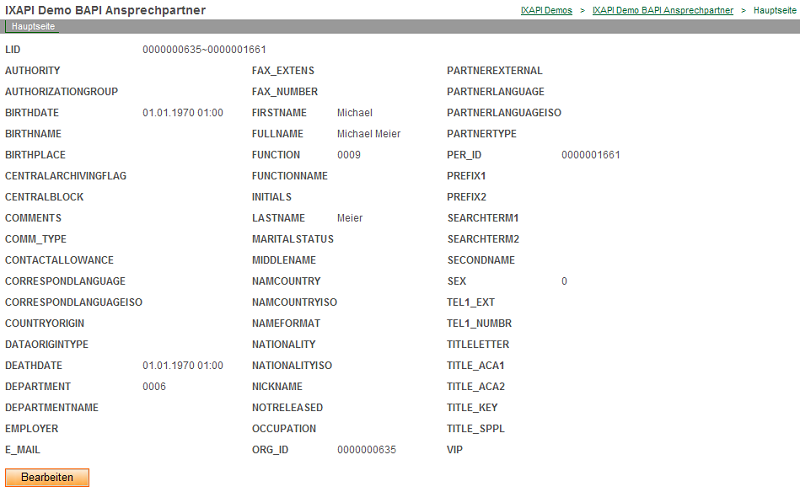
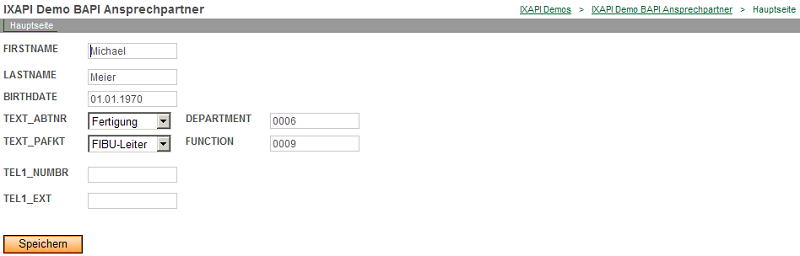
This example describes how to access SAP standard objects (with data stored in SAP). Unlike, for example, data storage in SAP, this approach does not involve direct read and write access to the SAP tables. The SAP standard usually provides access routines for this purpose in the form of function modules (possibly even as BAPI functions). If such BAPI functions exist for the desired object, they should also be used by the external caller. For illustrative purposes, we'll use the example "Change a customer's contact person in the portal" here. The SAP business object is "BUS1006002" (transaction SWO1). For example, in the SAP CRM environment or in some industry-specific solutions, this represents the relationship between an organization (customer) and a person (contact person at the customer's company).

BAPI functions (e.g., CREATE, CHANGE, etc.; identified by the green icon) are available for this object. In this example, the external caller always passes the organization ID (e.g., stored as a user parameter during login) and can then access the contact information. Detailed information about the contact person's SAP business object "BUS1006" is also included.
Concept
-
New processing module as an inheritance of the data handler for GENERIC_VIEW
-
Transfer structure with included BAPI structures, enriched with key information and formatted Customizing texts
-
Support Structure with X Fields for BAPI Change Methods
-
Redefining the GET_LIST, GET_DETAIL, and MODIFY Methods
-
Support for Offset Access and Sorting
-
GET_LIST uses the GET_DETAIL implementation via a pass-by-reference variable
Screenshots
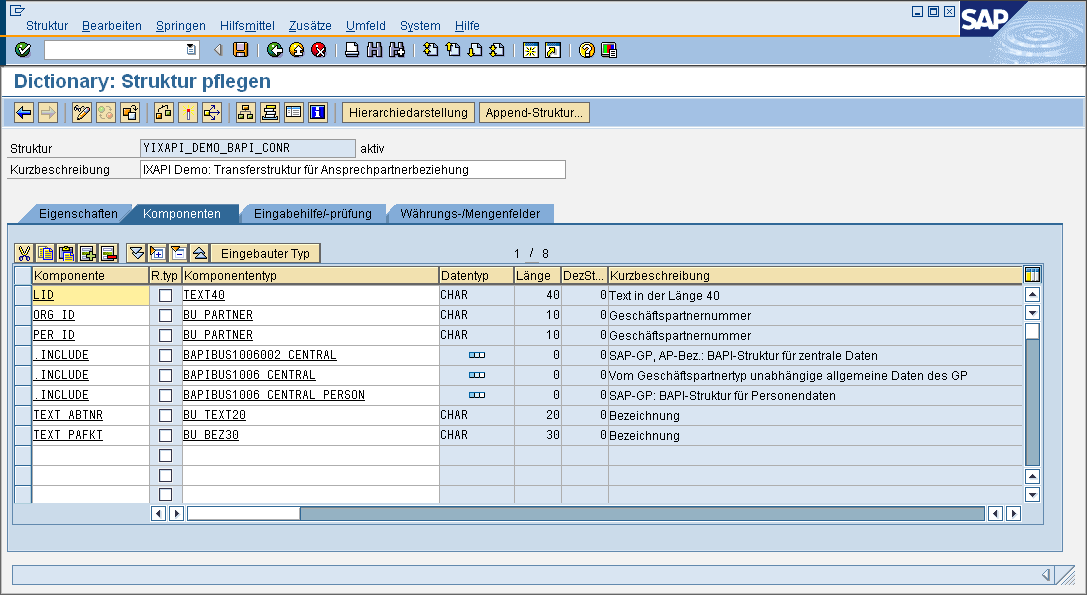
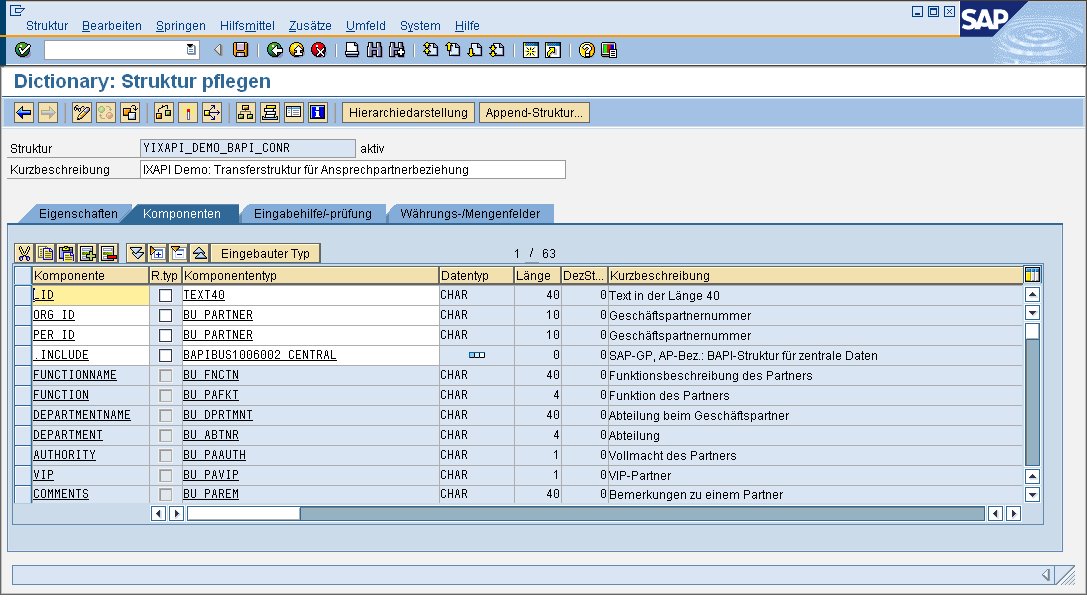
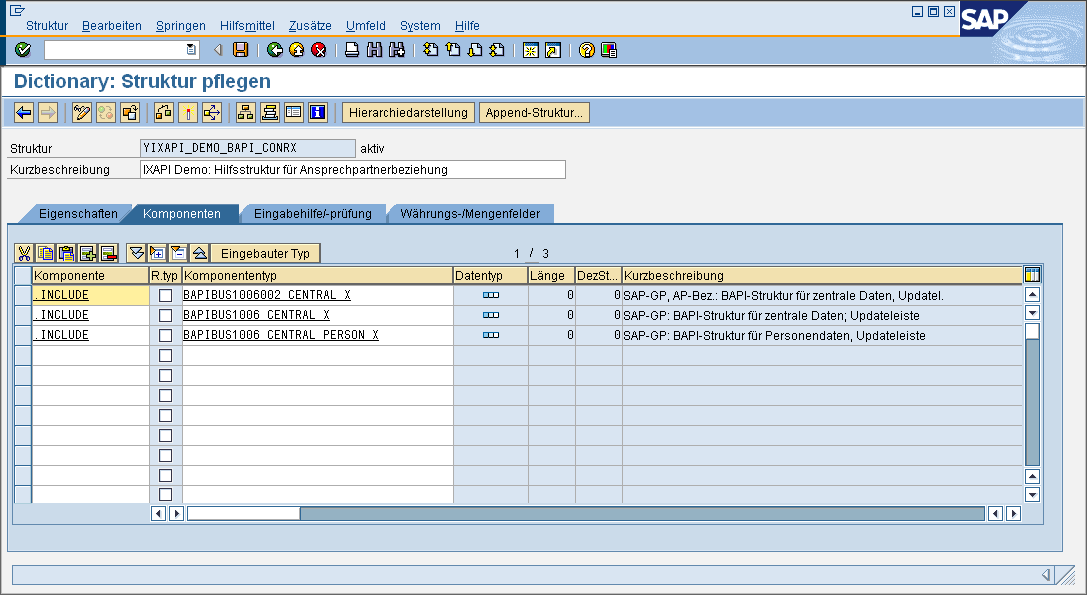
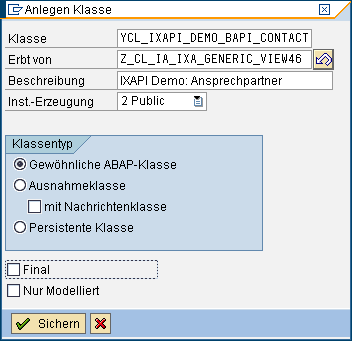

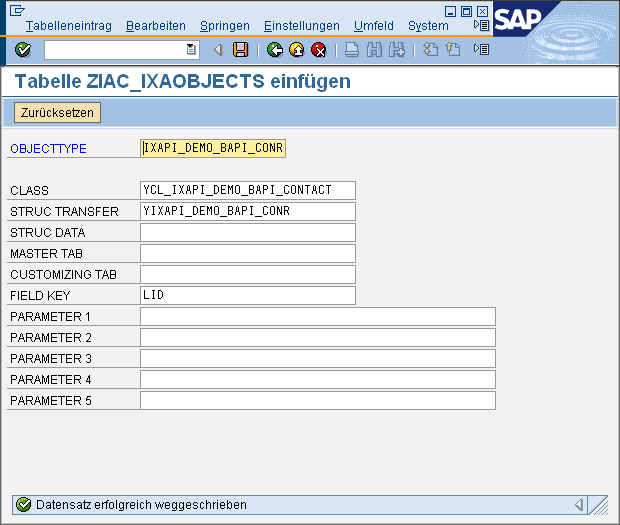

Coding
GET_DETAIL
            METHOD z_if_ia_ixa_intrexx_api~get_detail.

				* ------ local data
				DATA: lv_org  TYPE bu_partner.
				DATA: lv_per  TYPE bu_partner.
				DATA: ls_data TYPE yixapi_demo_bapi_conr.
				DATA: ls_relation TYPE bapibus1006002_central.
				DATA: ls_central TYPE bapibus1006_central.
				DATA: ls_person TYPE bapibus1006_central_person.
				DATA: lt_return TYPE TABLE OF bapiret2.
				DATA: lv_error.
				DATA: lv_language TYPE spras.

				* ------ set default
				ev_error = 'X'.
				cv_processed = 'X'.

				* ------ check for new record
				IF iv_key EQ space OR iv_key EQ '-1'.
				* ------ optional: set a default data structure and leave without errors
				EXIT.
				ELSE.
				* ------ split key
				SPLIT iv_key AT '~' INTO lv_org lv_per.
				* ------ check key
				CHECK lv_org NE space AND lv_per NE space.
				ENDIF.

				* ------ get data relation
				CALL FUNCTION 'BAPI_BUPR_CONTP_GETDETAIL'
				EXPORTING
				businesspartner           = lv_org
				contactperson             = lv_per
				IMPORTING
				*     VALIDFROMDATE             =
				*     VALIDUNTILDATE            =
				*     DEFAULTRELATIONSHIP       =
				centraldata               = ls_relation
				TABLES
				return                    = lt_return
				.
				LOOP AT lt_return TRANSPORTING NO FIELDS
				WHERE type CA 'EAX'.
				lv_error = 'X'.
				EXIT.
				ENDLOOP.
				CHECK lv_error NE 'X'.

				* ------- get data BP
				CALL FUNCTION 'BAPI_BUPA_CENTRAL_GETDETAIL'
				EXPORTING
				businesspartner   = lv_per
				valid_date        = sy-datum
				IMPORTING
				centraldata       = ls_central
				centraldataperson = ls_person
				TABLES
				return            = lt_return.
				LOOP AT lt_return TRANSPORTING NO FIELDS
				WHERE type CA 'EAX'.
				lv_error = 'X'.
				EXIT.
				ENDLOOP.
				CHECK lv_error NE 'X'.

				* -------- build transfer record
				* 1. BAPI Info
				MOVE-CORRESPONDING ls_relation TO ls_data.
				MOVE-CORRESPONDING ls_central  TO ls_data.
				MOVE-CORRESPONDING ls_person   TO ls_data.

				* 2. ID Info
				ls_data-org_id  = lv_org.
				ls_data-per_id  = lv_per.

				* 3. Key Info
				CONCATENATE lv_org lv_per
				INTO ls_data-lid
				SEPARATED BY '~'.

				* 4. generate additional text fields with type converting
				*    get portal language
				CALL METHOD me->map_intrexx_language_to_sap
				EXPORTING
				iv_language = me->ix_control-ix_language
				IMPORTING
				ev_language = lv_language
				EXCEPTIONS
				not_found   = 1
				OTHERS      = 2.
				IF sy-subrc <> 0.
				lv_language = sy-langu.
				ENDIF.
				*  get department
				IF ls_data-department NE space.
				SELECT SINGLE bez20 FROM tb911 INTO ls_data-text_abtnr
				WHERE spras EQ lv_language
				AND abtnr EQ ls_data-department.
				ENDIF.

				*  get function
				IF ls_data-function NE space.
				SELECT SINGLE bez30 FROM tb913 INTO ls_data-text_pafkt
				WHERE spras EQ lv_language
				AND pafkt EQ ls_data-function.
				ENDIF.

				* -------- save for other API Methods
				me->current_data = ls_data.

				* -------- build export
				CALL METHOD me->set_results_from_struc
				EXPORTING
				is_data         = ls_data
				*    IT_REQUESTED    =
				iv_data_struc   = 'YIXAPI_DEMO_BAPI_CONR'
				iv_key_value    = ls_data-lid
				iv_record       = 1
				iv_struc_name   = 'DEFAULT'
				iv_struc_record = 0
				CHANGING
				*    CT_KEYS         =
				ct_results      = et_result_values
				EXCEPTIONS
				failed          = 1
				OTHERS          = 2
				.
				IF sy-subrc <> 0.
				EXIT.
				ENDIF.

				* ------- finally OK result
				ev_error = ' '.

				ENDMETHOD.
GET_LIST
            METHOD z_if_ia_ixa_intrexx_api~get_list.

				* -------------- local data
				DATA: lt_data TYPE TABLE OF yixapi_demo_bapi_conr.
				DATA: lt_data_int TYPE TABLE OF yixapi_demo_bapi_conr.
				DATA: ls_data TYPE yixapi_demo_bapi_conr.
				DATA: lt_return TYPE TABLE OF bapiret2.
				DATA: ls_filter TYPE LINE OF zia_ixa_api_intrexx_filter_t.
				DATA: lv_org TYPE bu_partner.
				DATA: lv_key TYPE zia_ixa_fieldvalue.
				DATA: lv_error.
				DATA: lv_processed TYPE xfeld.
				DATA: lv_lin TYPE i.
				DATA: lt_rel TYPE TABLE OF bapibus1006_relations.
				DATA: ls_rel TYPE bapibus1006_relations.
				DATA: ls_orderby TYPE LINE OF zia_ixa_api_intrexx_orderby_t.
				DATA: lv_rows TYPE i.

				* -------------- init
				cv_processed = 'X'.
				ev_error     = 'X'.

				* -------------- get inbound parameters
				READ TABLE it_filter INTO ls_filter
				WITH KEY fieldname = 'ORG_ID'.
				IF sy-subrc NE 0.
				ev_error     = ' '.
				EXIT.
				ENDIF.
				lv_org = ls_filter-value_low.

				* -------------- initial check routines
				IF lv_org IS INITIAL.
				ev_error     = ' '.
				EXIT.
				ENDIF.

				* -------------- process
				* 1. Search
				CALL FUNCTION 'BAPI_BUPA_RELATIONSHIPS_GET'
				EXPORTING
				businesspartner = lv_org
				TABLES
				relationships   = lt_rel
				return          = lt_return.
				LOOP AT lt_return TRANSPORTING NO FIELDS
				WHERE type CA 'EAX'.
				lv_error = 'X'.
				EXIT.
				ENDLOOP.
				CHECK lv_error NE 'X'.

				* 2. check relations
				DESCRIBE TABLE lt_rel LINES lv_lin.
				CHECK lv_lin GT 0.

				* 3. build data table
				LOOP AT lt_rel INTO ls_rel
				WHERE relationshipcategory  = 'BUR001'
				AND validfromdate         LE sy-datum
				AND validuntildate        GE sy-datum.
				*   build key
				CONCATENATE ls_rel-partner1
				ls_rel-partner2
				INTO lv_key
				SEPARATED BY '~'.
				*   clear working var
				CLEAR me->current_data.

				*   build detail information; transfer via working var
				CALL METHOD me->z_if_ia_ixa_intrexx_api~get_detail
				EXPORTING
				iv_key           = lv_key
				*    IT_REQUESTED     =
				*  IMPORTING
				*    EV_ERROR         =
				*    ET_MESSAGES      =
				*    ET_RESULT_VALUES =
				CHANGING
				cv_processed     = lv_processed
				EXCEPTIONS
				failed           = 1
				OTHERS           = 2
				.
				IF sy-subrc EQ 0
				AND lv_processed EQ 'X'
				AND NOT me->current_data IS INITIAL.
				*     append working var to table
				APPEND me->current_data TO lt_data.
				ENDIF.
				ENDLOOP.

				* -------------- fill outbound parameters
				* 1. ev_count
				DESCRIBE TABLE lt_data LINES ev_count.
				* 2. sort internal table
				DESCRIBE TABLE it_orderby LINES lv_lin.
				IF lv_lin EQ 1.
				READ TABLE it_orderby INTO ls_orderby INDEX 1.
				IF ls_orderby-ordertype EQ 'A'.
				SORT lt_data BY (ls_orderby-fieldname) ASCENDING.
				ELSE.
				SORT lt_data BY (ls_orderby-fieldname) DESCENDING.
				ENDIF.
				ELSE.
				SORT lt_data BY per_id.
				ENDIF.

				* 3. check offset access
				IF iv_max_rows GT 0 OR iv_start_row GT 0.
				*   move to a working tab
				lt_data_int[] = lt_data.
				REFRESH lt_data.

				*   loop working tab
				LOOP AT lt_data_int INTO ls_data.

				*     check offset access
				IF iv_start_row GT 0
				AND sy-tabix LE iv_start_row.
				CONTINUE.
				ENDIF.

				*     append to exporting tab
				APPEND ls_data TO lt_data.

				*     check max rows
				IF iv_max_rows GT 0.
				ADD 1 TO lv_rows.
				IF lv_rows GE iv_max_rows.
				EXIT.
				ENDIF.
				ENDIF.

				ENDLOOP.
				ENDIF.

				* 4. loop and fill export
				LOOP AT lt_data INTO ls_data.
				CALL METHOD me->set_results_from_struc
				EXPORTING        is_data         = ls_data
				it_requested    = it_requested
				iv_data_struc   = 'YIXAPI_DEMO_BAPI_CONR'
				iv_key_value    = ls_data-lid
				iv_record       = sy-tabix
				iv_struc_name   = 'DEFAULT'
				iv_struc_record = 0
				CHANGING
				ct_keys         = et_result_keys
				ct_results      = et_result_values
				EXCEPTIONS
				failed          = 1
				OTHERS          = 2.
				IF sy-subrc EQ 0.
				*     ignore
				ENDIF.
				ENDLOOP.

				* -------------- finally set no error
				ev_error    = ' '.

				ENDMETHOD.
MODIFY
            METHOD z_if_ia_ixa_intrexx_api~modify.

				* ------ local data
				DATA: lv_org  TYPE bu_partner.
				DATA: lv_per  TYPE bu_partner.
				DATA: ls_data TYPE yixapi_demo_bapi_conr.
				DATA: ls_datax TYPE yixapi_demo_bapi_conrx.
				DATA: ls_relation TYPE bapibus1006002_central.
				DATA: ls_relation_x TYPE bapibus1006002_central_x.
				DATA: ls_central TYPE bapibus1006_central.
				DATA: ls_central_x TYPE bapibus1006_central_x.
				DATA: ls_person TYPE bapibus1006_central_person.
				DATA: ls_person_x TYPE bapibus1006_central_person_x.
				DATA: lt_return TYPE TABLE OF bapiret2.
				DATA: ls_return TYPE bapiret2.
				DATA: lv_error.

				* ------ set default
				ev_error = 'X'.
				cv_processed = 'X'.

				* ------ get fields
				CALL METHOD me->get_fields_from_struc
				EXPORTING
				it_fields         = it_fields
				*    IV_RECORD         = '1'
				*    IV_STRUC_NAME     = 'DEFAULT'
				*    IV_STRUC_RECORD   = '0'
				iv_data_strucname = 'YIXAPI_DEMO_BAPI_CONR'
				iv_convert        = 'X'
				CHANGING
				cs_data           = ls_data
				cs_data_x         = ls_datax
				EXCEPTIONS
				failed            = 1
				OTHERS            = 2
				.
				IF sy-subrc <> 0.
				EXIT.
				ENDIF.

				* ------ split key
				IF iv_key CS '~'.
				* ############################################### MODIFY
				* existing record
				SPLIT iv_key AT '~' INTO lv_org lv_per.
				CHECK lv_org NE space AND lv_per NE space.

				* prepare BAPI access
				MOVE-CORRESPONDING ls_data TO ls_central.
				MOVE-CORRESPONDING ls_datax TO ls_central_x.

				MOVE-CORRESPONDING ls_data TO ls_person.
				MOVE-CORRESPONDING ls_datax TO ls_person_x.

				MOVE-CORRESPONDING ls_data TO ls_relation.
				MOVE-CORRESPONDING ls_datax TO ls_relation_x.

				* Change BAPI BP
				IF NOT ls_central_x IS INITIAL
				OR NOT ls_person_x IS INITIAL.
				CALL FUNCTION 'BAPI_BUPA_CENTRAL_CHANGE'
				EXPORTING
				businesspartner     = lv_per
				centraldata         = ls_central
				centraldataperson   = ls_person
				centraldata_x       = ls_central_x
				centraldataperson_x = ls_person_x
				TABLES
				return              = lt_return.
				LOOP AT lt_return TRANSPORTING NO FIELDS
				WHERE type CA 'EAX'.
				lv_error = 'X'.
				EXIT.
				ENDLOOP.
				CHECK lv_error NE 'X'.
				ENDIF.

				* Change BAPI Relation
				IF NOT ls_relation_x IS INITIAL.
				CALL FUNCTION 'BAPI_BUPR_CONTP_CHANGE'
				EXPORTING
				businesspartner             = lv_org
				contactperson               = lv_per
				*     VALIDFROMDATE               =
				*     VALIDUNTILDATE              =
				*     DEFAULTRELATIONSHIP         =
				*     DEFAULTRELATIONSHIP_X       =
				centraldata                 = ls_relation
				centraldata_x               = ls_relation_x
				TABLES
				return                      = lt_return
				.
				LOOP AT lt_return TRANSPORTING NO FIELDS
				WHERE type CA 'EAX'.
				lv_error = 'X'.
				EXIT.
				ENDLOOP.
				CHECK lv_error NE 'X'.

				ev_key = iv_key.

				ENDIF.
				ELSE.
				* ############################################### INSERT
				*  check given business partner for org
				lv_org = ls_data-org_id.
				CHECK lv_org NE space.

				*  prepare bapi data
				MOVE-CORRESPONDING ls_data TO ls_central.
				MOVE-CORRESPONDING ls_data TO ls_person.
				MOVE-CORRESPONDING ls_data TO ls_relation.

				*  create business partner
				CALL FUNCTION 'BAPI_BUPA_CREATE_FROM_DATA'
				EXPORTING
				*   BUSINESSPARTNEREXTERN              =
				partnercategory                    = '1'
				*   PARTNERGROUP                       =
				centraldata                        = ls_central
				centraldataperson                  = ls_person
				*   CENTRALDATAORGANIZATION            =
				*   CENTRALDATAGROUP                   =
				*   ADDRESSDATA                        =
				*   DUPLICATE_MESSAGE_TYPE             =
				*   ACCEPT_ERROR                       = ' '
				IMPORTING
				businesspartner           				= lv_per
				TABLES
				return                             = lt_return
				.
				LOOP AT lt_return TRANSPORTING NO FIELDS
				WHERE type CA 'EAX'.
				lv_error = 'X'.
				EXIT.
				ENDLOOP.
				CHECK lv_error NE 'X'.

				CHECK lv_per NE space.

				*   create relation
				CALL FUNCTION 'BAPI_BUPR_CONTP_CREATE'
				EXPORTING
				businesspartner              = lv_org
				contactperson                = lv_per
				*   VALIDFROMDATE                = '00010101'
				*   VALIDUNTILDATE               = '99991231'
				*   DEFAULTRELATIONSHIP          =
				*   ADDRESSGUID                  =
				centraldata                  = ls_relation
				*   ADDRESSDATA                  =
				*   DUPLICATE_MESSAGE_TYPE       =
				TABLES
				return  				= lt_return
				.
				LOOP AT lt_return TRANSPORTING NO FIELDS
				WHERE type CA 'EAX'.
				lv_error = 'X'.
				EXIT.
				ENDLOOP.
				CHECK lv_error NE 'X'.

				*   build key
				CONCATENATE lv_org lv_per
				INTO ev_key
				SEPARATED BY '~'.

				ENDIF.

				* ------------ final BAPI Commit
				CALL FUNCTION 'BAPI_TRANSACTION_COMMIT'
				EXPORTING
				wait   = 'X'
				IMPORTING
				return = ls_return.
				IF ls_return-type CA 'EAX'.
				EXIT.
				ENDIF.

				* ------------ set finally OK
				ev_error = ' '.

				ENDMETHOD.
Test
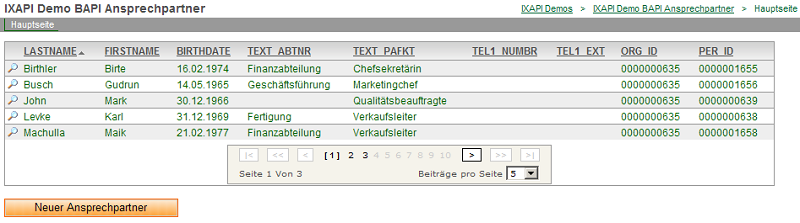

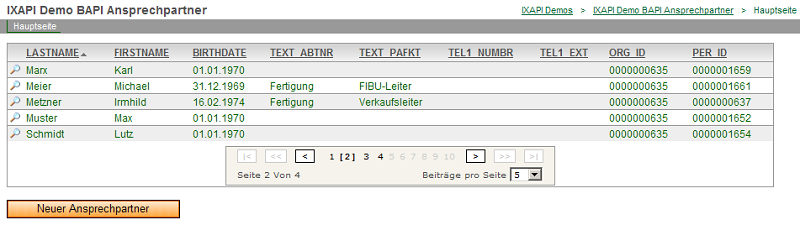
Make SAP Documents Available Externally
There is often a need to make SAP documents available externally. This applies, for example, to scanned incoming invoices or invoices sent to customers that have been requested by the customer and are available electronically, such as in PDF format. A technical implementation recommendation depends on how the binary data for the desired documents is physically stored in SAP. Here are some examples of the options available:
-
As an attachment to an SAPOffice object (e.g., outgoing email)
-
As binary data for older WebRFC functions
-
As a document associated with an SAP business object
-
Customized functionality for saving and reading documents
At a minimum, the external caller must have access to the binary data, the document type, and the physical length. This means that it must be possible to extract the documents as an internal table before they can leave the SAP system, once they have been formatted for an external caller. In most cases, these are documents that are not physically stored in the SAP system but rather on a content server (also known as a Knowledge Provider)—that is, in a specialized document management system (e.g., Docuware, ixOS). In such cases, an SAP application that displays a scanned document associated with an SAP business object (e.g., an incoming invoice) would only recognize the links between the SAP business object and the binary document. The document management system—which is usually external—will be used to display the information. In newer versions of SAP, this is handled via an HTTP request. In theory, an external caller could exploit this by using this DMS server to actually deliver the document.
Make Documents from the DMS Available Externally
If the desired documents are available in a document management system, the document could be retrieved directly from the DMS via a generated URL. To do this, the DMS server must be accessible from the location where the document is to be available. There are often scenarios in which external users need to access the company's internal document management system. It must be clear that this means a company’s perhaps most important server (a DMS sometimes also contains contracts or technical documentation) must be made accessible on the Internet, which can pose a significant security risk. This could also allow outsiders to gain access to documents that are normally off-limits to external users. At the very least, you should plan for a certain amount of effort to be spent on organizational activities and security measures (e.g., setting up a firewall). For this scenario, a handler would need to be developed that evaluates the externally specified search criteria (e.g., customer number, date, keywords), identifies links to potential documents, and finally generates URLs where the documents are available externally. In the SAP system, these links are typically found in the TOA* tables.
Replicate Documents Externally
This scenario assumes that the documents are available as an internal table in ABAP. They would then also be copyable. A common scenario would be to copy the document to the external caller's file system. The document would then be accessible externally via the path information (e.g., as an HTTP request, if the document had been replicated to a web server's web space). In this scenario, copies of the actual documents are created. Depending on the size of the documents, the network connection, and other technical conditions, synchronous scenarios (request / extract document / replicate document) may become practically impossible. From an ABAP perspective, the scenario involving document replication can be implemented quite easily if the documents are available as an internal table. The target paths can usually be mounted on the SAP application server or accessed via a network name (e.g., "\\webspace\outdocs") (e.g., using transaction AL11). You can then write data to this external directory directly from SAP using the OPEN DATASET …TRANSFER command. If you also want to prevent the misuse of such externally stored documents, you can obfuscate the file names. In this case, it is best to use Global Unique IDs (GUIDs), since they are very difficult to remember. GUIDs can be generated using the GUID_CREATE function module (e.g., as 32-character strings). The next step is to compress the documents using passwords (e.g., ZIP). On Windows-based SAP systems, the well-known WINZIP program can be launched from the command line (see transactions SM49 and SM69; function module SAPXPG_START_XPG). Consequently, care should also be taken to ensure that such duplicates are deleted. This can be implemented, for example, using an SAP batch job or through periodic scripts run by an external caller (e.g., delete all files at 12:00 a.m.).
Asynchronous Delivery of Documents
The above-mentioned Scenarios show that while synchronous scenarios are desirable, they are sometimes not feasible from an organizational or technical standpoint. Here, you should consider whether it really disrupts the desired process that much if documents aren't available right away. In many cases, it is sufficient to change the process from "View Document" to "Request Document." The requested document is retrieved and delivered asynchronously. This can be done as a copy on an external web server or via email. Both scenarios are quite common. Emails can be sent, for example, from SAP in a background process. The function module SO_NEW_DOCUMENT_ATT_SEND_API1 is suitable for this purpose.
Making Documents from the Archive System Available via URL
The following example uses the archive system link to retrieve documents such as SAP order confirmations and similar items. available externally. The URL generated here must also be accessible to external users. However, it is possible to hide the standard SAP URL behind a different prefix and forward the prefix visible externally to SAP using reverse proxying (see the Apache documentation). The code first uses the user code provided externally (e.g., SAP business partner number) to identify the relevant data records (customer-specific table) and then retrieves the corresponding orders from table VBAK. An SAP function is then used to determine the URL for the document (if it exists). Of course, a prerequisite for this function is that the archiving functions for the relevant business objects (in this case, order VBAK) have been set up in the SAP standard system and that documents (e.g., order confirmations) exist in the archive (Print and File Order Confirmation). This method can also be used for other types of documents (e.g., delivery slips, invoices). To do this, the relevant archive-specific settings must have been configured in SAP.
            METHOD z_if_ia_ixa_intrexx_api~get_list.

				"* ---------- local data"
				DATA: ls_filter LIKE LINE OF it_filter.
				DATA: lv_user TYPE bu_partner.
				DATA: lt_f4 TYPE /tsii/fr_f4_value_t.
				DATA: ls_f4 LIKE LINE OF lt_f4.
				DATA: lr_handler TYPE REF TO /tsii/cl_bl_bp_user.
				DATA: ls_data TYPE /tsii/exix_ixa_tr_dc_vbak.
				DATA: lt_data LIKE TABLE OF ls_data.
				DATA: lv_guid TYPE /tsii/fr_id_internal.
				DATA: lt_par TYPE /tsii/fr_parameter_t.
				DATA: ls_par LIKE LINE OF lt_par.
				DATA: ls_customizing TYPE /tsii/df_cust_scenario.
				DATA: lv_url TYPE string.

				"* --------- macros"
				DEFINE append_par.
				clear ls_par.
				ls_par-param = &1.
				ls_par-value = &2.
				append ls_par to lt_par.
				END-OF-DEFINITION.

				"* --------- init"
				ev_error = ' '.
				cv_processed = 'X'.

				"* --------- check inbound parameter – get external user"
				READ TABLE it_filter INTO ls_filter
				WITH KEY fieldname = 'USER'
				operand   = 'EQ'.
				IF sy-subrc NE 0.
				EXIT.
				ELSE.
				* --------- add leading 0
				lv_user = ls_filter-value_low.
				CALL FUNCTION 'CONVERSION_EXIT_ALPHA_INPUT'
				EXPORTING
				input  = lv_user
				IMPORTING
				output = lv_user.
				ENDIF.

				"* ---------- get all orders (from table VBAK depending of another table)"
				DATA: lt_iba TYPE TABLE OF /tsii/m_enpriba.
				DATA: lt_vbak TYPE TABLE OF vbak.
				DATA: ls_vbak TYPE vbak.

				* ---------- get orders orderes by given user
				SELECT * FROM /tsii/m_enpriba
				INTO TABLE lt_iba
				WHERE basket_user EQ lv_user.
				CHECK NOT lt_iba[] IS INITIAL.

				"* ---------- get depending vbak record"
				SELECT * FROM vbak
				INTO TABLE lt_vbak
				FOR ALL ENTRIES IN lt_iba
				WHERE vbeln = lt_iba-basket_id.
				CHECK NOT lt_vbak[] IS INITIAL.

				"* ---------- loop VBAK and fill export table with archive URL "
				DATA: lv_objid TYPE saeobjid.
				DATA: lt_url TYPE TABLE OF toauri.
				DATA: ls_url LIKE LINE OF lt_url.
				DATA: lv_lin TYPE i.
				DATA: lv_tabix TYPE sytabix.

				LOOP AT lt_vbak INTO ls_vbak.
				lv_tabix = sy-tabix.

				*   prepare export table
				CLEAR ls_data.
				MOVE-CORRESPONDING ls_vbak TO ls_data.
				ls_data-user = lv_user.

				*   get archive info
				lv_objid = ls_vbak-vbeln.
				REFRESH lt_url.
				CALL FUNCTION 'ARCHIVOBJECT_GET_URI'
				EXPORTING
				objecttype               = 'VBAK'
				object_id                = lv_objid
				location                 = 'B'
				http_url_only            = 'X'
				TABLES
				uri_table                = lt_url
				EXCEPTIONS
				error_archiv             = 1
				error_communicationtable = 2
				error_kernel             = 3
				error_http               = 4
				error_dp                 = 5
				OTHERS                   = 6.
				IF sy-subrc EQ 0.
				DESCRIBE TABLE lt_url LINES lv_lin.
				IF lv_lin GE 1.
				READ TABLE lt_url INTO ls_url INDEX lv_lin.
				IF sy-subrc EQ 0.
				ls_data-url = ls_url-uri.
				ENDIF.
				ENDIF.
				ENDIF.

				*   optional replace the sap like URL with a extern available prefix
				*   …

				*   append record to export
				APPEND ls_data TO lt_data.

				sy-tabix = lv_tabix.
				ENDLOOP.

				"* ----------- sort"
				DELETE lt_data WHERE url EQ space.
				SORT lt_data BY vbeln DESCENDING.

				"* ----------- loop and fill to final export parameter"
				LOOP AT lt_data INTO ls_data.
				CALL METHOD me->set_results_from_struc
				EXPORTING
				is_data         = ls_data
				"*    it_requested    ="
				iv_data_struc   = '/TSII/EXIX_IXA_TR_DC_VBAK'
				iv_key_value    = ls_data-vbeln
				iv_record       = sy-tabix
				iv_struc_name   = 'DEFAULT'
				iv_struc_record = 0
				iv_convert      = 'X'
				CHANGING
				ct_keys         = et_result_keys
				ct_results      = et_result_values
				EXCEPTIONS
				failed          = 1
				OTHERS          = 2
				.
				IF sy-subrc EQ 0.
				ADD 1 TO ev_count.
				ENDIF.
				ENDLOOP.

				"* ----------- set final"
				ev_error     = ' '.

				ENDMETHOD.
More Information
SAP Trust Manager SSO Configuration
API Description, Part 1 - Overview
API Description, Part 2 - SAP Portal Plugin
API Description, Part 3 - Implementing Custom Processing Modules
Developer's Guide, Part 2 - Integration Scenario: SAP External Data Group
Developer's Guide, Part 3 - Integration Scenario: Scripting
Developer's Guide, Part 4 - Personalized SAP Access / Single Sign-On (SSO)