

Button - Link Destination
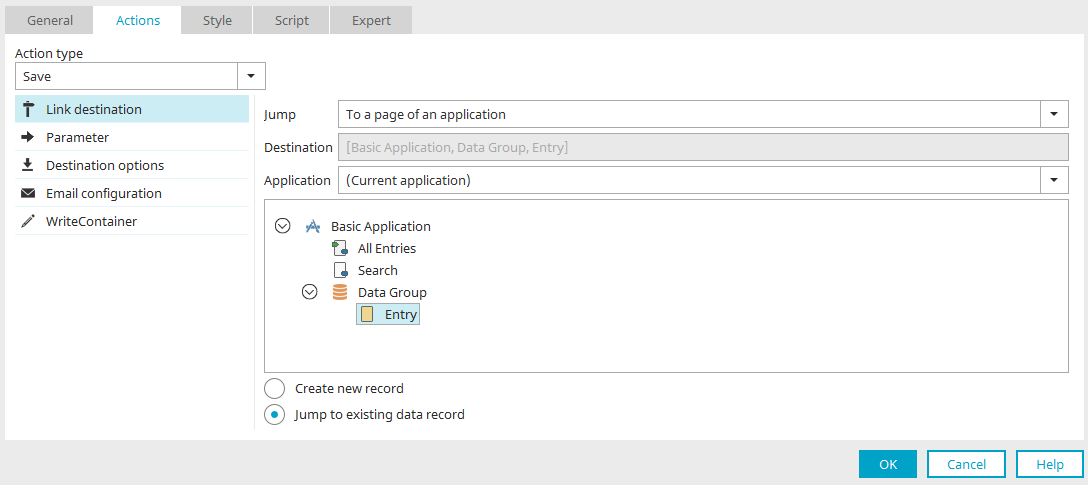
In the jump destination, for example, the "No Action," "Save," and "Delete" actions specify whether a page is loaded—and, if so, which page—when a user clicks the button.
Jump
In this drop-down list on the right side of the dialog, you can specify for the "Save" and "Delete" action types that the system should navigate to a page within an application. If the "No Action" action type is selected, the following options are available:
-
No jump
This setting can be used, for example, when a button is supposed to execute JavaScript but take no other action and not load any page.
-
Back
Goes to the previously loaded page.
-
To a page in an application
Loads the corresponding page.
-
To a URL
Goes to the URL, which you can enter directly into the "Go to" field when making this selection.
-
To the portal's home page
Loads the portal's home page (cannot be selected for the "Button" button type ).
-
Go to the plugin's page
If the jump destination is set from within a calendar item, the page where the calendar plugin is defined can be loaded here.
Jump to
The page to be loaded is automatically entered in this field when it is selected in the application structure shown below.
Application
Select the application that contains the landing page here.
Create a new record
This setting can be enabled for buttons that navigate to input pages. The input page will then load blank, with no data, so you can create a new record.
Go to an existing record
This option allows you to load an existing data set from view tables, for example.
Jump to in Table View, Custom Table, and Chart
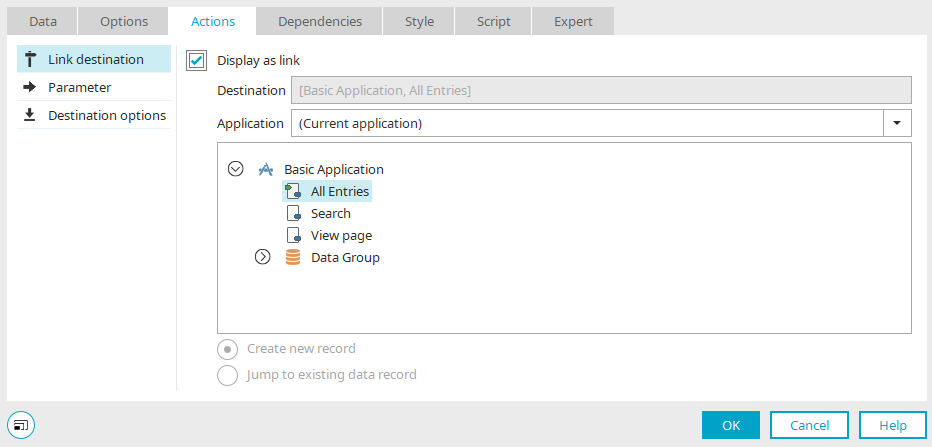
A jump destination can also be set for
-
Buttons and data fields that are embedded in a column in a view table
-
Data records in a freely formatted table, if the "Entry is a link" setting is enabled here
-
Clicks on any point in charts
The jump target specifies which page is loaded to display the record when a user clicks the button or a record in the custom table in the browser.
For the "Custom Table," select the "Entry is a Link" setting if you want a jump to occur when a record is clicked.
Set the "Entry is a Link" option for data fields that are included in view tables as well, so that the entries function as text links.