

Multi-Tenancy
Intrexx's multi-tenant capability enables soft data separation within large, interconnected enterprise structures.
When there are multiple clients, setup and operation (e.g., on intranets) are greatly simplified in many areas. Multi-client capability also provides valuable support for both B2B and B2C.
Since this is a soft data separation, it is not possible to store files in isolation or to export a portal containing data from only one client.
Multi-Tenancy in the "Users" Module
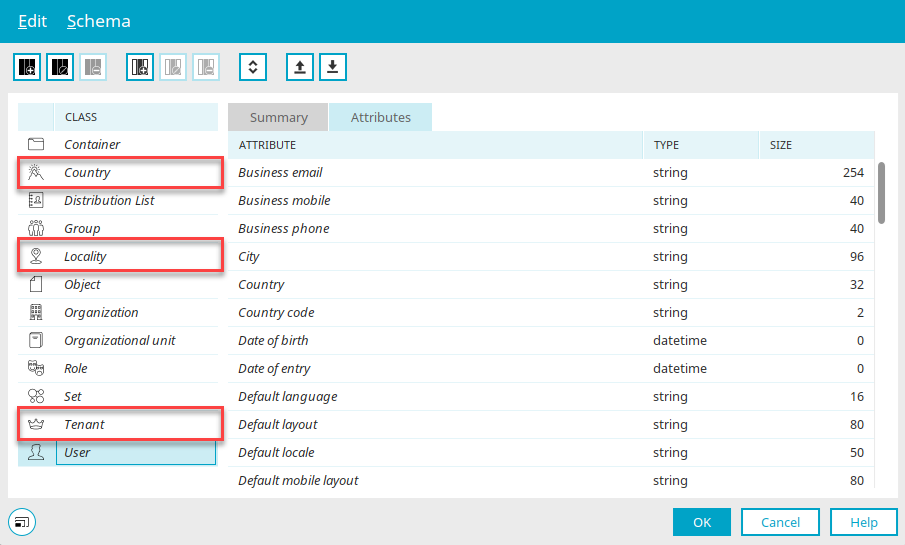
Client management is based on the following three objects
-
Country
-
Client
-
Location
in the "Users" module. In the Schema Manager, you can define any new custom objects that can act as clients.
Create Client Dependency
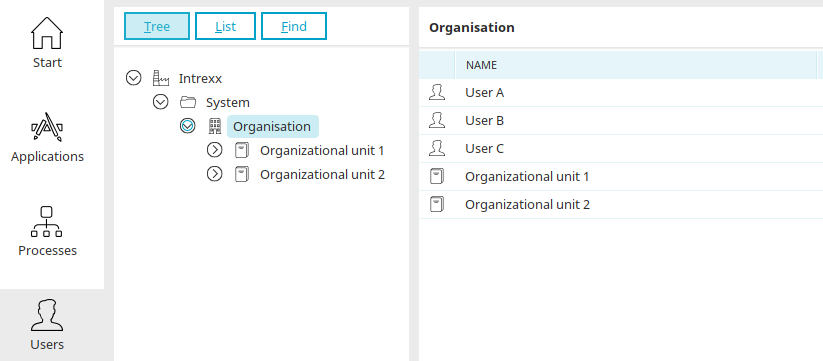
Using the following very simple structure, we'll show you how to link user objects to clients.
User A is assigned to the client "Organizational Unit 1," User B to the client "Organizational Unit 2," and User C to both clients.
There is nothing unusual about these two organizational units; they were created using the base class "Organizational Unit. " Therefore, it is not necessary to use the "Client" object to create a client.
The first step is to edit the user object to be assigned to a client in the Schema Manager.
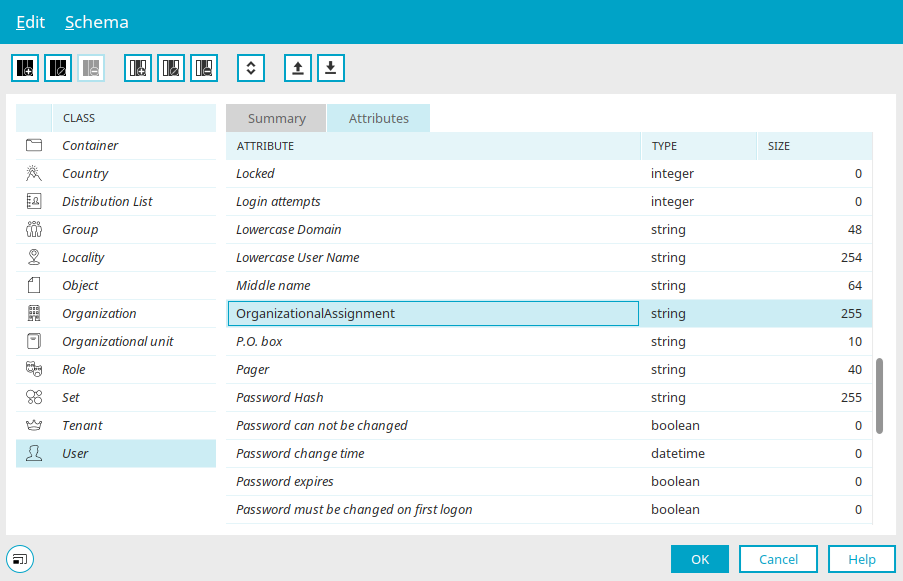
In our example, users A, B, and C are to be assigned to a client. These users are based on the "User" class.
If the class is selected in the left pane of the Schema Manager, you can create an attribute for this purpose via the "Edit / New Attribute" menu—in our example here, the "Organizational Assignment" attribute.
If multiple clients are assigned to an object (1:n), the "Text" data field type should be selected so that a list of client assignments can be stored. If there is only a 1:1 mapping and a string field is also specified as the reference attribute, a string data field can also be used.
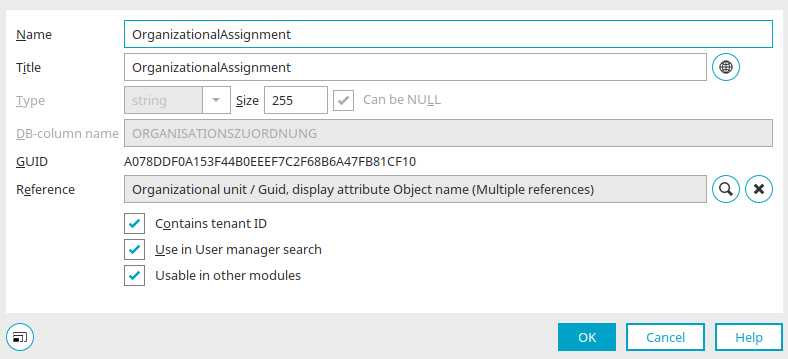
To ensure that the "Organizational Assignment" attribute is used to store the client ID, enable the "Contains Client ID" setting. Clicking "Edit Reference" at  opens a dialog box where you can edit the reference.
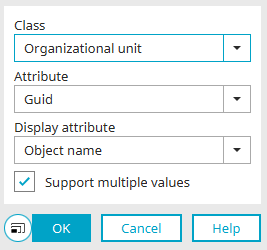
For our example, the "Organizational Unit" class is selected here because "Organizational Unit 1" and "Organizational Unit 2" were created based on this class, as described at the beginning.
Any reference attribute can be specified—that is, not only the LID or GUID, but also any other attribute that contains a unique identifier (e.g., organization code, cost center). The display attribute of the referenced class can also be freely defined. Here, we select the object name. To allow user C to be assigned to both clients, the "Allow multiple references" setting is enabled.
Once all dialog boxes have been closed by clicking "OK," client dependency is set up.
Client Assignment
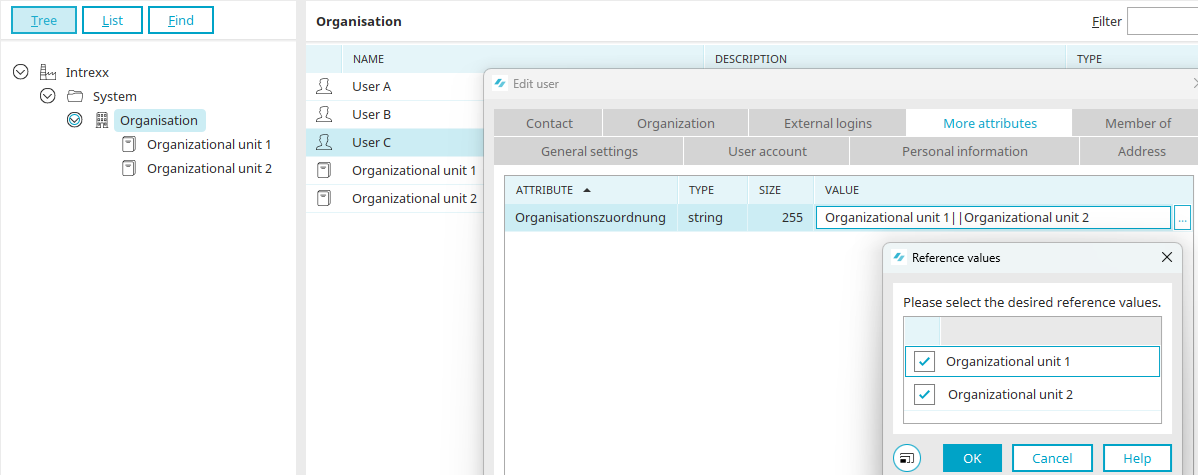
In a user's properties, the client can now be assigned on the "Additional Attributes" tab. To do this, select the attribute you created for the client dependency and click "Edit Value" (  ) in the "Value" column.
In our example, User A is assigned to Organizational Unit 1, User B to Organizational Unit 2, and User C to both organizational units.
Multi-Tenancy in Applications
Client Management in Data Groups
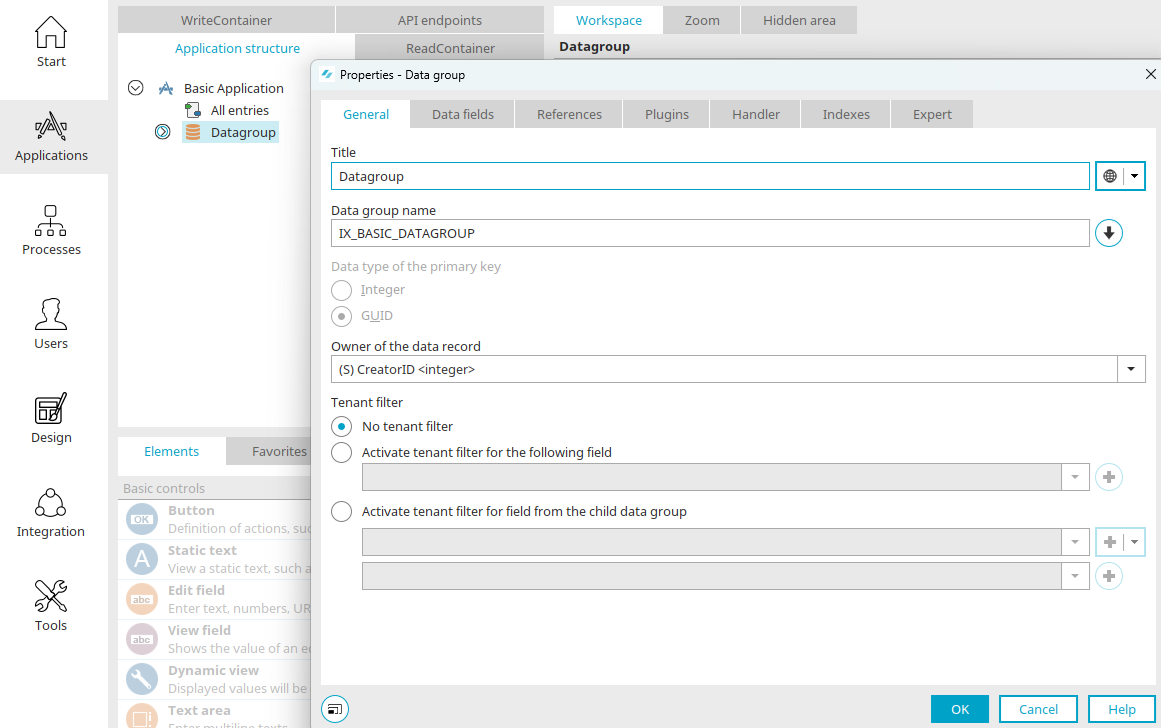
Strict client control is managed through the client filter in the data groups. There, the user's client membership can be linked to the record. There is either an n:1 relationship directly within the data group or an n:n relationship via a child data group, which allows for any number of client assignments per record.
Client Control in Filters
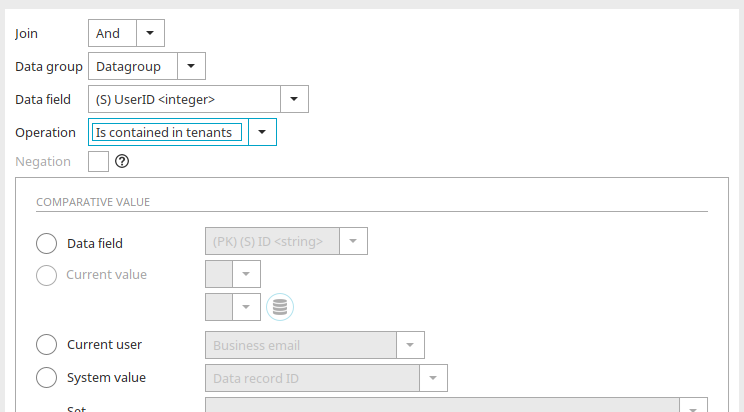
For tables, drop-down lists, multiple selections, and data pickers, the "Is contained in client" operator is available. When compared with the user ID, only the entries assigned to the corresponding client are displayed.
Client Filter
Please note that client filters apply exclusively to parent records. In other words, child data groups are not "filtered out" by the client filtering of the parent data group.
Client Filters in the Intrexx Search
Please note that the search is performed across all clients. This means that the Intrexx search returns results from all clients deployed on the Intrexx server.
Client Management in Distribution Lists
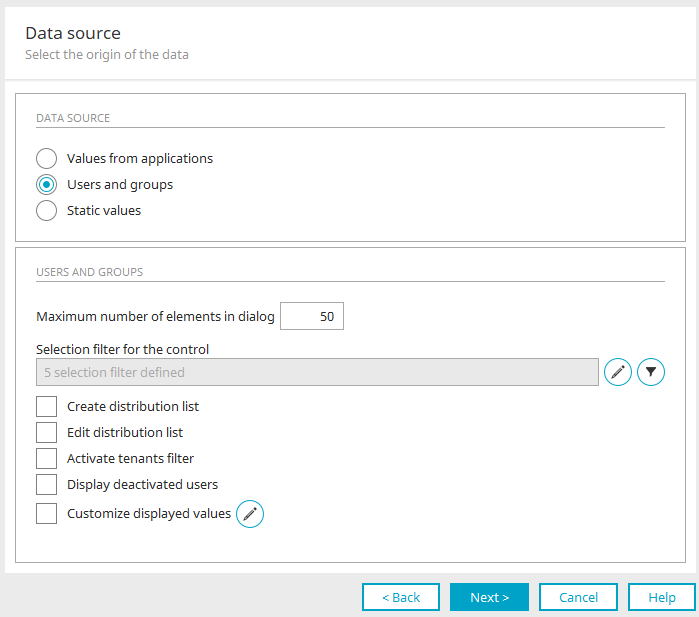
In the "Multiple Selection" element, you can use the "Distribution List Selection" setting to select any objects to define a distribution list. Filters can be applied to the objects, for example, to display only users or roles that are assigned to the current user's client.
Groovy API
The API in Groovy allows you to
-
Creating objects to define clients and organizational structures
-
Creating groups, roles, distribution lists, and their membership in other objects
-
Editing All Objects
-
Deleting All Objects
Here is an example script:
            // Create "Organisation"

def strTitle = g_record["GUID"].value /* datafield Title <string> */
def strParentNode = g_record["GUID"].value /* datafield Tenant <string> */

def organization1 = g_om.createContainer ("ORGANIZATION", {
       container      = strParentNode
       NAME           = strTitle
       EXTERNALGUID   = "1235"
       PRIORITY       = 25
       DN             = "testDN"
       DISABLED       = false
       DESCRIPTION    = "Organization created by Groovy around ${new Date()}"
       INTERNALUSN    = 2
       STATE          = "BW"
       POBOX          = "UP"
       STREET         = "UP-Alley"
       ISOCOUNTRYCODE = "DE"
       CITY           = "Freiburg"
       POSTALCODE     = "79098"
       COUNTRY        = "Germany"
})

// Create "default roles"
def role1 = g_om.createSet ("ROLE", {
	container      = organization1
	NAME           = strTitle + ": Employee"
	DESCRIPTION    = "Role created by Groovy on ${new Date()}"
	memberOf       = ["Users"]
})

// Create "additional roles"
def role2 = g_om.createSet ("ROLE", {
	container      = organization1
	NAME           = strTitle + ": User"
	DESCRIPTION    = "Role created by Groovy on ${new Date()}"
	memberOf       = ["Users"]
})

// Delete roles
g_om.deleteSet(role1.GUID)

// Delete container (All included objects will also be deleted!)
g_om.deleteContainer(containerBase1.GUID)
To determine a logged-in user's tenant memberships and the tenant objects selected for the session, the `GroovyTenantHelper` is available in the Groovy context. When defining a GroovyTenantHelper object, the current session is passed as a parameter. In addition, the GroovyTenantHelper can also be used to change the selection of active tenants in the session. The "Variants as a list of strings" (||) option allows for the direct processing of distribution or multiple-selection information from long-text fields.
            // Import of class
import de.uplanet.lucy.server.usermanager.groovy.GroovyTenantHelper

// Definition of a new TenantHelper object
def thelper = new  GroovyTenantHelper(g_session)

//
thelper.getTenants():Set<String>thelper.getSelectedTenants():Set<String>thelper.getAllTenantValues():String seperated by ||
thelper.getSelectedTenantValues():String seperated by ||

// Define an active tenant
thelper.setSelectedTenant(String)

// Define multiple active tenants - the definition is made by a list of tenants
thelper.setSelectedTenants(Set<String>)

//Define multiple active tenants - the definition
// of tenants is made in the form of a list as a string seperated by ||

thelper.setSelectedTenants(String)
thelper.setSelectedTenants("TENANT1_ID||TENANT2_ID")
            import de.uplanet.lucy.server.ServerFeature

// Determines the setting in the portal that determines the selection of the active
// tenants limited to one tenant

ServerFeature.isSingleTenantMode()
Velocity API
The API in Velocity allows you to
-
Verification of client membership (user object vs. client object)
-
Determining the attributes of an object (Client, Organization, Organizational Unit, Role, Group)
            ## Check for tenant match (user - record)
#set($TenantMembersSelected = $Tenants.getAllTenantValues($Session))
#set($TenantMembersSqlList = $TenantMembersSelected.replace("||", "','") )

#set($stmtTable = $PreparedQuery.prepare($DbConnection,
"SELECT STR_TITEL FROM DATAGROUP('GUID') WHERE STR_MANDANT IN (?)"))
$stmtTable.setString(1, $TenantMembersSqlList)
#set($rsTable = $stmtTable.executeQuery())

#foreach($element in $rsTable)
	#set($Title = $element.getStringValue(1))
	$Title <br>#end
$rsTable.close()
$stmtTable.close()

## Read object information (attributes)
#set($ObjectGuid = "8808E768D142663695576F533A27E5CAC2739552")
#set($stmtObject = $PreparedQuery.prepare($DbConnection, "SELECT STRIDENT FROM VDSTENANT WHERE STRGUID = ?"))
$stmtObject.setString(1, $ObjectGuid)
#set($ObjectIdent= $stmtObject.executeAndGetScalarStringValue(""))
$stmtObject.close()
The $Tenants object provides the following methods for tenants:
            ## List of all tenants of the current user
$Tenants.getTenants($Session)

## List of all selected tenants of the current user/session
$Tenants.getSelectedTenants($Session)

## Piped-List of all selected tenants of the current user
$Tenants.getSelectedTenantValues ($Session)

## Number of tenants of the current user
$Tenants.getTenants($Session).size()

## All tenants of the current user as string list
## (seperated by ||)
$Tenants.getAllTenantValues($Session)

## Number of selected tenants
$Tenants.getSelectedCount($Session))
The following methods can be applied to the list of tenant objects (getTenants / getSelectedTenants):
            ## Display of the name of the first tenant
#set($TenantList = $Tenants.getTenants($Session))
$TenantList.get(0).getTitle()

## Check if first tenant is selected
$TenantList.get(0).isSelected()

## ID of the tenant
$TenantList.get(0).getValue()