

Groovy Handlers in Applications
"Handler" tab
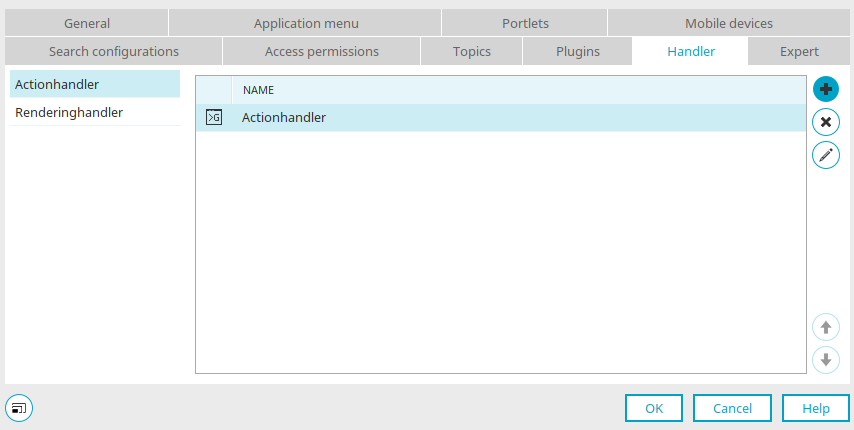
You can access this dialog—provided that the Expert Options are enabled—in the Properties dialog for an application and in the Properties dialogs for its pages and data groups. Handlers can be defined here to execute Groovy scripts.
Action Handler
Responds to actions such as saving or deleting data.
Rendering Handler
Becomes active when the page is rendered.
Examples of How to Use Handlers
Using the action handler, for example, old values from a record can be written to the processing context and used as history via a process. Another example of this is the generation of IDs that are composed of the values from various input fields (e.g., name, year, sequential number). If this problem is solved using a handler, neither a process nor JavaScript is required. For security reasons, using a handler is advantageous because the code is executed on the server rather than on the client side.
Script Execution
Each script is executed in the environment in which it is stored. For a single page, the script runs only on that page; for data groups, it runs on all pages and actions contained in that data group. A script in the application node runs application-wide.
 Remove the handler definition
The currently selected handler definition will be deleted.

 Move up / down
Changes the order of the handlers.

 / Edit handler definition
Opens a dialog box where you can define a new handler or edit an existing handler definition.
Handler Definition
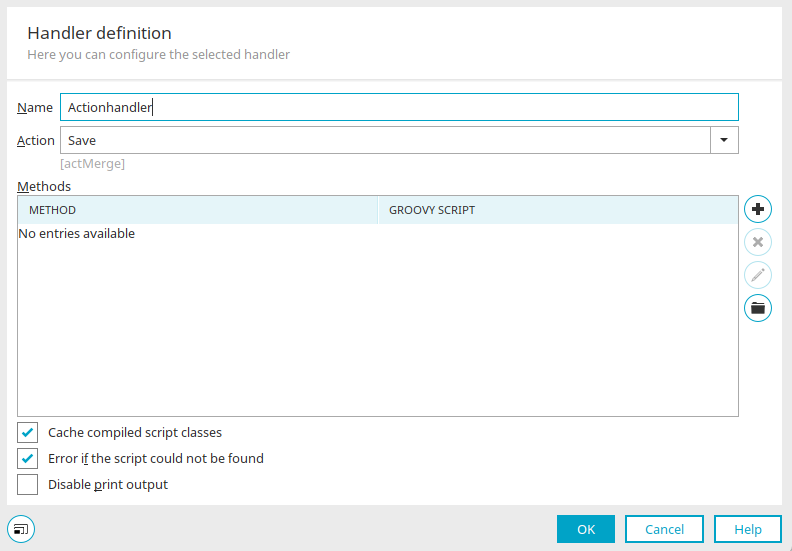
Name
Enter a name for the handler here.
Promotion
Can be selected in an action handler to run the script. No action can be selected for rendering handlers.
"Method" Column
The method is specified here.
"Groovy Script" column
Displays the path to the referenced Groovy script file.
Add Method
Here, you can select the desired time for the script to run. The following execution phases can be selected:
-
processBefore
The script is executed before the request is processed
-
processBeforeWorkflow
Only for action handlers; executed after the request, before a process is executed
-
processAfter
Execution at the end
Once the desired method has been selected, the Groovy File Manager opens automatically, where you can, among other things, specify the location of the script.
The storage location is in the portal directory "internal/application/store/<application-GUID>/groovy".
You can find the application GUID by pressing the F4 key on the application node, provided that the expert options are enabled. Even within each of the two handler types, there is a specific order in which they are processed, based on the application structure:
RenderingHandler
processBefore:
-
The application's RenderingHandler
-
RenderingHandler for the data group
-
Page Rendering Handler
processAfter: reverse order
ActionHandler
processBefore and processBeforeWorkflow:
-
Application ActionHandler
-
ActionHandler for the data group
-
Page ActionHandler
processAfter: reverse order
Remove Method
Removes the currently selected method from the list.
Edit Script
Opens the script editor.
 Select a script file
Opens the Groovy File Manager.
Cache Compiled Script Classes
The compiled Groovy script classes are cached.
Error if script does not exist
Displays a message if the referenced script cannot be found.
Suppress println output
Disables `println` messages.