

Custom value
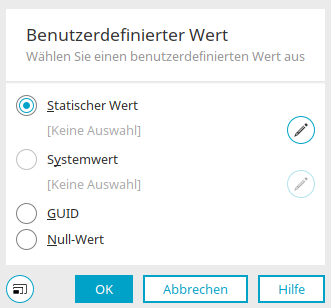
A custom value can be defined in various places in Intrexx, such as
-
in the properties of the "Data Group Action" process element
-
in the properties of a connection for the dg archive connector in the "Integration" module
The user-defined value can then be used, for example, in field mappings.
Static value
This option uses a static value.
 Edit Static Value
Opens a dialog box where you can enter a static value. You can find all the information here.
System value
This option uses a system value.
Edit System Value
Opens a dialog box where you can create a system value. You can find all the information here.
Guid
Creates a GUID in each case, which is used as a user-defined value.
Zero value
The value NULL is used as a user-defined value.
Static value
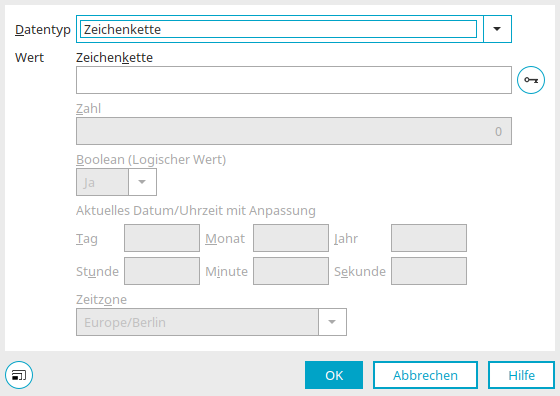
Here, you can create a static value as a user-defined value.
Data Type
The following data types are available:
-
String
-
Number
-
Boolean (Logical Value)
-
Date/Time
Value
Enter the static value here.
 Insert GUID
For the string data type, a GUID can be generated here and entered as a string.
Number
For the numeric data type, you can enter the desired value here.
Boolean (Logical Value)
Select "Yes" or "No" here.
Current Date/Time with Adjustment
You can find all the information about the date change here.
Time Zone
Select the desired time zone here.