

Edit System Value
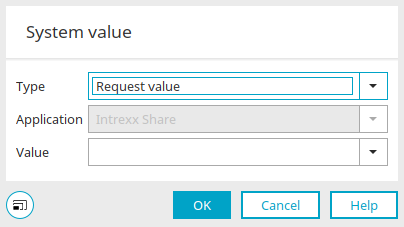
A system value can be defined in many different places in Intrexx, such as in the properties of process elements like the email or WebSocket action, to provide the content in each case.
Type
System values can be retrieved from the following sources:
-
Request Value
-
Session value
-
System Data Group
-
User Rating
Session Value / Processing Context
The parameter in the session or processing context can, for example, contain a list of strings separated by a double pipe (||) that consists of user GUIDs. The users' work email addresses will then be provided. The parameter can also contain a list of email addresses separated by semicolons, commas, or line feeds.
Application
For the system data group type, you can select the application in which the system data group is located.
Value
Enter the name of the variable that returns the value here. For the system data group type, you can select the data field that provides the value here. For the "User Value" type, you can select a data field from the "User" module.
Alternative if the value is not set
This setting is available only if the relevant conditions are met, as applicable. Here, you can specify how the system should handle cases where a value has not been set. When you select this setting, the following options are enabled:
Zero value
The value NULL is used when no value is set.
Static value
A static value is used if no value is set.