

This section applies to you if you have chosen the on-premises version and would like to install and run Intrexx on your own infrastructure.
Before you begin the installation, it is helpful to understand some key concepts of the Intrexx architecture.
Portal Server and Portal Manager
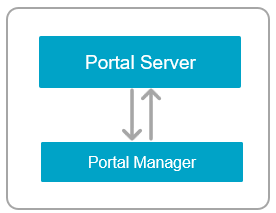
Intrexx consists of two core components: "Portal Server" and "Portal Manager." To install, operate, and use Intrexx, it is helpful to understand the interaction between these two components.
Portal Server
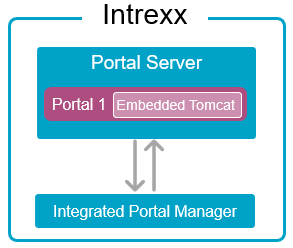
The Portal Server is the main component in Intrexx. It contains several components, including the web server (Embedded Tomcat) on which your portal or applications and processes run. Multiple portals can run on one Portal Server. Usually, the search service for your portal (Apache Solr) also runs on the Portal Server.
The Portal Server runs continuously after installation (as a service), except when running updates.
The Portal Server does not actually have a graphical user interface. To access the portal server or your portal, you need the Portal Manager.
Portal Manager
The Portal Manager is the other main component in Intrexx. It is a separate program that exists independently from the Portal Server and runs separately as its own service.
In the classic setup, the Portal Manager is installed on your (physical or virtual) server with the Portal Server when you run the setup. You can start the installed Portal Manager there, for example, in the Start menu.
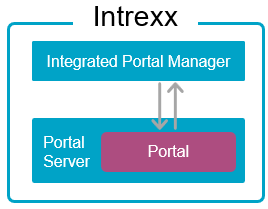
The Portal Manager is also available in a version that does not require installation. You can download this version to your computer (client) and run or launch it immediately.
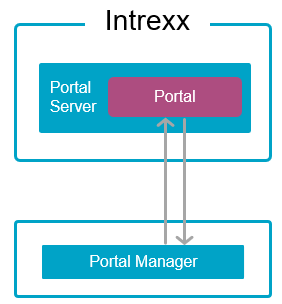
For more information about the Portal Server and Portal Manager, see the section titled " Intrexx Components - Portal Server and Portal Manager."
Web Server (Embedded Tomcat)
Intrexx includes an embedded web server as an integral part of the system. This is Apache Tomcat.
So when you install Intrexx, the embedded Tomcat is automatically installed as well.
(For detailed information about Apache Tomcat, see the following link: https://tomcat.apache.org)
Portals
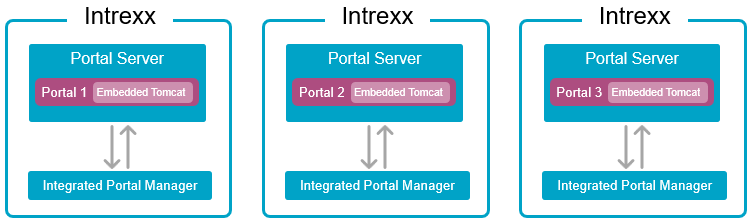
You can run multiple portals on the Intrexx Portal Server.
Multiple portals
These may include multiple production portals, as well as separate development and test portals. Each time a new portal is created, a new embedded Tomcat instance is deployed.
Production portals and test and development portals should be deployed on separate Intrexx portal servers. This allows you to test updates or upgrades on the test or development portal first before installing them on your production portal.
Portal and Database
When you create a new portal in Intrexx, Intrexx prompts you to select a database server and either create a new database or use an existing (empty) database.
You must install your preferred database server or database type before installing Intrexx. The database server can be installed on the same (physical or virtual) server on which Intrexx is installed.
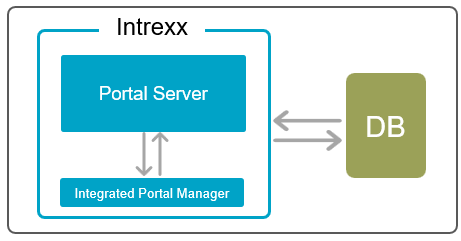
Intrexx and the database server can also be installed on different (physical or virtual) servers.
Use a Front-End Web Server (Reverse Proxy)
A front-end web server (reverse proxy) is typically used in conjunction with Intrexx. In most cases, these are Microsoft IIS or NGINX.
Neither product is part of Intrexx. They are not included with Intrexx.
There are many reasons why using a reverse proxy is recommended. In particular, an existing Windows authentication can be used for portal access via a reverse proxy.
This online help contains key information regarding IIS for the installation of Intrexx.
At the same time, it may be helpful for you to familiarize yourself more thoroughly with the features of IIS. The same applies to NGINX.
In principle, a portal can be accessed even without a reverse proxy. However, this is only recommended for test and development portals.
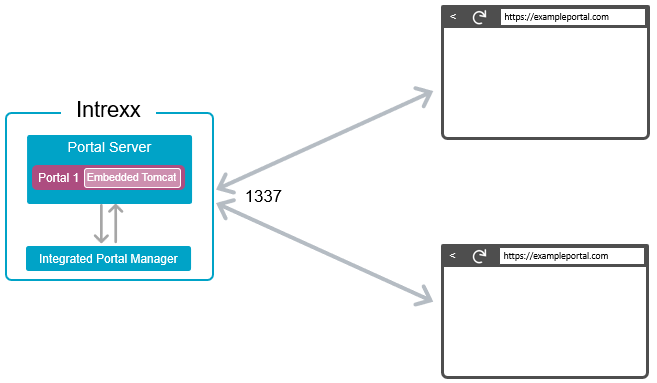
For production portals, you should use a reverse proxy.
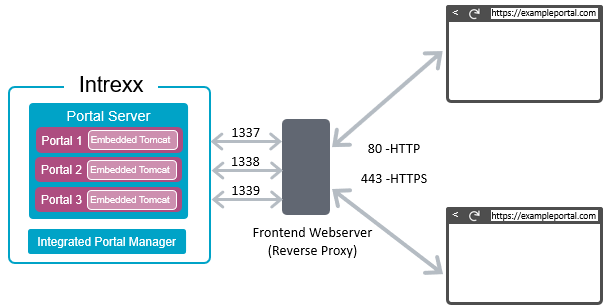
Intrexx and Reverse Proxy on a Single Server
Intrexx and the reverse proxy can be installed on a (physical or virtual) server. In this case, an encrypted connection between the Intrexx server and the proxy server is not required, since communication takes place locally on the same physical server. Encrypted communication (SSL/HTTPS) is required between the reverse proxy and the browser. Encryption is configured in the reverse proxy and performed by it.

Intrexx and Reverse Proxy on Different Servers
Intrexx and the reverse proxy can also be installed on different (physical or virtual) servers. In this case, it is recommended to encrypt not only the connection between the reverse proxy and the browser, but also the connection between Intrexx and the reverse proxy, since communication here already takes place over a network.
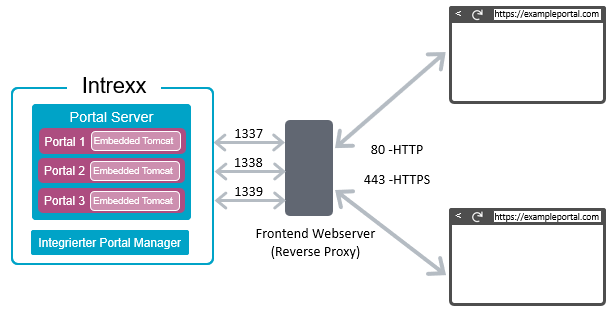
Ports
Embedded Tomcat
By default, Embedded Tomcat listens on port 1337. During a new installation, Intrexx uses this port. For each additional portal, Intrexx increments the port number by one. When upgrading, you can keep the port from the previous version's installation.
Note: Port 1337 is the default port for a new Intrexx installation. When you upgrade, Intrexx will retain the port you used in a previous version of Intrexx. You can leave this port as is.
Reverse Proxy By default, the reverse proxy (IIS) listens on port 80 when you set up an HTTP connection. The reverse proxy listens on port 443 when you set up an HTTPS connection. You must set up an HTTPS connection.

Note: Please be aware that you may need to open these ports in your firewall. This may be necessary, especially if you change ports during an upgrade.