

Style Guide
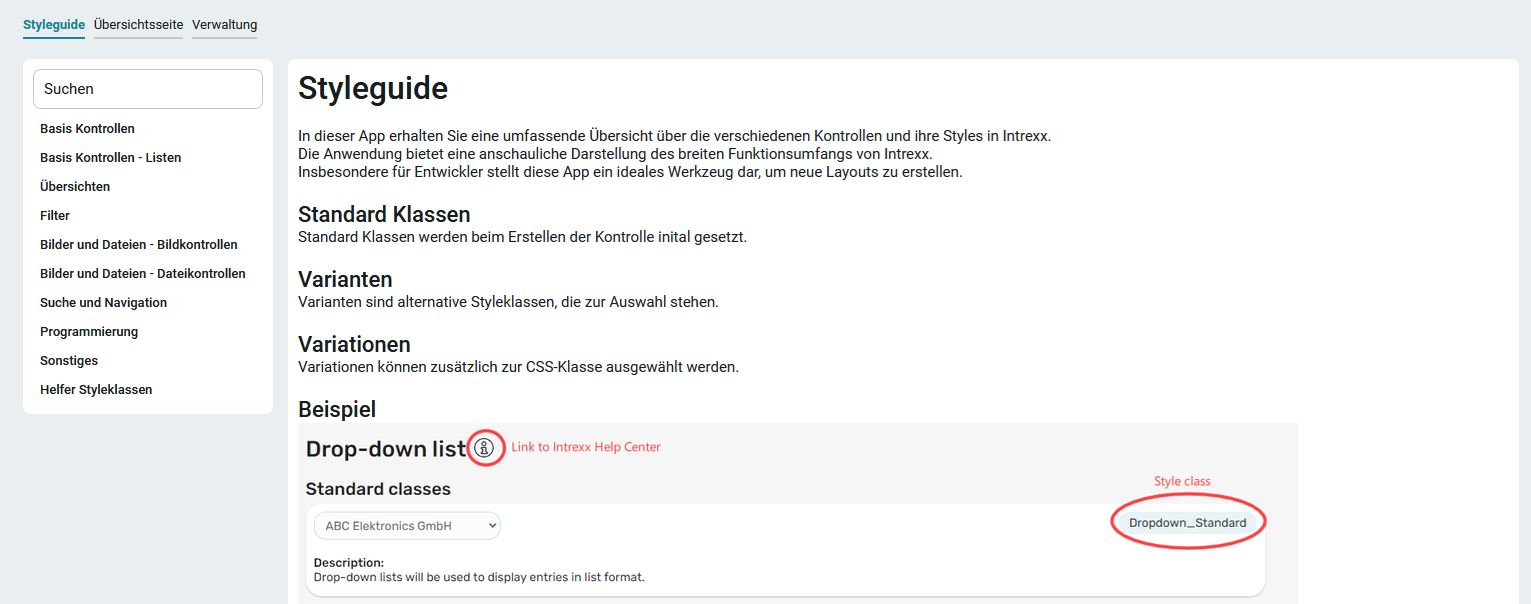
The " Styleguide " application template serves a different purpose than the other application templates. It is not intended as a template for an app for portal users. Rather, it is intended to enable application developers to gain an overview of the Intrexx application elements and how they are displayed in the portal (browser). The application elements are preconfigured with the initial styles or CSS classes. In the " Styleguide " application template, you can make changes to the styles and check whether the results meet your expectations. This application template serves both as a reference guide (with links to relevant sections in the online help) and as a practical testing and experimentation environment for application elements. Once all desired settings and changes meet your expectations or CI guidelines, the application template style guide can also serve as a reference for company-wide application development.
Please note that while all application elements are listed in the " Styleguide " application template, not all of them can be fully represented in terms of functionality. This applies, for example, to the Filewalker element, which requires a custom setting for each customer. However, you can integrate such elements into the style guide yourself if necessary.
To learn how to import the template, see: Importing Online Application Templates.
Roles
Roles are automatically created when the template is imported.
App_Style Guide_User
As a member of this role, you can view the application and the overview showing all application elements.
App_Style Guide_Manager
This role allows you to maintain dummy data on the Administration page. In addition, it includes all permissions associated with the App_Styleguide_User role.
To learn how to add portal users as members to these roles, see: Roles and Permissions in Application Templates.
Dummy data
The " Styleguide " application template comes with sample data. You can find these on the Administration page. If you have the appropriate permissions or are a member of the (App_Styleguide_Manager) role, you can customize the dummy data.
As with the other apps, this app has two roles: App_Styleguide_Manager. Users with this role are allowed to edit the dummy data on the administration page. and the second role, App_Stylguide_User, allows users to view the application and the overview with all controls.