Customizable Login
The standard login for accessing a portal via Intrexx authentication allows you to integrate updates-safe customizations, such as the integration of additional external login providers.
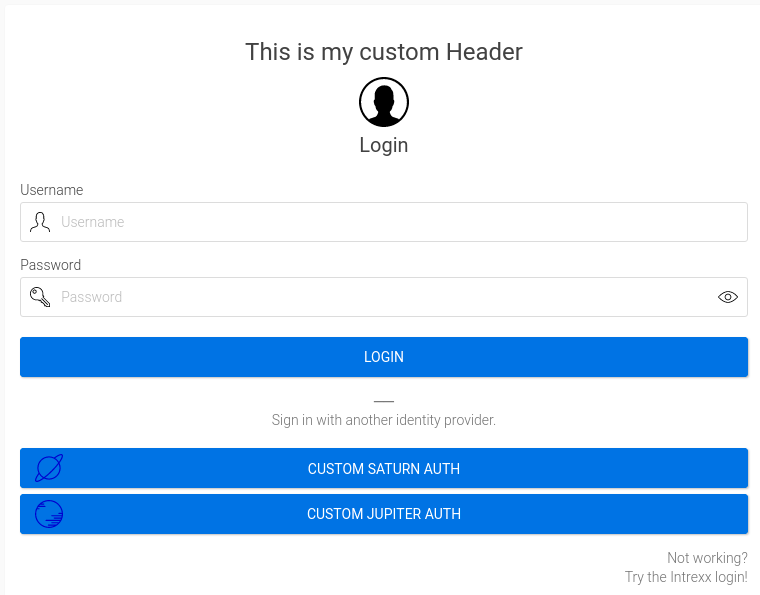
In the login module, a Velocity file is included both before and after the system login dialog (with username, password, and domain), allowing you to make your own customizations. These are not changed during an Intrexx update. User-specific customizations are preserved, regardless of whether changes are made to the Intrexx login module.
The VMs are located in the portal directory at:
-
internal/system/vm/custom/custom_login_head.vm
-
internal/system/vm/custom/custom_login_foot.vm
This behavior affects various login scenarios immediately after the Velocity files are saved (whenever the Intrexx default login screen is displayed):
-
Standard Login on the Portal
-
Previous Session
-
Deep link (not logged in)
-
Log In/Log Out Button (Additional Control in the Portal Layout)
-
Mobile Views
Example
In addition, the portal directory also contains a sample file that demonstrates how to extend the default login:
-
internal/system/vm/custom/custom_login.sample
The sample file is not update-safe, since the example may, in some cases, can be adjusted.
Integration
To test the behavior, you can copy the sample code from the custom_login.sample file into the two custom_login files and customize or extend it as needed.