

General Information, Features
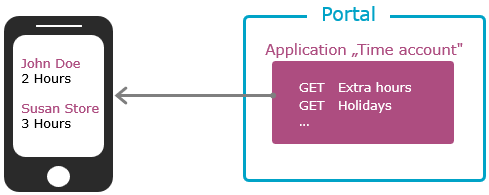
For example, if you have created a time-tracking application, you can access the data set(s) via the API and display the time accounts in a smartphone app that uses the API endpoints.
Distinction Between "Application API" and "Administration API"
Intrexx offers two comprehensive API functionalities: the Intrexx Application API and the Intrexx Administration API. With the Application API, you can create your own API endpoints for Intrexx applications. The Administration API provides you with a defined set of API endpoints that offer key functions for configuring Intrexx.
Processes
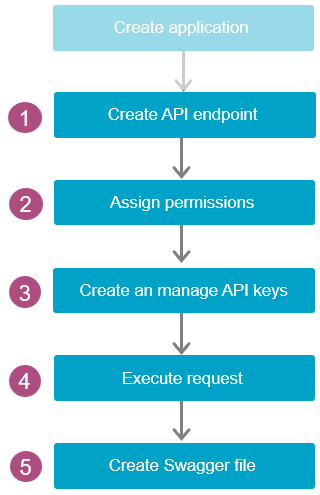
Below is a description of the key steps you need to follow to create and deploy your own API endpoints.
|
|
First, create an application as usual. |
|
Next, create the desired API endpoint. To do this, you must have checked the "API Endpoints" checkbox under "View" in the main menu. You can create API endpoints for data sets, processes, and Groovy scripts. You can use the GET, POST, PATCH, and DELETE methods for this. |
|
|
In the next step, grant permissions for each individual API endpoint. You can assign permissions at the application level. Here, you select the users who are allowed to access the corresponding API endpoint. |
|
|
As an alternative to or in addition to application-level permissions, you can grant permissions using API keys. To do this, you must first create an API key and then assign it to one or more API endpoints and a user. |
|
|
By following these steps, you have set up the necessary conditions for an API consumer to access an API endpoint. To access the API endpoint (request), context menus provide helpful functions such as copying the API URL or the API key. |
|
|
Finally, you can create Swagger documentation or a Swagger file in .yaml format. You can provide this, along with the API keys, to an external service provider, for example, who is developing a smartphone app for you. |
Target Audience and Prerequisites
The "Application API" feature and the accompanying online help are intended for users who have a basic understanding of API development. The application API complies with the Open API specification. If necessary, you should familiarize yourself with it.
How to Read the Online Help for the Application API
In the first section, " Create Application API Endpoints," you general information about creating Application API endpoints. You'll find an overview of the individual dialogs and their functions, general information about path and query parameters, and details on the structure of the API URL. If you'd like to familiarize yourself (first) with the basics of creating API endpoints in Intrexx and need general information on API development, it's helpful to read this section first.
However, you can also start right away with the sections on creating the individual endpoints. There you'll find detailed, step-by-step instructions for each endpoint type. These will guide you through the individual dialog boxes and explain what information you need to enter or select in each case.
You can find the step-by-step instructions in the following sections:
You should definitely read the following sections on granting permissions (Grant Permissions), creating API keys (Create and Manage API Keys), and executing requests (Execute Requests) should definitely be read so that you can use the API endpoints you have created effectively.
The " Generate Swagger Documentation " section is particularly helpful if you want to generate an OpenAPI file in .yaml format and, if necessary, share it with a service provider.
Additional Information
Below are some links that can help you familiarize yourself with the basics of API development and the related standards: