

You can access Salesforce from Intrexx using a third-party data group while simultaneously using a service user.
To do this, you must add the "connector.impersonation.user" attribute in the "Expert" tab of the external data group. You must enter the GUID of the Intrexx user you selected as the service user in the Intrexx Salesforce Connector under the "Service User" menu item.
Step-by-Step
To assign a service user to a third-party data group, follow these steps:
-
Open the external data group.
-
Switch to the "Expert" tab.
The following attributes are displayed.
Attribute Value connector.dataGroup.adapter.class de.uplanet.lucy.server.odata.consumer.salesforce.SalesForceDataGroupAdapter salesforce.data.group.name Account salesforce.service.uri https://example.salesforce.com -
Click the "
 " icon.
The "Add Setting" dialog box appears.

-
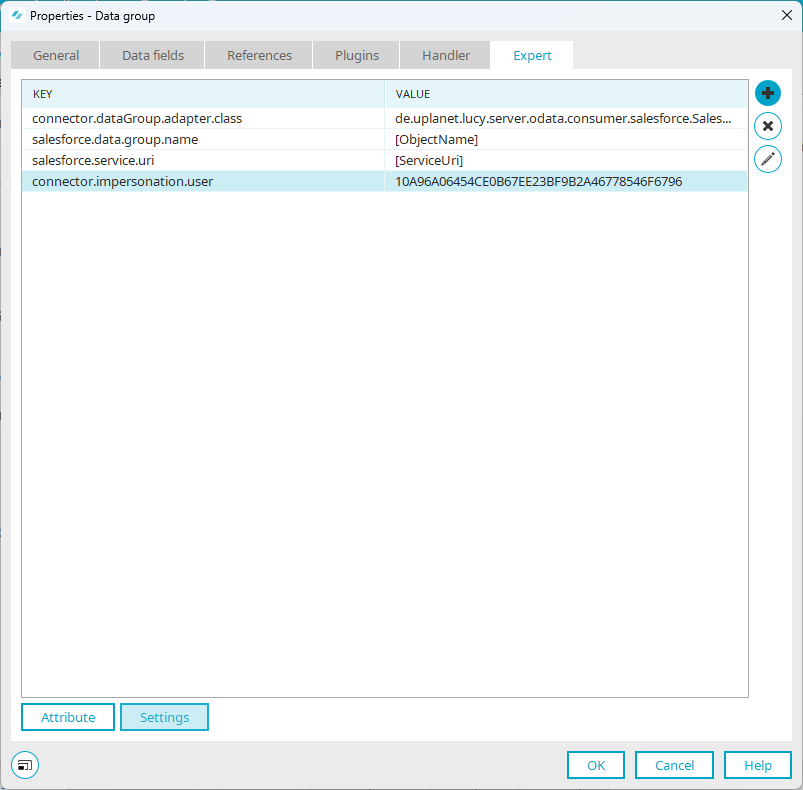
In the "Key" field, enter the value "connector.impersonation.user".
-
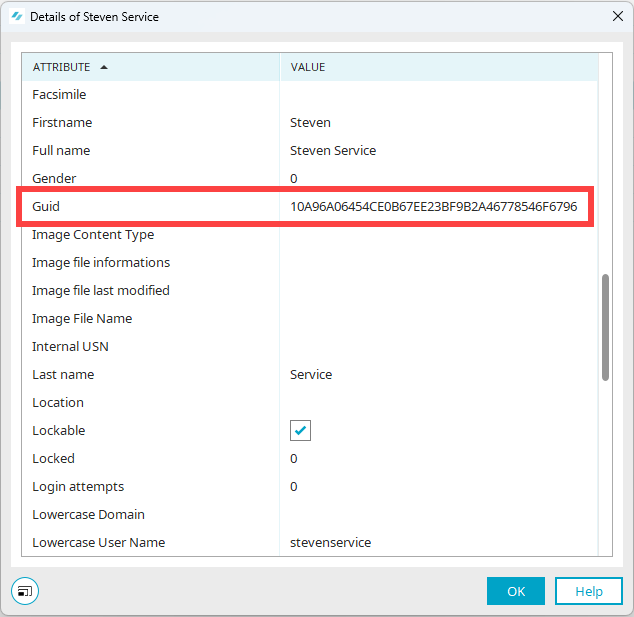
In the "Value" field, enter the GUID of the Intrexx user you selected as the service user in the Intrexx Salesforce Connector under the "Service User" menu item.
You can find the GUID in the "Users" module. Select a user and press the F4 key to view the user's details.
-
Click "OK."
The service user key and its GUID are displayed.
-
Click "OK."