

Assign a routing alias to an API URL
When you make an API request, you can replace the application's GUID with a descriptive name—the routing alias.
Example 1
/api/app/12F12A12C123456B1234567C12B1B12345F1FD1C/myEndpoint
/api/app/myRoutingAlias/myEndpoint
Example 2
/api/app/12F12A12C123456B1234567C12B1B12345F1FD1C/get-stores-in-given-city?store-city={STRING}
/api/app/stores/get-stores-in-given-city?store-city={STRING}
The API URL is displayed at the top of the API endpoint dialogs (except in the "General" dialog step).

Step-by-Step
To create a routing alias for application API endpoints, follow these steps:
-
Launch the application.
-
Click the "API Endpoints" section.
Make sure that the API endpoints view is enabled.
("View" > "API Endpoints")
-
Select the endpoint for which you want to create the routing alias.
You can also select multiple endpoints and enter the routing alias for all selected endpoints at the same time.
-
Click the "
 " icon.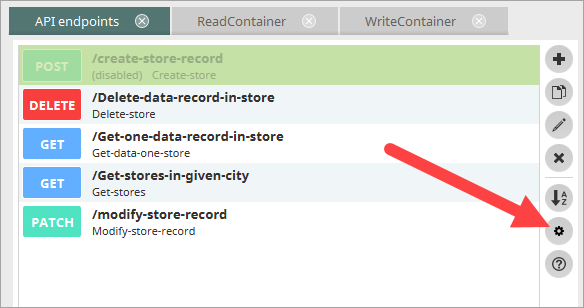
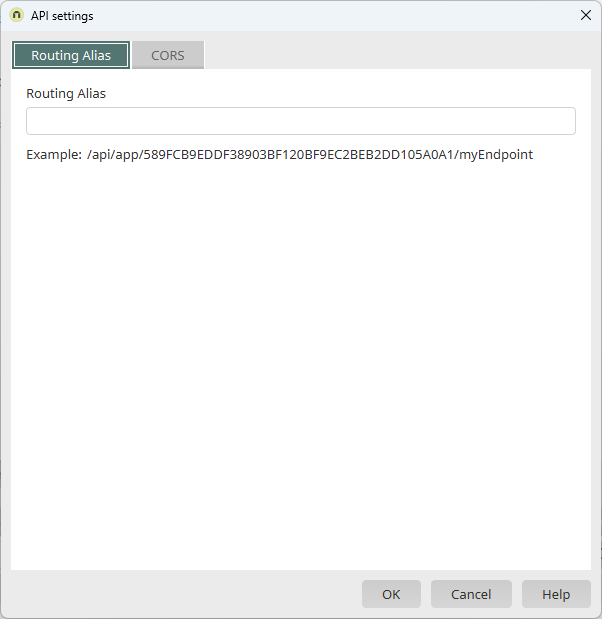
The "API Settings" dialog box appears.
-
Enter a routing alias.
-
Click "OK."
Example - Using Postman
Using the Application's GUID

Using Routing Aliases
