

Four Principles
WCAG stands for Web Content Accessibility Guidelines and is a recommendation from the World Wide Web Consortium (W3C) for designing accessible websites.
International agreements on web content accessibility establish common standards designed to help content creators and developers design digital content—such as websites, web applications, and other digital technologies—in a way that makes it easily accessible to everyone.
The guidelines are divided into four principles: Perceivable, Operable, Understandable, and Robust.
The four principles provide a framework for categorizing and systematizing web accessibility. Many of the challenges faced by people with disabilities can be described using one of the four principles. At the same time, the four principles overlap. They cannot always be strictly distinguished from one another. They often complement each other.
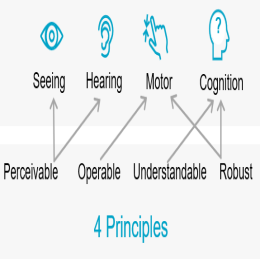
Four Principles and Impairments
The four WCAG principles describe a wide range of measures and guidelines that can be used to make portal and application pages accessible to people with disabilities. There is no one-to-one correspondence here; instead, there are frequent overlaps. For example, under the principle “Perceptible,” measures for overcoming barriers related to vision and hearing are listed.
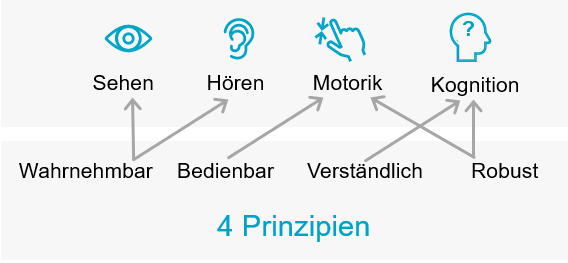
Brief Description of the Four Principles
Perceptible
"Information and user interface elements must be presented to users in a way that allows them to perceive them." (WCAG)
The "Perceptible" principle ensures that users can perceive information and components on portal and application pages using at least one of their senses. For example, if a user is blind, they should be able to use screen readers to hear information instead of seeing it. This is achieved primarily by providing text alternatives for graphics or, where applicable, buttons, which are then read aloud by screen readers.
For users with impaired vision, it is critical that color contrasts, font sizes, line spacing, and character spacing be sufficiently large. For people with red-green color blindness, it is important to use colors that they can distinguish.
Operable
"Elements of the user interface and navigation must be operable." (WCAG)
The "Usable" principle is about ensuring that a user can navigate through portal and application pages without any problems. A well-designed page structure with a clear menu is crucial for this. To operate portal and application pages, the user must not be required to take any action that they cannot perform.
The main measure in connection with operability is the ability to access any content with the keyboard. Additionally, the page can be navigated by keyboard, allowing the user to move from one area of the page to the other without any limitations.
Understandable
"Information and user interface operations must be easy to understand." (WCAG)
Language plays a central role in the "Understandable" principle. As a general rule, "plain language" should be used. On the level of language, there are no Intrexx-specific or technical aspects to consider in regard to this principle. This pertains exclusively to "editorial" activities.
The situation is somewhat more technical in the case of error messages, which should provide appropriate information for the correct handling of an application. At the same time, such error messages must be accessible to screen readers. They should also be displayed for a sufficiently long time.
However, the principle of "comprehensibility" also includes non-linguistic aspects. For example, the navigation should be consistent and thus comprehensible.
Sturdy
"Content must be robust enough to be interpreted by a wide variety of user agents, including assistive technologies." (WCAG)
The "Robust" principle focuses on technical aspects. This principle is presented very succinctly by WCAG. Essentially, it involves ensuring that portal and application pages are compatible with future technologies, especially assistive technologies. Among other things, the correct syntax of the source code plays a decisive role here.
Principles, Guidelines, and Success Criteria
The four principles of accessibility are described in more detail in the guidelines. At the same time, the guidelines already provide guidance on how the respective principles and their objectives can be implemented on portal and application pages. There are 13 guidelines in total.
The following chart provides an overview of the four principles and the thirteen guidelines associated with them.
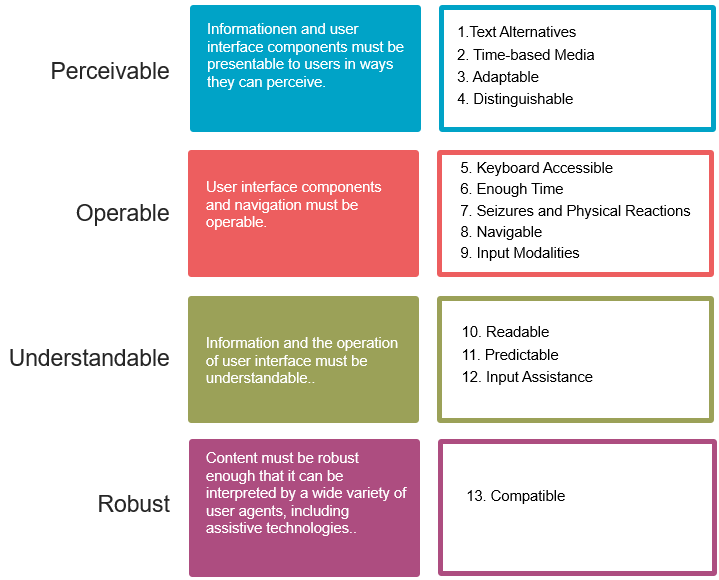
After all, there are success criteria for every guideline. These success criteria specify numerous specific conditions that must be met in order for the respective principle or guideline to be implemented on the page.
Success criteria for the "Distinguishable" guideline (the "Perceivable" principle) include, for example:
-
Use of Color
-
Audio Control
-
Contrast (Minimum)
-
Change text size
-
Images from a Text
-
Contrast (increased)
-
Quieter or no background audio
-
Visual Presentation
-
Images from a Text (No Exception)
-
Reflow
-
Non-text contrast
-
Text Spacing
Priority Levels - A, AA, AAA
Success criteria have different priority levels. For example, the success criterion "Use of Color" has priority level A (lowest priority), "Change text size" has priority level AA (medium priority), and "Contrast (increased)" has priority level AAA (highest priority).
A page with Priority Level A must meet all the requirements for that level. For priority level AA, the requirements for levels A and AA must be met; for priority level AAA, the requirements for levels A, AA, and AAA must be met. However, compliance with Level AAA is not considered a general requirement for the entire website, since some content may not meet every requirement of that level.